
Want wireless CarPlay for everyday driving and video on your car’s screen when you’re parked? These adapters take different approaches: some run streaming apps on a built-in system, while others mirror your phone or accept an HDMI source.
The most important check comes before features or price: confirm how your car supports wired CarPlay. From there, the right choice depends on whether you want standalone apps, a TV stick connection, or simple phone mirroring.
Best 10 Wireless Carplay Adapters with Video Streaming Picks for 2026
Best for Rear-Seat Screens
LAMTTO Wireless CarPlay Streaming Adapter

- Mini HDMI output for a compatible headrest monitor
- Pre-installed streaming apps and USB-drive playback
- Wireless CarPlay or Android Auto; choose the matching version
Best For: Drivers adding passenger-screen entertainment to a compatible factory wired system
Best TF-Card Option

- Wireless CarPlay and Android Auto conversion
- Netflix, YouTube, and TikTok via hotspot
- TF-card playback for offline content
Best For: Drivers who want TF-card video alongside wireless phone projection
Best for USB Video Playback

- Built-in streaming apps with stated 1080p output
- Offline USB-video playback up to 128GB
- Requires factory wired CarPlay, not wired Android Auto alone
Best For: Families wanting USB-video backup in a factory wired CarPlay vehicle
Best for Large TF Cards

- TF-card support up to 512GB
- Built-in Netflix and YouTube
- Network setup requires disconnecting phone projection
Best For: Touchscreen-equipped wired CarPlay cars needing ample offline media storage
Best Standalone Streaming

- Installs streaming apps on the car display
- Separate Wi-Fi modules for projection and hotspot
- Check vehicle compatibility and warranty terms
Best For: Parked app-based streaming in a compatible factory wired CarPlay or Android Auto vehicle
Best HDMI Input

- HDMI input for TV sticks or consoles
- Adds wireless CarPlay and phone mirroring
- Listed video output is 1080p
Best For: Parked viewing from an existing HDMI device in a compatible wired-CarPlay vehicle
Best for Phone Mirroring

- CarPlay, Android Auto, AirPlay, and mirroring
- USB-A and USB-C connection options
- No DRM-protected streaming via mirroring
Best For: Wireless projection and supported phone-video mirroring while parked
Offline Media Pick

- Built-in Netflix and YouTube
- TF card playback up to 256GB
- Wireless CarPlay and Android Auto
Best For: Streaming plus offline media playback
Best Heavy-Duty Pick
YESTRYS 3-in-1 Wireless Adapter
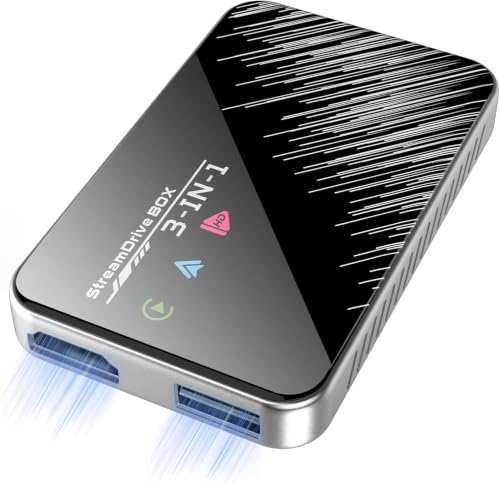
- HDMI input for streaming sticks
- USB power for accessories
- Wireless CarPlay and Android Auto
Best For: Using an existing HDMI streaming stick
Built-In Apps Pick

- Five listed preloaded video apps
- USB drive and TF card playback
- Wireless CarPlay and Android Auto
Best For: Multiple video apps and offline playback
Best for Rear-Seat Screens – LAMTTO Wireless CarPlay Streaming Adapter
Among wireless carplay adapters with video streaming, the LAMTTO stands out for its Mini HDMI output, which can connect to a compatible headrest monitor. It converts a factory wired CarPlay or Android Auto connection to wireless and includes pre-installed streaming apps.
Best For: Drivers who want wireless phone projection and a separate display option for rear-seat passengers.
Pros:
- Supports wireless CarPlay and Android Auto with automatic reconnection after initial setup.
- Pre-installed apps include Netflix, YouTube, TikTok, Disney+, and Prime Video; streaming requires a hotspot or Wi-Fi.
- Supports offline playback from a USB drive and offers Mini HDMI output for a compatible monitor.
Cons:
- Requires a factory touchscreen with wired CarPlay or Android Auto; the correct CarPlay or Android Auto version must be selected.
- Does not support additional app downloads and is incompatible with BMW and Tesla.
The extra playback and display options make this a flexible road-trip pick. Check your vehicle’s wired system before ordering, and power the adapter from a 5V vehicle USB port rather than a fast charger.
Best TF-Card Option – 3-in-1 Magic Video Box
The 3-in-1 Magic Video Box is one of the wireless carplay adapters with video streaming worth considering if you also want offline playback from a TF card. It converts a compatible factory wired CarPlay or Android Auto system to wireless and offers Netflix, YouTube, and TikTok streaming through a hotspot.
Best For: Drivers who want both online video and TF-card playback without giving up wireless phone projection.
Pros:
- Supports both wireless CarPlay and wireless Android Auto.
- Plays offline content from a TF card as well as supported online video services.
- Designed to retain factory touchscreen, button, knob, and voice controls.
Cons:
- Requires a compatible factory wired CarPlay or Android Auto system; BMW and Tesla are excluded.
- Online video requires a hotspot connection.
This is a practical choice if removable offline storage matters more than relying entirely on mobile data. Confirm vehicle compatibility before buying; the stated phone requirements are iOS 10+ or Android 11+.
Best for USB Video Playback – OTTOCAST Play2Video Ultra
For shoppers comparing wireless carplay adapters with video streaming, the OTTOCAST Play2Video Ultra pairs built-in streaming apps with offline playback from a USB drive of up to 128GB. It also converts factory wired CarPlay to wireless CarPlay or Android Auto.
Best For: Households with a compatible factory wired CarPlay vehicle that want streaming and USB-video options for passengers.
Pros:
- Supports Netflix, YouTube, and Prime Video, with stated 1080p video output.
- Plays offline video from a USB drive up to 128GB; the drive is not included.
- Lists Android 12, 4GB RAM, 32GB storage, Wi-Fi 6, and Bluetooth 5.4.
Cons:
- Requires factory wired CarPlay; it does not work with wired-Android-Auto-only vehicles or aftermarket head units.
- BMW and Tesla are excluded, and the supplied listing states no warranty.
Its USB-drive support is useful when reception is unreliable. The key buying check is the vehicle’s factory connection: wired CarPlay is required even if you plan to use an Android phone.
Best for Large TF Cards – REEIIO Wireless CarPlayBox
The REEIIO CarPlayBox is a straightforward entry among wireless carplay adapters with video streaming: it converts factory wired CarPlay to wireless and includes Netflix and YouTube. Its TF-card slot supports up to 512GB of preloaded audio or video for offline use.
Best For: Drivers with a touch-enabled, factory wired CarPlay screen who want substantial removable storage for offline media.
Pros:
- Supports TF cards up to 512GB for preloaded media.
- Includes Netflix and YouTube for online streaming over a phone hotspot or Wi-Fi.
- Automatically reconnects to a previously paired device.
Cons:
- Requires factory wired CarPlay and will not work with a vehicle that already has built-in wireless CarPlay; BMW is excluded.
- Its instructions say to disconnect CarPlay or Android Auto before connecting the box to a network, and a non-touchscreen car display is not recommended.
Choose this one for its unusually generous stated TF-card capacity, not for seamless switching between projection and streaming. Check the car’s original CarPlay setup and screen controls first.
Best Standalone Streaming – ATOTODIRECT Dual-WiFi AI Box
Among wireless carplay adapters with video streaming, this AI box is the option for buyers who want to install streaming apps on the car display rather than mirror their phone. It converts a compatible factory wired CarPlay or Android Auto connection to wireless and uses separate Wi-Fi modules for projection and an internet hotspot.
Best For: Drivers with a compatible factory wired system who want app-based video during parked waits.
Pros:
- FindApps supports installing apps such as YouTube, Netflix, and Spotify.
- Includes USB-A–to–USB-C, USB-C–to–USB-C, and Y-shaped power cables.
- Offers a DriveChat voice assistant and a Bluetooth-based screen lock.
Cons:
- Requires a compatible factory wired CarPlay or Android Auto system; excludes BMW, Tesla, most Subaru models, aftermarket head units, and wireless-only systems.
- Streaming requires an internet connection, and video should be watched only while parked.
- The notes conflict on warranty length: the bullets say 18 months, while the details say 16 months.
Choose this for its onboard app approach, but verify your vehicle and the warranty terms before ordering.
Best HDMI Input – Rocketek Car TV Mate Pro
This entry among wireless carplay adapters with video streaming takes an HDMI-first approach: connect a compatible TV stick, game console, or other HDMI source to your car display while also gaining wireless CarPlay. It also lists phone mirroring, making it more flexible than an adapter limited to phone projection.
Best For: Drivers who already own an HDMI streaming device or want to connect a game console for parked use.
Pros:
- Combines an HDMI input with wireless CarPlay in one adapter.
- Supports phone mirroring and HDMI sources such as TV sticks and game consoles.
- Includes USB-A and USB-C connection cables plus an HDMI mini adapter cable.
Cons:
- Requires a compatible vehicle with wired CarPlay; a 2016-or-newer model year alone does not establish compatibility.
- HDMI streaming requires a separate source device.
- The notes list both a 2K HDMI-input claim and 1080p video output; do not assume 2K on the car display.
This is the most suitable of the three for using an existing TV stick or console. Confirm your car’s wired CarPlay support and the connectors your HDMI device needs.
Best for Phone Mirroring – GHAOKGH 4-in-1 CarPlay Dongle
For shoppers comparing wireless carplay adapters with video streaming, this compact dongle is a phone-mirroring choice rather than a standalone Netflix box. It combines wireless CarPlay, wireless Android Auto, AirPlay, and screen mirroring; supported videos and photos can appear on the vehicle display while parked.
Best For: Drivers who want wireless phone projection and occasional mirroring of supported content while parked.
Pros:
- Provides CarPlay, Android Auto, AirPlay, and screen-mirroring modes.
- Includes USB-A and USB-C connection options and supports multiple users.
- Retains supported vehicle controls, including steering-wheel buttons and Siri.
Cons:
- DRM-protected apps such as Netflix, Hulu, and Disney+ are not supported through screen mirroring.
- Requires factory wired CarPlay for its primary setup; Android Auto support also depends on factory wired Android Auto.
- The advertised five-second reconnect can vary by phone and head unit.
Pick this if mirroring compatible phone content matters more than access to subscription-video apps. Check both your vehicle’s wired system and the apps you plan to display.
Offline Media Pick – 6-in-1 Magic Video Box
Among wireless carplay adapters with video streaming, this box stands out for pairing built-in Netflix and YouTube with offline playback from a TF card. It converts factory wired CarPlay to wireless CarPlay and supports wireless Android Auto, but check your vehicle against the seller’s compatibility guide first.
Best For: Drivers who want built-in streaming and a way to play saved media when a hotspot is unavailable.
Pros:
- Built-in Netflix and YouTube stream over Wi-Fi or a phone hotspot.
- TF card slot supports offline video and music playback from cards up to 256GB.
- Supports wireless CarPlay and Android Auto, with a USB-C to USB-A/USB-C cable included.
Cons:
- Requires factory wired CarPlay; BMW and Tesla vehicles are excluded.
- Cannot run CarPlay or Android Auto and streaming services simultaneously.
- Does not support downloading additional apps.
The TF card slot is its most useful distinction if coverage is unreliable. Choose it only if its fixed app selection and separate streaming mode fit how you plan to use the screen.
For shoppers comparing wireless carplay adapters with video streaming, the YESTRYS offers a different approach: its HDMI input lets you connect an external streaming stick rather than relying on built-in video apps. It also converts factory wired CarPlay to wireless CarPlay and supports wireless Android Auto.
Best For: Drivers who already have a streaming stick and want to connect it to a compatible car touchscreen.
Pros:
- HDMI input accepts external streaming devices, including compatible Google TV or Fire TV sticks.
- USB port can power an attached accessory.
- Supports wireless CarPlay and Android Auto with automatic phone reconnection.
Cons:
- Requires a factory wired CarPlay system and touchscreen; it does not work with OEM wireless CarPlay.
- Video streaming requires an external HDMI device.
- USB port supplies power but does not play media from flash drives.
This is the flexible choice if HDMI input matters more to you than built-in apps. Confirm car compatibility before buying, and budget for the separate streaming device.
The FAIMEE T11 is one of the more app-focused wireless carplay adapters with video streaming in this group. Its listed preloaded apps include Netflix, YouTube, TikTok, Disney+, and Prime Video; streaming requires a phone hotspot, while USB drives and TF cards offer offline media playback.
Best For: Drivers who want several preloaded video apps alongside wireless phone connectivity and offline playback options.
Pros:
- Lists five preloaded streaming apps, including Netflix and Disney+.
- Supports USB drive and TF card playback for saved movies and music.
- Offers wireless CarPlay and Android Auto, plus OTA updates.
Cons:
- Streaming needs a phone hotspot.
- Requires a compatible factory wired CarPlay or Android Auto system; BMW and Tesla vehicles are excluded.
Its combination of listed apps and offline inputs makes it versatile on paper. Verify your car’s wired system and touchscreen compatibility before choosing it.
How We Picked the Best Wireless Carplay Adapters with Video Streaming
We focused on the features that distinguish Wireless Carplay Adapters with Video Streaming: the type of video they support, their stated connection options, and whether they also convert wired CarPlay or Android Auto to wireless. The selected products include app-based video boxes, an HDMI-capable option, and a screen-mirroring dongle. Because a feature listed on a product page does not guarantee it will work in every car, treat compatibility claims as a starting point—not a substitute for checking your vehicle and phone.
Quick Comparison: Match the Video Method to Your Setup
Built-in streaming apps: Consider the LAMTTO adapter, OTTOCAST Play2Video Ultra, CarPlayBox, and the 3-in-1 or 6-in-1 video boxes if you want access to services such as Netflix or YouTube through the adapter. Check which apps are supported and how the box gets internet access.
HDMI input: The Car TV Mate Pro is the option to investigate if you already have a compatible TV stick, game console, or other HDMI source. Check its power and input requirements before buying.
Phone mirroring: The 4-in-1 AirPlay and screen-mirroring dongle suits buyers who prefer to send content from an iPhone, though app restrictions can limit what mirrors successfully. Several listed AI boxes also emphasize wireless CarPlay and Android Auto; check their video features separately rather than assuming every wireless adapter streams video.
Key Buying Factors for Wireless Carplay Adapters with Video Streaming
Car and Phone Compatibility
Start with your vehicle’s factory CarPlay setup. Many of these products are intended to plug into an existing wired CarPlay USB port; a car with only Bluetooth or an aftermarket screen may need a different solution. Check the seller’s supported vehicle years, USB-A or USB-C connection, and whether your phone meets the stated iOS or Android requirements. Wireless Android Auto support is not implied by wireless CarPlay support.
Internet, Playback, and Storage
App-based boxes may need a phone hotspot or another internet connection. Confirm whether the service you want is supported, whether signing in is required, and whether the adapter has a TF card slot or USB media playback if offline files matter. HDMI input, built-in apps, and AirPlay mirroring are different capabilities; choose the one that matches your content source.
Everyday Usability
Look for clear setup instructions, automatic reconnection, accessible ports, and a return policy that gives you time to test your specific car. Allow for possible startup delays when comparing an AI box with a simpler wireless CarPlay dongle. Never use video playback where it distracts the driver; follow local rules and keep viewing to appropriate parked use.
Who Should Buy Which Wireless Carplay Adapters with Video Streaming?
Choose an app-based video box if you want streaming without connecting an external HDMI device, provided its apps and internet setup suit you. Choose the HDMI-capable model if you want to bring your own compatible video source. Choose a mirroring-focused dongle if sharing your iPhone screen is the priority and you can tolerate app-by-app limitations. If you mainly want reliable wireless navigation and calls, prioritize CarPlay compatibility and reconnection over the longest entertainment feature list.