
An older car does not need a factory touchscreen to gain a useful view when reversing. The right retrofit can add a display to your dash or mirror, or connect a rear camera to a compatible screen you already own.
These 10 options cover simple wireless setups, wired camera-and-monitor kits, and camera-only upgrades. The best choice depends on your car’s layout, your tolerance for wiring, and where you want the image to appear.
Best 10 Backup Cameras for Older Cars Picks for 2026
Best No-Wiring Option
Pemacom Magnetic Wireless Backup Camera

- Rubber-coated magnetic camera mount
- 1080p view with parking guidelines
- Battery, solar, and USB-C power
Best For: Removable rear-camera installation without vehicle wiring
Best Large-Screen Upgrade
HAUXIY 9-Inch CarPlay Screen and Camera

- 9-inch dashboard touchscreen
- Wireless CarPlay and Android Auto
- Night-vision camera with 7-meter cable
Best For: Larger camera and navigation display without replacing the radio
Best Compact CarPlay Upgrade
7-Inch Portable Screen with 1080p Camera

- 7-inch bright anti-glare display
- 1080p camera with 150-degree view
- Wireless CarPlay and Android Auto
Best For: Compact all-in-one screen and camera upgrade for an older car
Best Wired Camera Kit
LeeKooLuu 1080p Backup Camera and Monitor

- Direct wired camera-to-monitor feed
- Compact 4.3-inch adjustable display
- Cigarette-lighter or reverse-light power
Best For: A dedicated camera kit with a wired video connection
Best Large-Screen Kit
Vexelion 2K Wired Backup Camera

- Includes a 7-inch monitor
- Specified 1440p video capture
- Wired connection; IP69K-rated camera
Best For: Older cars without an existing display
Best Camera-Only Upgrade
BOSS LPCB40 License Plate Camera

- Connects through RCA
- 170-degree view with guidelines
- IP67-rated; no monitor included
Best For: Vehicles with a compatible existing display
Best Mirror-Integrated Display

- 4.3-inch mirror display
- 170-degree camera with six LEDs
- Check bracket fit and 6-meter cable length
Best For: Drivers seeking a mirror-mounted screen
Compact Mount
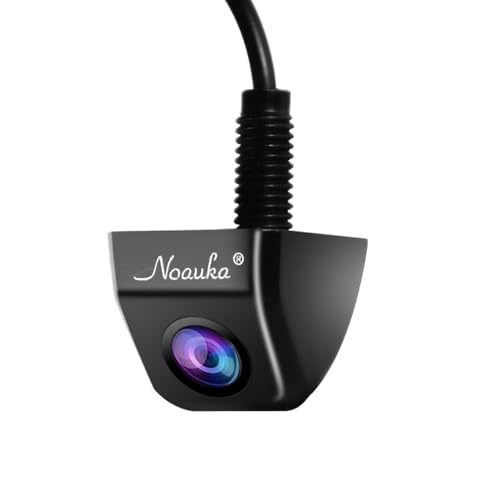
- Compact surface-mount design
- 170-degree view and 720p video
- Selectable guidelines and image orientation
Best For: Drivers with an RCA-compatible display who want a compact camera
Plate-Frame Pick
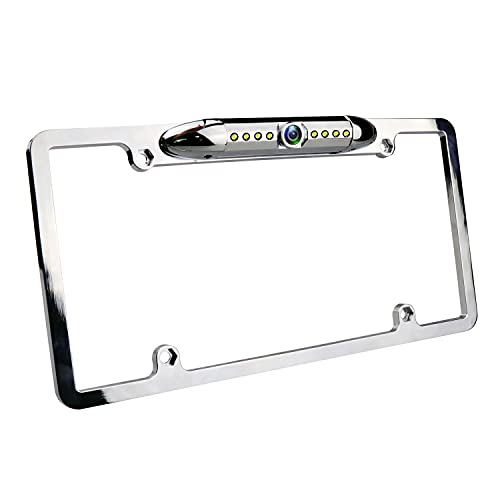
- Fits standard U.S. license plates
- Eight LEDs for dark conditions
- Adjustable angle and 170-degree view
Best For: Drivers wanting a plate-frame camera with LED illumination
12-LED Option

- Stated 1080p video resolution
- Twelve LEDs for low-light use
- Adjustable 170-degree camera angle
Best For: Drivers with an RCA display seeking 12-LED illumination
Best No-Wiring Option – Pemacom Magnetic Wireless Backup Camera
Among backup cameras for older cars, this Pemacom system stands out if you want to avoid running a camera cable through the vehicle. Its rubber-coated magnetic base attaches the camera without drilling, while the rechargeable battery and solar panel provide power.
Best For: Drivers who want a removable rear camera without wiring it into an older car.
Pros:
- Magnetic mounting makes the camera quick to attach and remove.
- 1080p camera, low-light imaging, and adjustable parking guidelines aid reversing.
- Rechargeable 15,000mAh battery, 5W solar panel, and USB-C charging offer flexible power options.
Cons:
- The battery still needs charging when solar power is insufficient.
- The stated wireless transmission range is up to 33 feet, so check the distance to your display.
This is the convenience pick for a suitable metal mounting surface. Its dual video channels also leave room for a second camera if you want another view.
Best Large-Screen Upgrade – HAUXIY 9-Inch CarPlay Screen and Camera
If you’re comparing backup cameras for older cars and also want phone-based navigation, this HAUXIY kit adds a 9-inch dashboard screen without replacing the factory radio. It supports wireless Apple CarPlay and Android Auto and includes a rear camera with night vision.
Best For: Drivers who want a larger display for reversing, maps, calls, and music.
Pros:
- 9-inch touchscreen brings camera video and smartphone features onto one display.
- Dashboard mounting and cigarette-lighter power avoid a head-unit replacement.
- Includes a waterproof night-vision camera and a 7-meter rear-camera cable.
Cons:
- The rear camera still requires cable routing and a connection to the backup lights.
- Navigation apps and phone features depend on a connected smartphone.
Choose this if a bigger screen is worth the additional camera-cable installation. It keeps the original radio in place while adding several audio-output options.
Best Compact CarPlay Upgrade – 7-Inch Portable Screen with 1080p Camera
This portable setup combines two useful upgrades for shoppers seeking backup cameras for older cars: a 1080p rear camera and a 7-inch screen with wireless Apple CarPlay and Android Auto. It is designed to add modern phone features without replacing the factory radio.
Best For: Older-car owners who want a compact camera display plus wireless phone integration.
Pros:
- Included 1080p camera has a stated 150-degree view and HDR capability.
- Bright, anti-glare 7-inch screen is designed for daytime visibility.
- Wireless CarPlay and Android Auto reconnect automatically after initial pairing.
Cons:
- The 7-inch display offers less viewing area than a 9-inch alternative.
- CarPlay and Android Auto features require a compatible smartphone.
Its appeal is the combination of a rear view, navigation, and audio access in one portable display. Bluetooth, FM, and AUX options help it work with different existing car stereos.
Best Wired Camera Kit – LeeKooLuu 1080p Backup Camera and Monitor
For buyers who want backup cameras for older cars without adding smartphone features, this LeeKooLuu kit focuses on a direct camera-to-monitor connection. It pairs a 1080p rear camera with a 4.3-inch display and can draw power from a cigarette-lighter socket.
Best For: Drivers who prefer a dedicated reversing display and a wired video connection.
Pros:
- Included 4-pin cable provides a direct connection between camera and monitor.
- Can be powered through the cigarette lighter or connected to reversing lights for automatic triggering.
- Adjustable monitor settings and camera night-vision LEDs help tailor the view.
Cons:
- Installation requires routing a cable from the camera to the monitor.
- The 4.3-inch display is smaller than the portable CarPlay screens here.
This is a straightforward choice when a stable wired feed matters more than wireless mounting or infotainment extras. Its compact monitor may also suit a dashboard with limited space.
Best Large-Screen Kit – Vexelion 2K Wired Backup Camera
For shoppers comparing backup cameras for older cars, this Vexelion kit pairs a rear camera with a 7-inch monitor, so you do not need an existing display. Its wired connection is intended to provide a stable, real-time view.
Best For: Drivers who want a complete kit with a larger screen and a wired video connection.
Pros:
- 7-inch monitor and specified 1440p video capture resolution.
- 170-degree field of view and enhanced low-light imaging.
- IP69K-rated camera for exposure to wet weather.
Cons:
- Requires running a cable between the rear camera and monitor.
- The 7-inch display takes up more cabin space than a mirror-integrated screen.
This is the most self-contained option here if your older vehicle lacks a compatible display. Plan where to mount the monitor and route the cable before installing it.
Best Camera-Only Upgrade – BOSS LPCB40 License Plate Camera
Among backup cameras for older cars, the BOSS LPCB40 makes sense when you already have a receiver with a compatible RCA video input. It mounts at the license plate and provides a 170-degree view, but it does not include a viewing monitor.
Best For: Drivers adding a rear camera to an existing compatible receiver or display.
Pros:
- License-plate mounting keeps the camera near the center of the vehicle.
- 170-degree viewing angle and on-screen distance guidelines.
- IP67 weatherproof rating and a specified 0.1-lux rating.
Cons:
- No monitor is listed among the included components.
- 640 × 480 resolution is lower than the other two products’ stated video resolutions.
Choose this camera if your main missing piece is the camera itself. Check your receiver’s video-input compatibility before buying.
Best Mirror-Integrated Display – AUTO-VOX T2 Backup Camera
If you want backup cameras for older cars without adding a dashboard screen, the AUTO-VOX T2 puts a 4.3-inch display in a replacement rearview mirror. Its wired camera can show an image when you shift into reverse, depending on how it is powered.
Best For: Drivers who prefer a mirror display and can confirm the supplied bracket fits their vehicle.
Pros:
- Mirror-integrated screen avoids a separate dashboard monitor.
- 170-degree camera with six LEDs for low-light use.
- Wired video connection and IP68-rated camera.
Cons:
- The OEM-style mirror bracket may not fit every vehicle; check compatibility first.
- The included 6-meter video cable may require an extension for a longer vehicle.
The T2 offers a tidy-looking installation when its mirror mount fits. Confirm the bracket and cable length before choosing it over a standalone monitor kit.
Compact Mount – NOAUKA 720p Backup Camera
For shoppers comparing backup cameras for older cars, this compact NOAUKA camera is an option if you already have a monitor with an RCA video input. Its small metal housing can be surface-mounted, and it runs on 12V power.
Best For: Drivers who want a small, weather-resistant camera and have a compatible display.
Pros:
- 720p video and a specified 170-degree field of view.
- IP69-rated, weather-resistant metal housing.
- Selectable parking guidelines and mirror or non-mirror image.
Cons:
- Requires a separate monitor with RCA video input.
- Wired installation and 12V power are required.
This is a flexible camera-only choice when you can supply the display and want control over the image orientation and guidelines.
Plate-Frame Pick – JPP 8-LED Backup Camera
Among backup cameras for older cars, this JPP model offers a mounting approach: its frame fits a standard U.S. license plate. It connects to an RCA-input monitor and uses 12V power, so check your display setup before buying.
Best For: Drivers with a standard U.S. license plate who prefer a plate-frame camera with LED illumination.
Pros:
- Frame fits standard U.S. license plates.
- Eight LEDs provide illumination in dark conditions.
- Specified 170-degree view with a physically adjustable camera angle.
- IP68 waterproof rating and selectable image orientation and guidelines.
Cons:
- A separate RCA-input display is needed.
- The license-plate frame may not suit vehicles without a standard U.S. plate.
The frame and adjustable angle make this worth considering if you want a plate-mounted installation, while the LED lighting is a practical feature for reversing after dark.
12-LED Option – UHANBUT 1080p Backup Camera
If you are shopping for backup cameras for older cars and already have an RCA-input monitor, this UHANBUT camera offers a stated 1080p resolution and 12 LEDs for low-light use. It runs on 12V power and has an adjustable camera angle.
Best For: Drivers seeking a wired camera with LED illumination and a stated 1080p video output.
Pros:
- Stated 1080p video resolution and 170-degree field of view.
- Twelve LEDs illuminate the image in low light.
- IP68 waterproof rating.
- Can be positioned at the rear, front, or side, according to the supplied mounting options.
Cons:
- Requires a separate monitor with RCA video input.
- Wired 12V installation is necessary.
This is a camera-only choice for buyers prioritizing the listed resolution and LED count; confirm that its mounting position and wiring route fit your vehicle.
How We Picked the Best Backup Cameras for Older Cars
We selected a range of Backup Cameras for Older Cars rather than treating every retrofit as the same job. The list includes complete kits with monitors, portable screens that add other features, mirror displays, wireless options, and camera-only models. We prioritized the questions that matter before purchase: where the picture appears, how the camera mounts, what must be wired, and whether the setup suits a car without a modern infotainment system. Advertised resolution, viewing angle, night-vision features, and weather resistance are useful comparison points, but real-world image quality and installation ease can vary.
Quick Comparison: Which Setup Makes Sense?
- Wireless or magnetic kit: Consider one when you want to minimize cable routing. Check how the camera is powered and charged; “wireless” does not necessarily mean wire-free.
- Wired camera and monitor kit: A practical choice when you need a dedicated display and prefer a consistent video connection. Plan for routing a cable through the vehicle.
- Portable CarPlay screen with camera: Best if you also want navigation and phone features. Confirm the screen has a suitable camera input and a secure mounting spot.
- Mirror monitor kit: Keeps the dash clear, but check mirror fit, visibility, and how it attaches.
- Camera-only or license-plate model: Suitable when you already have a compatible screen. Budget separately for any needed wiring or adapters.
Key Buying Factors for Backup Cameras for Older Cars
Display and Signal Compatibility
Start with the screen, not the camera. A camera-only purchase is useful only if your display accepts its video signal and connector. Check whether the image switches on automatically in reverse, and whether your car can provide the required reverse-trigger connection. Do not assume a portable screen or aftermarket stereo works with every camera.
Mounting, Power, and Installation
License-plate mounts can be convenient, but plate size, trunk shape, and handle placement affect the viewing angle. A mirror screen may be easier to see at a glance; a dash display needs a position that does not obstruct your view. Wired systems require cable routing, while wireless systems still need a dependable power source. Check the product’s instructions before assuming a claimed quick install fits your vehicle.
Visibility Where You Park
A wide view helps reveal nearby obstacles, though very wide lenses can distort distance. Look for a usable image in low light and rain, and check that the mounting position stays reasonably clean. Treat resolution numbers, LED counts, and waterproof ratings as specifications to verify—not guarantees of a better parking view.
Who Should Buy Which Backup Cameras for Older Cars?
Choose a complete wired kit if your older car has no compatible display and you are comfortable with a more involved installation. Pick a wireless kit if avoiding a long video cable is your priority, but verify its power arrangement first. A portable CarPlay screen makes sense when you want a broader cabin upgrade; a mirror monitor suits drivers who want to preserve dash space. If you already have a compatible display, a camera-only license-plate or universal mount may be the simplest purchase. Whichever route you take, measure the mounting area and confirm power, connector, and display requirements before ordering.