
A digital dash display can put speed and other useful driving data closer to your line of sight without replacing your vehicle’s instrument cluster. The right choice depends less on the number of advertised features than on how it connects to your car and where you can read it comfortably.
These 10 options span simple GPS speedometers and OBD2-connected displays, including compact dashboard units and larger HUD-style screens. Here’s what to check before choosing one.
Best 10 Car Digital Dash Displays Picks for 2026
Flexible Dual-Mode Pick
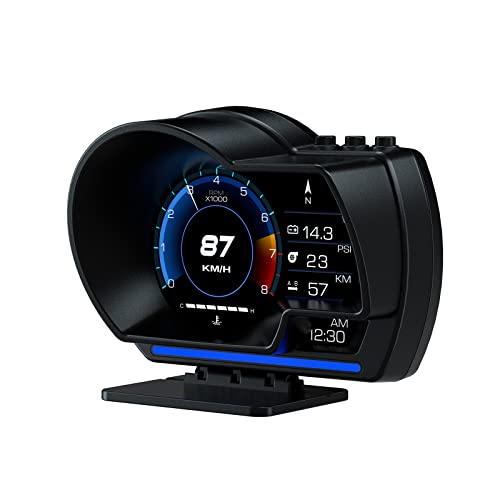
- OBD2 and GPS modes
- 10 display interfaces
- Dashboard or windshield mounting
Best For: Drivers seeking speed and vehicle data in one display
Trip-Data Pick

- GPS+BDS positioning
- Multiple trip-data layouts
- Automatic brightness
Best For: Drivers wanting USB-powered speed and trip information
Feature-Rich Gauge Pick
wiiyii P28 OBD2 and GPS Display

- 3.6-inch display with 13 themes
- Gesture-controlled interface switching
- Vehicle alerts and performance tests
Best For: Drivers who want customizable gauges and test functions
Simple Speed-Only Pick

- Large GPS speed readout
- USB plug-and-play setup
- No OBD connection needed
Best For: Drivers who only need an easy-to-read speed display
Compact OBD2 Gauge

- 2.8-inch LCD with large speed readout
- Displays engine data and mileage
- Automatic brightness and driving alerts
Best For: Compatible 2010-onward gasoline cars needing an OBD2 data display
Windshield Speed Projection

- Projects speed onto the windshield
- USB power; no OBD port needed
- Automatic brightness adjustment
Best For: Drivers wanting a simple GPS speed projection
Dual-Mode Data Display

- Switches between OBD2 and GPS modes
- Scans and clears supported engine fault codes
- Custom screens and configurable alerts
Best For: Compatible post-2008 OBDII/EOBD cars needing data and GPS modes
Best Windshield Projection

- Projects speed onto the windshield
- 10Hz GPS/BDS updates
- 5V USB power; no OBD port needed
Best For: Simple, line-of-sight speed readings
Best Large-Screen GPS Display
SinoTrack 5.5-Inch Speedometer

- Large 5.5-inch GPS display
- Speed, compass, and trip data
- Overspeed and four-hour driving alerts
Best For: Drivers wanting a large screen and trip reminders
Best Dual-Mode Compact Display

- Switches between OBD2 and GPS
- 3-inch dash or A-pillar display
- OBD gauges plus preset-speed warning
Best For: Compact mounting with OBD2 data and GPS fallback
Flexible Dual-Mode Pick – wiiyii P6 OBD2 and GPS Gauge
Among car digital dash displays, the wiiyii P6 is a practical choice if you want speed and vehicle data in one glanceable unit. Its OBD2 and GPS modes provide more options than an OBD-only gauge, while an adjustable bracket lets you position it on the dashboard or windshield.
Best For: Drivers who want speed, vehicle readings, and a visible speeding alert in a flexible mounting setup.
Pros:
- Displays speed alongside available readings such as RPM, voltage, water temperature, and fuel consumption.
- Offers 10 switchable interfaces and fault-code viewing.
- Ambient light changes from blue to red for an abnormal-driving alert, including speeding.
Cons:
- Vehicles without a compatible OBD2 protocol are limited to GPS functions.
- The range of readings and display choices may be more than a speed-only buyer needs.
The P6 makes the most sense when you will use its OBD data as well as its speed display. Check your vehicle’s OBD2 compatibility if those extra readings are the main reason you are buying it.
Trip-Data Pick – F2 GPS Speedometer
For shoppers comparing car digital dash displays without wanting an OBD connection, the F2 runs from a USB port and uses GPS+BDS satellite positioning for speed. It also offers trip information and selectable screen layouts in a compact dashboard unit.
Best For: Drivers who want a plug-and-play GPS speed display with mileage, altitude, and driving-time options.
Pros:
- Switches between more than six interfaces, including speed with time, odometer, or altitude.
- Includes overspeed and four-hour continuous-driving reminders.
- Automatically adjusts brightness and supports MPH/KM/H switching.
Cons:
- Satellite reception can be interrupted in tunnels and underground garages.
- Metal-coated windshield film may affect signal reception.
The F2 is a useful middle ground between a basic speed readout and a more data-rich trip display. Its satellite dependence is the key trade-off, so consider where you drive and whether your windshield could interfere with reception.
Feature-Rich Gauge Pick – wiiyii P28 OBD2 and GPS Display
The wiiyii P28 sits at the feature-rich end of car digital dash displays. It combines OBD2 vehicle readings with GPS positioning, a 3.6-inch display area, 13 themes, and gesture-based interface switching for drivers who want more than a large speed number.
Best For: Drivers interested in configurable vehicle data, alerts, and acceleration or braking tests.
Pros:
- Shows available readings including speed, RPM, water temperature, voltage, fuel consumption, and turbo pressure.
- Gesture control changes interfaces without touching the display.
- Supports speed, temperature, and voltage alerts, plus 0–100 km/h acceleration and 100–0 km/h braking tests.
- Includes an adjustable rotating bracket and multiple display themes.
Cons:
- OBD features are compatible with only some vehicle models.
- Its many settings, themes, and lighting modes may be unnecessary for a simple speed readout.
Choose the P28 if you expect to explore its gauges and performance tools rather than leave it on one screen. Verify OBD compatibility before relying on its vehicle-specific readings; the GPS system is the broader-compatibility option described in the product notes.
Simple Speed-Only Pick – VJOYCAR G20 GPS HUD
If you want car digital dash displays to do just one job, the VJOYCAR G20 keeps the focus on a large GPS-based speed readout. It connects by USB, needs no OBD port or button setup, and is described for use across a wide range of vehicles.
Best For: Drivers who want a straightforward, USB-powered speed display without connecting to vehicle diagnostics.
Pros:
- Displays speed in large digits with no button settings required.
- Uses GPS rather than the vehicle’s OBD port.
- Turns on and off with its accessory power supply and includes a USB cable.
Cons:
- Does not work where it cannot obtain GPS reception, such as tunnels or underground parking.
- Offers a speed readout rather than the vehicle gauges or trip metrics found on more elaborate displays.
The G20 is the uncomplicated option here: power it by USB and read your speed. Allow for the stated 10–30 seconds to acquire a signal on first use, and choose a different model if you need engine data or additional trip screens.
Compact OBD2 Gauge – 2.8-Inch Digital Speedometer
Among car digital dash displays, this compact 2.8-inch LCD is a practical choice if you want vehicle data alongside a large speed readout. It connects through the OBD2 port and mounts with the included bracket.
Best For: Drivers of compatible 2010-onward gasoline cars who want speed, engine data, and basic alerts in one display.
Pros:
- Shows speed, RPM, fuel consumption, turbo pressure, coolant temperature, voltage, and mileage.
- Provides engine-fault, temperature, voltage, and adjustable overspeed warnings.
- Automatically adjusts brightness for changing light conditions.
Cons:
- Designed for most gasoline vehicles from 2010 onward; check compatibility before buying.
- OBD protocol detection requires the engine to be running during installation.
This is the pick for a small, information-rich dashboard screen rather than a speed-only display. Confirm your car’s OBD2 compatibility first.
Windshield Speed Projection – USB GPS Head-Up Display
If you are comparing car digital dash displays but only need a speed readout, this GPS head-up display projects the number onto the windshield. Its 5V USB power connection does not use the vehicle’s OBD port.
Best For: Drivers who want a simple, windshield-projected speed display without OBD2 setup.
Pros:
- Projects a large speed readout into the driver’s line of sight.
- Uses GPS and BDS positioning with a stated 10Hz refresh rate.
- USB-powered for use with vehicles that have a suitable USB port; brightness adjusts automatically.
Cons:
- Does not provide the engine data available from OBD2 gauges.
- Satellite reception can suffer in tunnels, underground garages, poor weather, or behind metallic windshield film.
Choose this model for straightforward speed projection, not diagnostics. Like other GPS-based displays, its reading can vary slightly, and it works best with a clear satellite signal.
Dual-Mode Data Display – OBD2 and GPS Head-Up Display
For shoppers considering car digital dash displays with more flexibility, this model switches between OBD2 vehicle data and GPS-based information. In OBD2 mode, it can show driving metrics and scan or clear engine fault codes on supported cars.
Best For: Owners of compatible post-2008 OBDII/EOBD vehicles who want customizable data screens, alerts, and a GPS mode.
Pros:
- OBD2 mode covers speed, RPM, fuel consumption, coolant temperature, voltage, and other driving data.
- Can scan and clear engine fault codes on compatible vehicles.
- Offers 10 interface styles, adjustable brightness, and configurable speed, temperature, voltage, and RPM alerts.
- Includes GPS mode and dashboard or windshield mounting options.
Cons:
- OBD2 mode has extensive vehicle exclusions, including diesel, hybrid, pickup, and RV applications and several listed brands.
- If your car’s OBD2 protocol is incompatible, only GPS functions are available.
The dual-mode design is useful if your vehicle supports its OBD2 features, but compatibility deserves a careful check before purchase. GPS mode provides a fallback, not the full set of engine readings.
Best Windshield Projection – K1 GPS Speed HUD
For shoppers comparing car digital dash displays, the K1 puts a large speed readout on the windshield rather than adding another screen to the dashboard. It runs on 5V USB power and uses GPS and BDS satellites, so it does not need an OBD connection.
Best For: Drivers who want a simple, windshield-projected speed readout without connecting to the vehicle’s OBD port.
Pros:
- Projects speed into the driver’s line of sight.
- 10Hz satellite-based updates and automatic brightness adjustment.
- Compact, USB-powered design works with vehicles that have a suitable 5V USB supply.
Cons:
- Satellite reception can suffer in tunnels, garages, severe weather, or behind metallic windshield film.
- Primarily a speed display; the supplied notes do not describe additional driving gauges.
Choose this model if keeping speed in view matters more than seeing a full set of vehicle data. Its usefulness depends on a clear satellite signal and a suitable windshield for projection.
Best Large-Screen GPS Display – SinoTrack 5.5-Inch Speedometer
Among car digital dash displays, this SinoTrack unit prioritizes an information-rich screen: its 5.5-inch display shows MPH alongside trip-related data and a compass. GPS operation and automatic brightness adjustment make it a practical option for drivers who want more than a single speed number.
Best For: Drivers who prefer a large GPS display with trip information and audible driving reminders.
Pros:
- Shows speed, direction, satellite information, and selectable driving time or distance data.
- Includes a settable overspeed alert and a reminder after four hours of driving.
- Adjusts brightness automatically, with a manual setting available.
Cons:
- Trip distance does not accumulate across power-off cycles.
- Requires a 5V power supply; higher-voltage input is not permitted.
The larger screen and alerts make this a better fit for at-a-glance trip monitoring than a speed-only HUD. Do not count on it as a persistent odometer.
Best Dual-Mode Compact Display – P8 OBD2/GPS HUD
If you are comparing car digital dash displays for a small mounting footprint, the P8 offers a 3-inch screen that attaches to the dashboard or A-pillar trim. Its switchable OBD2 and GPS modes give you vehicle data when compatible and a GPS-based option when they are not.
Best For: Drivers seeking a compact display with OBD2 gauges and a GPS fallback for incompatible vehicles.
Pros:
- OBD2 mode shows RPM, coolant temperature, fuel consumption, and voltage.
- GPS mode provides speed and compass information.
- Dashboard or A-pillar mounting, automatic brightness, and a preset-speed flash warning.
Cons:
- OBD2 mode is specified for compatible 2008-and-newer standard 16-pin vehicles.
- GPS mode offers different, more limited data than OBD2 mode.
This is the flexible pick when space is tight and you want access to vehicle gauges where OBD2 compatibility permits. Check your vehicle before buying if the OBD-specific readouts are your main reason for choosing it.
How We Picked These Car Digital Dash Displays
We focused on the differences that matter at installation and on the road: GPS versus OBD2 data, screen size and placement, power requirements, and whether a display offers information beyond speed. The selection includes straightforward GPS speedometers, OBD2 gauges, and dual-system models so you can match the display to your vehicle rather than shop by feature count alone. Listed capabilities are not a guarantee of compatibility or readability in every car; check the current product specifications before ordering.
Quick Comparison: GPS, OBD2, and Dual-System Displays
GPS-only displays are the simplest starting point when you mainly want a digital speed readout. They do not need access to the vehicle’s diagnostic data, but speed readings depend on satellite reception and may lag briefly during rapid changes.
OBD2 displays connect to the car’s diagnostic port and can show vehicle-reported information such as RPM, voltage, or coolant temperature when supported. Compatibility and available readings vary by vehicle; confirm your model and model year before buying.
Dual GPS/OBD2 displays offer more flexibility if you want GPS speed alongside supported engine data. They may take more setup, and having two connection methods does not mean every advertised metric will work with your car.
Key Buying Factors for Car Digital Dash Displays
Connection and Compatibility
Locate your OBD2 port before choosing a plug-in gauge, and check the seller’s vehicle-compatibility guidance. For a GPS unit, confirm its power connection and consider whether your usual routes include tunnels or areas with limited satellite reception.
Visibility and Placement
A larger screen may be easier to glance at but harder to position without blocking your view. Compare dimensions, brightness controls, and mounting options, especially if you want a compact unit near the A-pillar or a display on a crowded dashboard. If a model projects onto the windshield, check whether it needs a reflective film and whether that setup is acceptable in your area.
Useful Data and Alerts
Prioritize the readings you will use: speed alone for a simple upgrade, or RPM and temperature for closer vehicle monitoring. Overspeed and other alerts can be helpful if adjustable, but extra notifications may become distracting. Also check whether the display switches off reliably with the vehicle and whether its cable can be routed neatly.
Who Should Buy Which Car Digital Dash Displays?
Choose a GPS speedometer for an easy-to-understand speed display without relying on OBD2 compatibility. Choose an OBD2 gauge if your car supports it and you want vehicle data beyond speed. Consider a dual-system display if you want both types of information and are comfortable checking compatibility and settings. For any option, favor a readable, securely mounted screen over a longer feature list: a display is useful only when it is easy to glance at without obscuring the road.