
Choosing among the best MIDI interfaces under $300 is less about spending the maximum and more about matching your setup’s ports, routing needs, and computer connection. The right device can simplify a compact keyboard rig or keep a larger hardware studio organized.
This roundup covers USB MIDI interfaces, multi-output thru boxes, MIDI mergers, host interfaces, and simple USB-to-MIDI cables. Use the buying guide below to narrow the options by connectivity, flexibility, and the way you actually work.
Best 10 Midi Interfaces Under 300 Picks for 2026
Best Overall

- 5-pin MIDI in and out
- Audio interface with phantom power
- 5-year warranty and software bundle
Best For: Beginners building a compact home studio
Best for Large MIDI Rigs
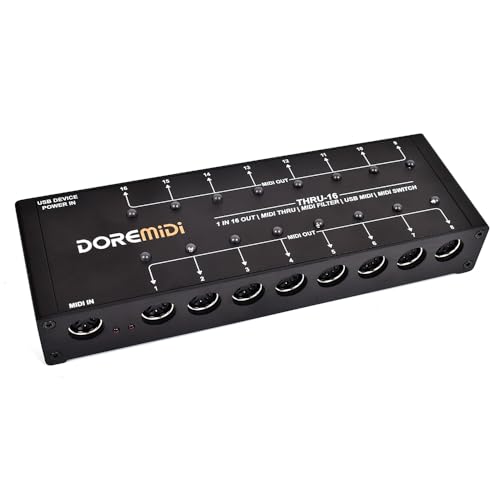
- One input feeds 16 outputs
- Editable filters per output
- Switches and status indicators
Best For: Large hardware MIDI and live setups
Best USB Expansion
ESI M4U eX 8-Port MIDI Interface

- Eight adaptable MIDI ports
- Three-port USB 3.0 hub
- Standalone routing and merging
Best For: Multi-device studios and live rigs
Best Simple MIDI Splitter

- One MIDI input and four outputs
- Compact 0.13 kg design
- 2-year warranty
Best For: Simple four-device hardware MIDI distribution
Most Expandable
CME H4MIDI WC Advanced USB Host MIDI Interface

- Hosts up to eight USB MIDI devices with a hub
- Advanced routing, filtering, mapping, and presets
- USB-C computer connection plus USB or 9V power
Best For: Expandable studio, pedalboard, and live MIDI setups
Best Simple MIDI Merger
MIDI Merge-3 3-in/2-out Interface

- Combines three MIDI inputs
- Supports clock, time code, SysEx, and standard commands
- Direct hardware operation with durable metal housing
Best For: Keyboard and hardware MIDI rigs needing signal merging
Best for Pedalboards
CME U4MIDI WC 2-in-2-out MIDI Interface

- Compact two-in/two-out MIDI connectivity
- USB-C and optional standalone 9V operation
- Routing, filtering, mapping, and SysEx support
Best For: Guitarists and compact pedalboard MIDI setups
Simple Computer Connection

- 1-in/1-out MIDI connection
- Windows and macOS compatible
- USB-to-Type-C adapter included
Best For: Direct keyboard-to-computer MIDI connections
Multi-Device Routing

- One MIDI input, six outputs
- Standard 16-channel MIDI support
- USB-powered, plug-and-play design
Best For: Sending one controller's MIDI data to multiple devices
Advanced USB MIDI Routing
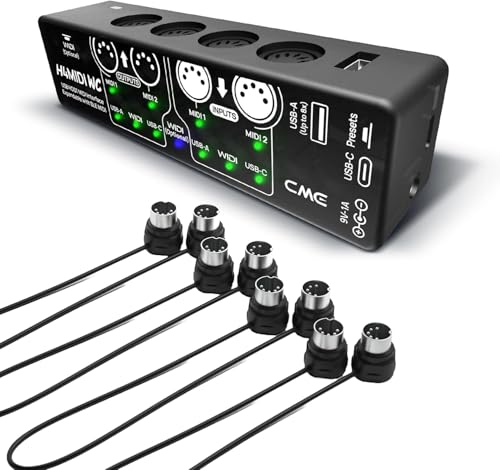
- Standalone USB MIDI host
- Configurable routing and filtering
- Includes four 1-foot DIN cables
Best For: Hybrid MIDI rigs requiring flexible routing and USB host control
Best Overall – Arturia MiniFuse 1
For musicians looking at MIDI interfaces under 300, the Arturia MiniFuse 1 is a compact, beginner-friendly choice that combines 5-pin MIDI connectivity with useful audio-recording features. It supports microphones, instruments, synths, and controllers while offering a plug-and-play USB workflow.
Best For: Home-studio beginners, vocalists, guitarists, and producers who need both audio recording and basic MIDI connectivity.
Pros:
- Includes 5-pin MIDI input and output connections.
- Offers 48V phantom power, balanced outputs, and headphone volume control.
- Includes Ableton Live Lite, Analog Lab Intro, Arturia FX, and other creative software.
- Backed by an extensive 5-year warranty.
Cons:
- Provides only one audio channel.
- Its compact design may be limiting for larger multi-device setups.
The MiniFuse 1 is a strong all-around pick when MIDI is part of a broader recording setup. Its software bundle and long warranty add value, especially for new producers building a first studio.
Best for Large MIDI Rigs – THRU-16 MIDI Splitter
Among MIDI interfaces under 300, the THRU-16 is designed for setups that need to distribute one MIDI source across many devices. It converts one MIDI input to 16 outputs and allows channel filtering and output switching for flexible routing.
Best For: Keyboardists, live performers, and studio users connecting one MIDI controller or sequencer to multiple instruments.
Pros:
- Provides 16 MIDI outputs from one MIDI input.
- Offers editable MIDI filters for each output.
- Individual switches and indicator lights make outputs easy to manage.
- Supports notes, CC, program changes, clock, time code, and SysEx.
Cons:
- It is a MIDI routing device rather than an audio interface.
- The supplied notes do not specify included software or a detailed warranty term beyond “30.”
The THRU-16 stands out when output count and per-channel control matter more than audio recording. Its independent filtering and switching make it suited to complex hardware MIDI systems.
Best USB Expansion – ESI M4U eX 8-Port MIDI Interface
The ESI M4U eX is a flexible option for shoppers comparing MIDI interfaces under 300 and needing several adaptable ports. Its eight MIDI ports can function as inputs or outputs, while the integrated USB 3.0 hub expands connectivity for a computer-based studio.
Best For: Producers and performers with multiple MIDI devices who want flexible routing, standalone operation, and extra USB ports.
Pros:
- Provides eight configurable MIDI ports.
- Includes a built-in USB 3.0 hub with three connectors.
- Supports standalone routing and merging without a computer.
- Class-compliant plug-and-play operation works with Windows and macOS.
Cons:
- The optional Windows driver is needed for complex multi-device and multi-client use.
- It is larger and heavier than compact single-interface options.
With adaptable ports, visible LED configuration, and standalone functionality, the M4U eX is well suited to a growing MIDI system. It also adds practical value by serving as a USB hub.
Best Simple MIDI Splitter – MIDI Solutions Quadra Thru
For a straightforward addition to a list of MIDI interfaces under 300, the MIDI Solutions Quadra Thru provides one MIDI input and four MIDI outputs in a compact through box. It is focused on distributing MIDI data rather than computer connectivity or audio recording.
Best For: Keyboard players and hardware users who need to send one MIDI signal to four compatible devices.
Pros:
- Simple 1-in/4-out MIDI signal distribution.
- Compatible with MIDI-capable software and a wide range of operating systems.
- Compact 0.13 kg design is easy to add to a hardware rig.
- Includes a 2-year warranty.
Cons:
- Has fewer outputs than the THRU-16.
- Does not provide USB connectivity or audio-interface features.
- The supplied notes do not mention per-output filtering or switching.
The Quadra Thru is a practical choice when four MIDI destinations are enough and simplicity is the priority. It avoids the extra routing features and larger footprint of more elaborate splitters.
Most Expandable – CME H4MIDI WC Advanced USB Host MIDI Interface
The CME H4MIDI WC stands out among MIDI interfaces under 300 for setups that need more than basic computer connectivity. It can host class-compliant USB MIDI devices directly, route MIDI data through advanced filtering and mapping tools, and run from USB or 9V DC power.
Best For: Producers, guitarists, and performers building flexible studio, pedalboard, or standalone MIDI rigs.
Pros:
- Supports up to eight USB MIDI device ports when used with a standard USB hub.
- Offers MIDI thru, split, merge, mapper, and filter functions through HxMIDI Tools.
- Works with macOS, Windows, iOS, Android, Linux, and ChromeOS.
- Compact design, four presets, and USB or 9V standalone power suit mobile and live setups.
Cons:
- Bluetooth MIDI requires the optional WIDI Core module.
- Its extensive routing features may be more than a simple MIDI connection requires.
Choose the H4MIDI WC when expansion and standalone routing are priorities. Its USB host capability is especially useful for connecting modern USB MIDI gear to traditional hardware without keeping a computer in the chain.
Best Simple MIDI Merger – MIDI Merge-3 3-in/2-out Interface
The MERGE-3 is a straightforward option among MIDI interfaces under 300 for combining signals from several MIDI sources. Its hardware-based design provides three MIDI inputs, direct MIDI output, and support for standard MIDI commands without relying on a computer for the merge function.
Best For: Keyboard players and hardware-focused MIDI setups that need multiple inputs combined into a direct output.
Pros:
- Combines signals from three MIDI inputs.
- Supports MIDI clock, MIDI time code, SysEx, and other standard MIDI commands.
- Hardware-direct operation is designed to avoid interference and delay.
- Aluminum alloy construction and silicone feet support durability and stability.
Cons:
- Provides fewer routing features than interfaces with filtering, mapping, or preset tools.
- The supplied notes specify keyboard compatibility but provide limited detail about standalone power.
The MERGE-3 makes sense when your primary goal is reliable MIDI signal combining rather than deep configuration. Its physical construction and direct hardware operation fit compact hardware rigs, while USB connectivity supports major desktop and mobile operating systems.
Best for Pedalboards – CME U4MIDI WC 2-in-2-out MIDI Interface
The CME U4MIDI WC is a compact choice among MIDI interfaces under 300 for guitarists and small hardware setups. It provides two MIDI inputs and two outputs, USB-C computer compatibility, configurable routing, and USB or 9V power for standalone use.
Best For: Guitarists, pedalboard users, and musicians connecting MIDI pedals, synthesizers, keyboards, or digital pianos to editing software.
Pros:
- Compact, reinforced casing is designed to fit pedalboard-oriented setups.
- Supports MIDI thru, split, merge, mapper, and filter configuration through UxMIDI Tools.
- Offers unlimited SysEx transmission between a guitar pedal and editor software.
- Works with macOS, Windows, iOS, Android, Linux, and ChromeOS.
Cons:
- Its two-in/two-out design is less expandable than a multi-port USB host interface.
- Bluetooth MIDI requires the optional WIDI Core module.
The U4MIDI WC is a focused fit for musicians who want dependable two-way MIDI in a compact enclosure. Its pedal-ready construction and external power options make it practical for live boards, while the routing tools add flexibility for studio editing and control.
Simple Computer Connection – USB to MIDI Cable
For shoppers comparing midi interfaces under 300, this USB-to-MIDI cable is a straightforward option for connecting a compatible keyboard or piano to a Windows or Mac computer. Its 1-in/1-out design supports MIDI data transfer for recording and editing, while an included USB-to-Type-C adapter may help with compatible mobile devices.
Best For: Home recording setups that need a direct connection between a 5-pin MIDI instrument and a computer.
Pros:
- Connects compatible keyboards and pianos to computers for MIDI recording and editing.
- Supports Windows and macOS systems, with 16 MIDI input and output channels.
- Includes a USB-to-Type-C adapter for potentially compatible phones and tablets.
- Flexible 4.5-to-6-foot cable length and recessed connectors are designed for easier handling.
Cons:
- It is a cable-style interface rather than a multi-port MIDI routing box.
- Mobile-device compatibility may require the included or another suitable adapter.
- Some older RCA-only audio equipment may need an additional adapter.
This is a practical pick when you need basic MIDI connectivity without extra routing features. Confirm your device connectors and adapter requirements before buying.
Multi-Device Routing – MIDI Thru-6 Box
Among midi interfaces under 300, the MIDI Thru-6 Box stands out for setups that need to distribute one MIDI input to several instruments. It sends incoming MIDI messages to six outputs, uses standard 5-pin MIDI connections, and is powered by a 5V USB supply.
Best For: Performers and producers who want one MIDI controller or synth to drive up to six connected MIDI devices.
Pros:
- Provides one MIDI input and six MIDI outputs.
- Passes standard 16-channel MIDI messages to connected devices.
- Designed for plug-and-play use without batteries.
- Works with MIDI products and supports Windows, macOS, and Linux environments.
Cons:
- It distributes MIDI signals but does not provide the broader routing and mapping features of a programmable interface.
- Requires a 5V DC USB power supply.
- Its usefulness depends on having compatible 5-pin MIDI equipment.
Choose this box when signal splitting is the priority. It is especially useful for expanding a hardware rig, but it is less suited to users seeking audio inputs or computer-focused recording features.
Advanced USB MIDI Routing – CME H4MIDI WC Bundle
For buyers exploring midi interfaces under 300, the CME H4MIDI WC bundle offers a more flexible hardware-routing approach. It can connect class-compliant USB MIDI instruments without a computer, while USB-C computer connectivity, routing tools, and four included 1-foot DIN cables support compact studio and performance setups.
Best For: Musicians who need USB host operation, configurable MIDI routing, and compatibility across multiple operating systems.
Pros:
- Connects USB MIDI instruments directly to MIDI hardware without a computer.
- Supports up to eight USB MIDI device ports through a standard USB hub.
- Offers thru, split, merge, mapper, and filter functions through HxMIDI Tools.
- Includes four 1-foot 5-pin DIN MIDI cables for compact connections.
Cons:
- Advanced configuration requires the HxMIDI Tools software.
- WIDI Bluetooth MIDI expansion requires the optional WIDI Core module.
- Its feature set may be more than needed for a basic single-keyboard connection.
This bundle is the most capable choice here for hybrid USB-and-DIN MIDI systems. It makes the most sense when you will use its routing, filtering, or standalone USB-host capabilities.
How We Picked the Best Midi Interfaces Under 300
We focused on practical MIDI connectivity rather than unrelated audio features. The selection includes compact interfaces for basic computer-to-keyboard connections, multi-port devices for hardware-heavy studios, and dedicated thru or merge boxes for routing MIDI without relying entirely on a computer.
We considered port count, input and output flexibility, USB host support, standalone operation, filtering and mapping features, power requirements, compatibility, and ease of installation. Because these products serve different roles, a simple cable can be the best choice for one buyer while a multi-output interface is more appropriate for another.
Quick Comparison
| Best For | Look For | Typical Choice |
|---|---|---|
| One keyboard or controller | USB-to-MIDI conversion and plug-and-play setup | USB MIDI cable or compact interface |
| Several hardware instruments | Multiple DIN inputs and outputs | Multi-port MIDI interface |
| Sending one source to many devices | Dedicated thru outputs and reliable timing | MIDI splitter or thru box |
| Combining multiple MIDI sources | Several inputs and configurable merge routing | MIDI merger or router |
| Computer-free control | Standalone operation, filtering, or mapping | Advanced host or standalone interface |
Key Buying Factors for MIDI Interfaces Under $300
Ports and Routing
Count the MIDI DIN inputs and outputs you will use now, then leave room for likely expansion. A 1-in/1-out device is sufficient for a single keyboard, but it will become limiting if you add a drum machine, synthesizer, or external controller. Thru boxes duplicate one MIDI stream, while mergers combine multiple sources; these functions are not interchangeable.
USB Host Compatibility
A standard USB MIDI interface usually connects instruments to a computer. A USB host interface is different: it can allow USB MIDI controllers or keyboards to communicate with traditional DIN MIDI hardware without a computer. Check the product’s host requirements and supported devices before buying.
Filtering, Mapping, and Standalone Use
Advanced routing features can filter channels, remap messages, or direct different sources to specific outputs. These are valuable for live rigs and hardware studios, but unnecessary if you only need straightforward recording. Standalone capability is especially useful when your setup must work without a computer.
Power, Drivers, and Compatibility
Confirm whether the unit is bus-powered, needs an adapter, or requires a powered USB hub. Class-compliant models are generally easier to use across modern computers, but verify operating-system and connector compatibility. Also check whether the included cables match your instruments.
Who Should Buy Which Midi Interfaces Under 300?
Choose a basic USB-to-MIDI cable or compact interface if you connect one keyboard or older MIDI controller to a computer. Choose a multi-port interface if you regularly record or control several DIN-equipped instruments. A thru box makes sense when one controller must drive multiple destinations with minimal configuration.
Buy a merger when multiple MIDI sources need to feed one or more destinations. Choose an advanced USB host interface if you want to integrate USB controllers with DIN hardware, or if routing, filtering, and standalone operation are central to your workflow. Before ordering, sketch your signal path and count every input, output, and cable; that simple step is the best way to avoid buying a device that lacks one critical connection.