
Room acoustics can make even excellent speakers sound misleading. The best studio monitors with room correction help reduce the impact of placement, reflections, and uneven bass so your mixes translate more consistently.
This roundup includes self-calibrating monitors, external correction systems, and affordable reference speakers that can fit desktop, home-studio, and professional workflows.
Best 10 Studio Monitors with Room Correction Picks for 2026
Compact Correction Pick

- Built-in ARC room calibration
- 36 Hz–32 kHz frequency range
- Desktop stands included
Best For: Compact desktop studios and computer-based monitoring
Flexible Studio Value

- Manual Acoustic Space controls
- 5.25-inch low-frequency driver
- XLR, TRS, and RCA inputs
Best For: Project studios needing adjustable placement compensation
Software Calibration Solution
SoundID Reference with Microphone

- Calibrates speakers and headphones
- Includes measurement microphone
- Works with computers and audio interfaces
Best For: Adding room correction to an existing monitoring setup
Professional Reference Pick
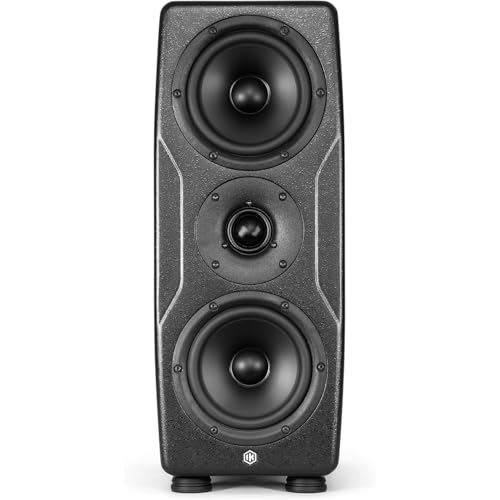
- ARC X calibration with included mic
- Dual 5-inch woofers and graphene tweeter
- 175W RMS with extensive DSP
Best For: Professional mixing, mastering, and immersive audio studios
Compact Desk Correction

- DSP switches address common placement issues
- USB-C and balanced 1/4-inch connectivity
- Compact pair with angled desktop stands
Best For: Songwriters and producers working at a desk
Dedicated Room Correction

- Measurement microphone and calibration software included
- Stand-alone processor corrects frequency imbalances
- Supports existing monitors and audio interfaces
Best For: Studio owners upgrading an existing monitoring system
Flexible Boundary Tuning

- Boundary EQ and HF Trim adjust for room placement
- Five-inch woofers with 41-watt amplifiers
- Image Control Waveguide supports a wide sweet spot
Best For: Home studios and producers wanting adjustable nearfields
Room Correction Software
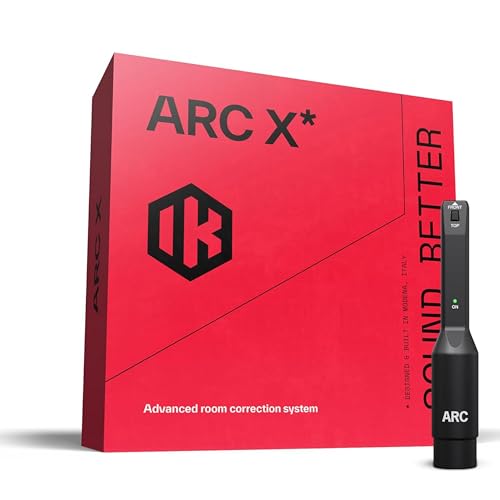
- Measures room response with the included microphone.
- Works with IK and third-party monitors.
- Adds 20+ virtual reference systems.
Best For: Existing monitor setups needing flexible acoustic calibration
Connected Active Monitors

- App and rear controls provide acoustic tuning.
- Three-way design with 110W RMS amplification.
- Includes XLR, TRS, RCA, AUX, and Bluetooth.
Best For: Flexible home-studio and desktop monitoring
Compact DSP Monitor

- Compact design with DSP and acoustic EQ app.
- 90W RMS bi-amp power with 3-inch woofers.
- USB, Bluetooth, RCA, AUX, and instrument inputs.
Best For: Portable production and space-constrained workstations
Compact Correction Pick – iLoud MTM MKII White
The IK Multimedia iLoud MTM MKII is a compact option for anyone seeking studio monitors with room correction in a desktop or space-conscious setup. Its built-in ARC calibration, linear-phase design, and included tabletop stands are suited to mixing, music recording, and computer-based monitoring; the calibration microphone is sold separately.
Best For: Desktop studios, DJs, and users who need compact monitors with flexible placement options.
Pros:
- Built-in ARC calibration helps tune the monitor to the room.
- Ultra-flat 36 Hz to 32 kHz frequency range with controlled bass.
- Linear-phase sound and time alignment support precise monitoring.
- Includes adjustable tabletop stands and mic-stand mounting points.
Cons:
- The calibration microphone is sold separately.
- It is a single monitor, so a stereo pair requires two units.
- Its 3.5-inch woofers may be less suitable for listeners seeking larger-driver output.
This monitor stands out when space, placement flexibility, and room correction matter more than cabinet size. Add a second unit for stereo monitoring and the separate calibration microphone for ARC setup.
Flexible Studio Value – PreSonus Eris Studio 5
PreSonus Eris Studio 5 5.25-inch 2-Way Active Studio Monitors with EBM Waveguide
Check Price On AmazonThe PreSonus Eris Studio 5 is a practical nearfield monitor for audio production, with room-position controls rather than automatic calibration. Its Acoustic Space settings, highpass filter, and HF and midrange adjustments help compensate for placement near a wall or corner, while the wide EBM waveguide supports a broad listening sweet spot.
Best For: Home and project studios that want adjustable room tuning and multiple analog inputs.
Pros:
- Acoustic Space control offers flat, -2 dB, and -4 dB settings for placement compensation.
- 5.25-inch woven-composite woofer provides extended low-end response.
- EBM waveguide creates a wide sweet spot for stereo imaging.
- Balanced XLR, balanced TRS, and unbalanced RCA inputs support varied setups.
Cons:
- It does not provide automatic measurement-based room correction.
- The stated frequency response is 48 Hz to 20 kHz, with less extension than some larger monitors.
- This listing is for one monitor, so stereo use requires a pair.
The Eris Studio 5 is a solid choice when manual acoustic tuning is sufficient and connectivity flexibility is important. It offers useful placement controls without requiring dedicated correction software or a measurement microphone.
Software Calibration Solution – SoundID Reference with Microphone
Sonarworks SoundID Reference for Speakers & Headpgones with Measurement Microphone (Box)
Check Price On AmazonSonarworks SoundID Reference is a calibration-software package for users building studio monitors with room correction into an existing setup. It includes a measurement microphone for analyzing the room and is compatible with speakers, headphones, computers, and audio interfaces, making it a flexible way to address monitoring accuracy without replacing your speakers.
Best For: Producers and engineers who already own monitors and want measurement-based calibration across speakers and headphones.
Pros:
- Includes a measurement microphone for room analysis.
- Designed for calibration of both speakers and headphones.
- Compatible with audio interfaces, laptops, personal computers, and speakers.
- Omnidirectional microphone captures room information from a broad area.
Cons:
- It is calibration software and a microphone, not a pair of studio monitors.
- It requires a compatible computer-based setup.
- The supplied microphone uses an XLR connection, so suitable connectivity is needed.
This is the most adaptable option for shoppers who want to add room correction to monitors they already have. It makes sense when software-based calibration and headphone support are more valuable than buying new speakers.
Professional Reference Pick – iLoud Precision MTM MKII
The IK Multimedia iLoud Precision MTM MKII is a reference-grade choice for professional users who want studio monitors with room correction, monitor emulation, and substantial output. Its included microphone works with ARC X auto calibration, while dual 5-inch woofers, a graphene-reinforced tweeter, linear-phase processing, and extensive DSP controls target mixing, mastering, and immersive audio work.
Best For: Professional mixing, mastering, Dolby Atmos, broadcast, and other demanding nearfield monitoring applications.
Pros:
- ARC X auto calibration adapts the monitor to its acoustic environment.
- Includes a measurement microphone and monitor-emulation controls.
- Reference response of ±1 dB from 45 Hz to 30 kHz, with low-end extension to 37 Hz at -4 dB.
- 175W RMS output, 96 kHz DSP, and flexible low-frequency extension settings.
Cons:
- Its professional features and 21.7-pound cabinet make it less suited to casual desktop use.
- The listed connectivity is XLR, which may require suitable studio hardware.
- It is a single monitor, so stereo monitoring requires a pair.
For demanding monitoring work, this model combines automatic correction with detailed DSP adjustment and monitor emulation. Its size, output, and mounting flexibility make it better suited to a dedicated studio or immersive installation than a small workstation.
Compact Desk Correction – ADAM Audio D3V
The ADAM Audio D3V is a compact option for anyone seeking studio monitors with room correction features for a desktop setup. Its DSP-powered switches help address common placement-related acoustic issues, while USB-C, balanced 1/4-inch inputs, and included angled stands simplify connection and positioning.
Best For: Songwriters, producers, and listeners who need capable, space-conscious desktop monitors.
Pros:
- DSP-powered switches help compensate for common speaker-placement issues.
- D-ART tweeters and 3.5-inch aluminum woofers support detailed monitoring.
- USB-C connectivity, headphone output, and included 15-degree stands suit desktop workflows.
Cons:
- The 3.5-inch woofers offer less scale than larger five-inch monitors.
- Room correction is handled through onboard switches rather than a measurement-based system.
The D3V is a practical fit when desk space and straightforward setup matter most. Its built-in placement controls add useful flexibility, though users seeking full measurement-based correction will need a separate system.
Dedicated Room Correction – IK Multimedia ARC Studio
The IK Multimedia ARC Studio is a dedicated choice for anyone building a system around studio monitors with room correction. It combines a measurement microphone, calibration software, and stand-alone correction processor to address frequency imbalances and improve stereo imaging across home or professional studio environments.
Best For: Producers, mixers, and mastering users who want measurement-based correction for an existing monitor setup.
Pros:
- Includes a measurement microphone, correction software, and dedicated processor.
- Designed to correct frequency imbalances and improve stereo imaging.
- Works with studio monitors and audio interfaces in home or professional studios.
Cons:
- It is a correction system, not a pair of speakers, so monitors must be purchased separately.
- It adds calibration hardware and software to the signal chain.
ARC Studio is the most purpose-built room-correction solution in this selection. It makes sense for users who already have monitors they like and want a more systematic way to improve room response and monitoring consistency.
Flexible Boundary Tuning – JBL 305P MkII Pair
The JBL 305P MkII pair suits buyers who want studio monitors with room correction controls in a conventional nearfield format. Its Boundary EQ and HF Trim let you tailor low and high frequencies to the room, while the Image Control Waveguide is designed to provide precise imaging and a wide sweet spot.
Best For: Home-studio producers, podcasters, and sound designers who want adjustable five-inch monitors.
Pros:
- Boundary EQ and HF Trim provide practical room and placement adjustments.
- Five-inch woofers, Slip Stream ports, and 41-watt Class-D amplifiers support strong output.
- Image Control Waveguide provides a wide sweet spot and focused stereo imaging.
Cons:
- The built-in controls offer tonal adjustment rather than full measurement-based correction.
- The larger cabinets require more desk or stand space than compact desktop monitors.
The 305P MkII pair is a sensible choice when you want more low-end authority and straightforward room-tuning controls. Choose it for a traditional two-monitor setup, but consider a separate calibration system if you need detailed measurement-based correction.
Room Correction Software – ARC X
For shoppers building a system around studio monitors with room correction, IK Multimedia ARC X takes a software-and-microphone approach rather than replacing your speakers. It measures the room with its included mic, creates correction profiles, and supports third-party monitors through real-time calibration or a DAW plug-in.
Best For: Producers and mixers who already own monitors and want measurement-based correction plus virtual reference monitoring.
Pros:
- Uses multi-point acoustic measurement and VRM modeling for phase-coherent correction.
- Works with IK Multimedia and third-party monitors through speaker calibration or the ARC X plug-in.
- Includes virtual monitoring and emulation for more than 20 studio, consumer, and mobile playback systems.
- Offers nine target curves, adjustable correction ranges, and natural- or linear-phase modes.
Cons:
- It is a calibration system, not a pair of physical studio monitors.
- Results depend on completing the measurement process and integrating the software into your setup.
ARC X is the most flexible option here for adapting existing speakers to a room. Its measurement mic, customizable curves, and reference emulations make it particularly useful when mix translation is a priority.
Connected Active Monitors – Edifier MR5
The Edifier MR5 is a practical choice for buyers seeking studio monitors with room correction built into an active speaker pair. Its rear controls and Edifier ConneX app provide high- and low-frequency adjustment, low cut-off, desktop control, and acoustic-space presets.
Best For: Home studios and desktop systems that need room-tuning controls, broad connectivity, and a fuller three-way speaker design.
Pros:
- Three-way design combines a 5-inch woofer, 3.75-inch midrange driver, and 1-inch silk-dome tweeter.
- Provides physical high/low controls and app-based acoustic compensation features.
- Offers XLR, TRS, RCA, AUX, Bluetooth LDAC, and a front headphone output.
- 110W RMS amplification and a stated 46Hz–40kHz response suit near-field use or mid-sized rooms.
Cons:
- The acoustic tuning is app- and control-based rather than a microphone-led automatic measurement system.
- The speakers are relatively substantial for a compact desktop setup.
MR5 stands out when room adjustment is only one part of the buying decision. It pairs basic acoustic tuning with a three-way architecture and unusually broad wired and wireless input options.
Compact DSP Monitor – NUX AXON 3
The NUX AXON 3 brings studio monitors with room correction into a compact format. Its advanced DSP and acoustic-correction EQ app are paired with adjustable magnetic footpads, a mounting socket, and multiple inputs for portable production, streaming, and desktop work.
Best For: Mobile creators, streamers, and small workspaces that prioritize compact placement and app-based acoustic adjustment.
Pros:
- Compact monitor design uses 3-inch woofers, silk-dome tweeters, and 90W RMS bi-amp power.
- Advanced DSP and an acoustic-correction EQ app support sound adjustment for the listening environment.
- Includes USB DAC, Bluetooth, 1/4-inch stereo, RCA, and 1/8-inch AUX connectivity.
- Magnetic footpads provide +9° or -5° tilt, while the 3/8-inch socket supports stand mounting.
Cons:
- The 3-inch woofers and stated 55Hz low-end reach may offer less bass extension than larger monitors.
- The supplied notes do not indicate microphone-based automatic room measurement.
AXON 3 is a strong fit where desk space and portability matter more than large-driver bass. Its DSP, app control, flexible mounting, and wide I/O make it adaptable for compact creative setups.
How We Picked the Best Studio Monitors with Room Correction
We evaluated these products by looking at correction capability, monitoring accuracy, connectivity, power, placement flexibility, and suitability for common studio environments. The list includes monitors with built-in calibration, software-and-microphone systems that work with existing speakers, and conventional active monitors that can be paired with external correction.
We also considered practical details such as desktop footprint, stereo-pair value, mounting options, adjustment controls, and whether the system is appropriate for mixing, music production, editing, or general critical listening. Room correction can improve frequency balance, but it cannot fully compensate for poor speaker placement or severe acoustic problems.
Quick Comparison
| Best For | Recommended Type | What to Look For |
|---|---|---|
| Small desks and compact rooms | Compact calibrated monitors | Short listening distance, adjustable correction, low-end control |
| Existing speakers | External correction system | Measurement microphone, reliable software, flexible routing |
| Professional mixing | Higher-output calibrated monitors | Wide dynamic range, consistent imaging, detailed midrange |
| Budget home studios | Affordable active monitors | Balanced inputs, useful placement controls, stereo-pair pricing |
Key Buying Factors for Studio Monitors with Room Correction
Built-In Vs. External Correction
Built-in correction is convenient and usually easier to set up because calibration is stored or applied inside the monitor. External systems are more flexible: they can improve speakers you already own and may support virtual monitoring or headphone calibration. Check whether the correction operates through software, hardware, or both, and confirm compatibility with your interface and operating system.
Room Size, Listening Distance, and Bass
Choose a monitor that suits your room rather than simply selecting the most powerful option. Larger woofers can provide deeper bass, but untreated small rooms may exaggerate low frequencies. Compact nearfield monitors often work better on a desk, while larger models need more space and careful positioning.
Inputs, Controls, and Calibration Workflow
Balanced inputs such as TRS or XLR help reduce noise in studio setups. Look for gain, high-frequency, and low-frequency controls when available. A dependable measurement microphone, clear calibration instructions, and the ability to save or bypass profiles make daily use easier.
Imaging and Translation
Accurate stereo imaging helps you judge panning, depth, and reverb. Correction should make the response more predictable, not artificially exciting. Whenever possible, compare mixes on headphones, a second speaker system, and familiar reference tracks.
Who Should Buy Which Studio Monitors with Room Correction?
Choose compact monitors with integrated correction if you work at a desk, have limited space, or want the simplest all-in-one setup. Choose a higher-output calibrated monitor for larger rooms, demanding production work, and greater headroom.
Choose an external correction system if you already own capable speakers or want one calibration workflow for multiple monitoring setups. Choose conventional active monitors if price is the priority and you are willing to improve placement and acoustics manually or add correction later.
Whichever route you take, place the speakers symmetrically, aim the tweeters toward ear level, form an appropriate listening triangle, and measure from the actual listening position. These steps let room correction work more effectively and help you get the most reliable results from your investment.