
OTTOCAST ScreenFlow 11.4 Wireless Apple CarPlay & Android Auto Screen is aimed at drivers who want a larger, more flexible dash display without giving up familiar phone integration.
If you are comparing an OTTOCAST ScreenFlow 11.4 Wireless Apple CarPlay & Android Auto Screen review against simpler CarPlay adapters, the key difference is the bundled screen, pre-installed streaming apps, and backup camera support.
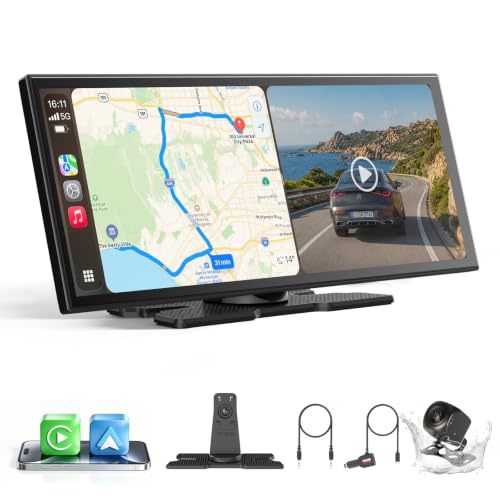
ScreenFlow 11.4 Review Summary
OTTOCAST ScreenFlow 11.4 Wireless Apple CarPlay & Android Auto Screen makes sense for buyers who want one device to cover navigation, wireless projection, media, and rear-camera use.
It is especially relevant for families, commuters, and road-trip drivers who want a larger visual surface than a stock infotainment display can usually provide.
The appeal is not just the size.
The listing positions it as a wireless Apple CarPlay and Android Auto screen with split-screen multitasking, dual-band WiFi, dual Bluetooth, and a bundled 1080P backup camera.
That combination suggests a product built for convenience and versatility rather than a bare-bones projection dongle.
Review Scorecard
| Category | Score | Rationale |
|---|---|---|
| Wireless phone integration | 9/10 | Supports both Apple CarPlay and Android Auto with one-time pairing and auto-reconnect. |
| Display usefulness | 8/10 | 11.4-inch IPS screen and split-screen mode should improve visibility and multitasking. |
| Media flexibility | 8/10 | Pre-installed Netflix, YouTube, Disney+, and Prime Video add built-in entertainment options. |
| Installation convenience | 8/10 | The listing emphasizes a tool-free, adhesive-bracket install and quick startup. |
| Backup-camera value | 9/10 | Bundled 1080P camera with dynamic guidelines adds real utility for parking and reversing. |
| Everyday compatibility | 8/10 | Marketed for sedans, SUVs, pickups, RVs, and trucks across many model years. |
| Tradeoff management | 6/10 | More features usually mean more setup and more things to configure than a simple adapter. |
Bottom line: this is a strong fit if you want a dash screen that does more than mirror your phone. It is less compelling if you only need the lightest possible CarPlay solution and do not care about streaming or backup-camera hardware.
Key Features and Specifications of ScreenFlow 11.4
The core hardware is an 11.4-inch IPS touchscreen with a 1920 x 720 resolution and a 60 fps refresh rate.
For a car display, that is a practical combination: large enough to read at a glance, and detailed enough to keep maps and menus usable without feeling cramped.
The listing also emphasizes split-screen multitasking.
That matters because the screen is not just trying to be a phone mirror.
It is designed so navigation and entertainment can coexist, which is useful on long drives or when a passenger wants media while the driver keeps directions visible.
Wireless Apple CarPlay and Android Auto are the headline software features.
The product claims one-time pairing and auto-reconnect on every drive, which is the right convenience target for a device like this.
A screen that needs repeated manual setup quickly loses its appeal.
Built-in streaming support is another differentiator.
The pre-installed apps listed on the product page include Netflix, YouTube, Disney+, and Prime Video, with access tied to the device’s curated Android OS and built-in app store.
That is a broader use case than standard projection-only hardware, though it also means buyers should expect an ecosystem with some boundaries.
The wireless stack is unusually dense for a product in this category.
The listing mentions dual-band WiFi, dual Bluetooth, and support for keeping CarPlay active while the car’s original sound system remains connected.
For buyers who have dealt with audio handoff headaches, that claim is one of the more interesting parts of the spec sheet.
The package also includes a 1080P night-vision backup camera with an IP67 waterproof rating, 19.69-foot cable, and dynamic parking guidelines.
That makes the screen feel closer to a bundled driving upgrade than a single-purpose display accessory.
| Spec or feature | What it means for buyers |
|---|---|
| 11.4-inch touchscreen | Large visible interface for maps, media, and camera output |
| 1920 x 720 IPS panel | Better readability and viewing angles than basic low-resolution panels |
| 60 fps refresh rate | Smoother interaction and less laggy feel when switching screens |
| Wireless CarPlay and Android Auto | No cable dependency for supported phones |
| Split-screen mode | Lets navigation and media stay visible at once |
| Pre-installed streaming apps | Adds entertainment value beyond phone projection |
| Dual-band WiFi and dual Bluetooth | Intended to reduce connection friction and audio compromise |
| Included 1080P backup camera | Useful for parking and reversing support |
Pros and Cons of ScreenFlow 11.4
Pros
- Large 11.4-inch display that should be easier to read than many compact dash screens.
- Wireless CarPlay and Android Auto reduce cable clutter and daily friction.
- Split-screen multitasking is a real advantage for navigation plus media.
- Pre-installed streaming apps broaden the device’s role beyond basic projection.
- Included backup camera makes the package more complete than a screen-only alternative.
- Tool-free install claim suggests a lower barrier to getting started.
Cons
- More complex than a basic adapter, so buyers who want minimal setup may not need the extra features.
- Curated Android OS means the app experience is not the same as an open tablet.
- Bundled camera support may be unnecessary if your vehicle already has a solid reverse-camera system.
- Feature density can add decision fatigue if you only wanted simple wireless phone mirroring.
Who Should Buy ScreenFlow 11.4?
This is a good match for drivers who want a larger dash display and value convenience features in one package.
If you regularly use wireless CarPlay or Android Auto, the auto-reconnect promise and split-screen support are the kinds of details that make daily use feel smoother.
It also fits households that share a vehicle, or buyers who want road-trip entertainment without relying entirely on a phone screen.
The pre-installed streaming apps and big display make that use case easy to understand.
The bundled backup camera is especially relevant if your vehicle lacks a modern reverse camera or if you want a clearer, upgraded parking aid.
The listing’s dynamic guidelines and night-vision emphasis point toward practical everyday visibility rather than cosmetic add-ons.
You should probably skip it if your car already has a strong factory infotainment system, you only need a cheap CarPlay adapter, or you prefer the simplest possible setup.
In that case, the extra screen and media features may be more than you need.
Built-In Media and Driving Use
Wireless Projection for Daily Driving
The most important function is still wireless phone integration.
For everyday commuting, that usually means faster access to maps, calls, and music without plugging in every time.
A buyer choosing this product is probably trying to remove friction from the dashboard, not just add another screen.
Split-Screen Navigation and Entertainment
Split-screen mode is the feature that makes the display feel meaningfully different from a plain projection unit.
Keeping directions visible while another app stays open can matter on longer trips, especially if a passenger wants music or video control without taking over the entire screen.
Streaming App Convenience
The pre-installed streaming apps are useful because they reduce the need to cast from a phone for every media task.
That said, the listing makes clear that this is a curated Android environment, so buyers should expect a controlled software experience rather than an unrestricted tablet.
Backup Camera Integration
The included 1080P camera expands the product’s role from convenience screen to parking aid.
For drivers who need better rear visibility or want a cleaner aftermarket camera bundle, that is a practical addition, not just a gimmick.
Alternatives to ScreenFlow 11.4
If you want a simpler wireless dash screen without the same emphasis on bundled entertainment, consider the Podofo wireless CarPlay screen.
It is closer to the basic projection-and-display category.
If your priority is stronger name recognition and a mature product line, the Carpuride CarPlay screen is another likely comparison point for buyers shopping this segment.
If you want a more compact and less feature-heavy approach, the BOSS Audio systems CarPlay monitor is worth comparing, especially if you prefer a simpler dashboard setup.
If your vehicle already has a reverse camera and you only need wireless phone integration, a wireless CarPlay adapter may be enough and could be easier to live with day to day.
Is ScreenFlow 11.4 Worth It?
Yes, if you want a feature-rich car screen rather than a bare adapter. OTTOCAST ScreenFlow 11.4 Wireless Apple CarPlay & Android Auto Screen stands out because it combines wireless phone integration, a large display, split-screen use, built-in streaming apps, and a bundled backup camera in one package.
The value proposition is strongest for drivers who will actually use those extras.
If you mainly want navigation and audio with minimal fuss, a simpler wireless CarPlay solution may be the better buy.
But if you want one upgrade that changes the feel of the dashboard and adds practical parking support, this is a credible option.