
An audio interface with onboard DSP can improve your workflow by handling monitoring, routing, voice processing, and effects before the signal reaches your computer. That makes these interfaces especially useful for streamers, podcasters, musicians, and home studios.
This roundup compares 10 options across compact USB interfaces, creator-focused mixers, multichannel recording systems, and DSP-powered setups. The right choice depends on your input needs, software compatibility, monitoring preferences, and budget.
Best 10 Audio Interface with Onboard Dsp Picks for 2026
Best for Streamers

- 80dB gain for demanding XLR microphones
- Onboard voice effects and low-latency monitoring
- Touch controls with Wave Link routing
Best For: Streamers using one XLR microphone
Best for Flexible Hybrid Setups
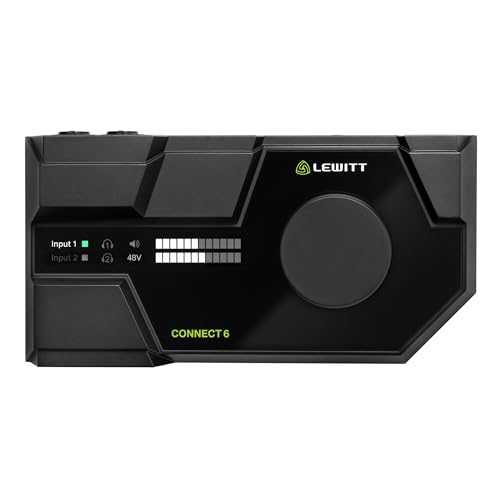
- 72dB preamp gain with low-noise performance
- Four onboard DSP effects plus maximizer
- Virtual channels and loopback for flexible routing
Best For: Podcasters and creators needing device flexibility
Best for Advanced Creator Routing
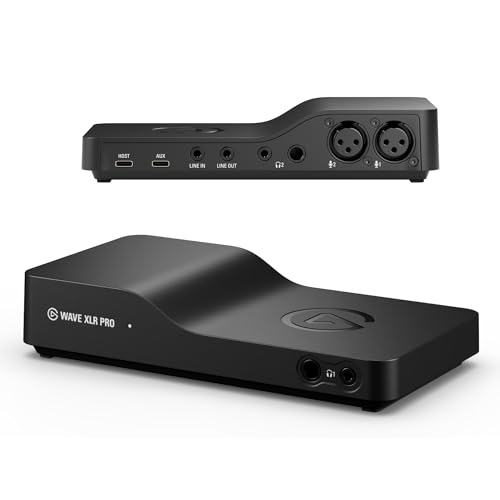
- Two XLR inputs with 80dB gain each
- Dual USB-C for flexible device connections
- Five hardware mixes and matrix routing
Best For: Advanced streaming and multi-device setups
Best for Home Studios

- 18x22 interface with extensive analog and digital I/O
- Six DSP-powered monitor mix buses
- Onboard reverb, EQ, and dynamics processing
Best For: Home studios needing extensive routing
Best Budget Mixer with DSP

- Eight channels with four combo inputs
- Built-in DSP effects and 3-band channel EQ
- USB, Bluetooth, MP3, Hi-Z, and phantom power
Best For: Flexible home, live, podcasting, and karaoke setups
Best Premium Interface with DSP
Zenith 2 USB-C Audio Interface

- Real-time onboard vocal and guitar processing
- Loopback and two independent headphone mixes
- 123 dB, 192 kHz/32-bit conversion with 75 dB gain
Best For: Streaming, podcasting, guitar, and vocal production
Best Simple 2-Input DSP Alternative

- Portable, bus-powered USB-C design
- Two combo inputs with Hi-Z and 48V phantom power
- 24-bit/192 kHz recording with direct monitoring
Best For: Beginner home recording and mobile creation
Compact Recording Pick

- Two combo mic, line, and instrument inputs
- Phantom power and zero-latency direct monitoring
- Includes MPC Beats and supports Ableton Live Lite
Best For: Podcasting, guitar and vocal recording, and live streaming
Effects Mixer Pick

- Six channels with four XLR inputs
- 16 built-in DSP effects plus three-band EQ
- Bluetooth and USB playback support
Best For: Live gigs, karaoke, streaming, and multi-source mixing
Streamer DSP Pick

- DSP mic chain with EQ, compression, and noise suppression
- Dual USB supports up to eight audio channels
- Designed for streaming, gaming, and podcasting
Best For: Streamers and podcasters using dual-PC or multi-device setups
Best for Streamers – Wave XLR MK.2
If you want an audio interface with onboard dsp for streamlined streaming, the Elgato Wave XLR MK.2 combines 80dB of gain, low-latency monitoring, and built-in voice processing in a compact USB setup. Its touch controls and Wave Link integration make everyday level adjustments straightforward.
Best For: Streamers and creators using one XLR microphone who want accessible DSP effects and software-based routing.
Pros:
- 80dB of gain can accommodate a wide range of XLR microphones.
- Onboard voice enhancer, compressor, EQ, and other effects work through the Wave FX Processor.
- Touch mute and LED feedback provide quick control and visual status checks.
- Wave Link supports routing, effects, monitoring, and Stream Deck integration.
Cons:
- It has two channels but is centered on a single XLR microphone workflow.
- Wave Link requires Windows 11 or Apple Silicon Mac support as specified.
The Wave XLR MK.2 is a practical choice when simple controls and creator-focused DSP matter more than extensive analog I/O. Its 80dB gain and unified effects chain give voice-focused setups useful flexibility.
Best for Flexible Hybrid Setups – LEWITT Connect 6
The LEWITT Connect 6 is an audio interface with onboard dsp designed for creators who need both analog and digital connectivity. Its onboard expander, compressor, four-band EQ, and maximizer pair with virtual channels, loopback, and automatic setup.
Best For: Podcasters, streamers, and musicians who need DSP processing, loopback, and broad device integration.
Pros:
- Studio-grade preamps provide up to 72dB of gain with low-noise performance.
- DSP includes an expander, compressor, four-band EQ, and maximizer.
- Virtual channels, mixer functions, and loopback support flexible computer-audio workflows.
- Control Center supports Windows, Mac, iOS, and Android integration.
Cons:
- Its maximum sample rate is listed as 96kHz.
- The supplied details do not specify the individual analog input and output count.
Connect 6 stands out for users who want more than basic recording: Auto Setup, loopback, and virtual channels can simplify complex content and communication workflows. It is especially appealing when mobile-device integration is important.
Best for Advanced Creator Routing – Wave XLR Pro
For demanding creator rigs, the Elgato Wave XLR Pro is an audio interface with onboard dsp that supports two XLR microphones, flexible routing, and multiple hardware mixes. Its Wave FX Processor combines DSP effects and VST plugins, while dual USB-C expands connection options.
Best For: Streamers and content teams managing two microphones, multiple computers or devices, and customized monitor mixes.
Pros:
- Provides 80dB of gain for each of two XLR microphones.
- Clipguard 2.0 helps prevent distortion in the signal path.
- Dual USB-C supports a second PC, console, or phone with flexible routing.
- Up to five independent hardware mixes and matrix mixing support complex setups.
Cons:
- Its advanced routing features may be more than a simple one-mic setup needs.
- The supplied notes do not list a maximum sample rate.
The Wave XLR Pro is the strongest fit here for users who need two-mic operation and extensive routing control. Five hardware mixes, dual USB-C, and matrix mixing make it suited to elaborate streaming or production environments.
Best for Home Studios – MOTU UltraLite-mk5
MOTU UltraLite-mk5 18x22 USB Audio Interface 3 for Mac, Windows and iOS with mixing and effects
Check Price On AmazonThe MOTU UltraLite-mk5 is a high-capacity audio interface with onboard dsp for recording, monitoring, and routing across a home studio. With 18 inputs, 22 channels, multiple digital connections, DSP mixing, and onboard effects, it is built for larger signal flows than a basic desktop interface.
Best For: Home studios and performers who need many I/O options, separate monitor mixes, and onboard processing.
Pros:
- Offers combo mic, line, and hi-Z inputs plus analog, S/PDIF, and optical connectivity.
- DSP-driven CueMix supports separate mixes for each output pair, with six mix buses.
- Onboard reverb, four-channel parametric EQ, and dynamics processing support monitoring.
- OLED metering and CueMix 5 provide detailed monitoring and control from Mac, PC, or iOS.
Cons:
- Its extensive I/O may be excessive for simple voice recording.
- At 2.9 pounds, it is less compact than lightweight desktop interfaces.
- The supplied dimensions are listed as 12 by 16 by 7 inches, so workspace planning is important.
The UltraLite-mk5 is the most suitable option here for a studio that needs substantial expansion and multiple monitor mixes. Its DSP effects and broad connectivity reduce the need for separate monitoring hardware.
Best Budget Mixer with DSP – Compact 8-Channel USB Mixer
If you need an audio interface with onboard dsp plus flexible mixing controls, the Pyle PMX408ST combines USB recording with an 8-channel mixer, Bluetooth, MP3 playback, and built-in effects. It is designed for users who want more hands-on control than a basic two-input interface provides.
Best For: Home studios, small live setups, podcasts, karaoke, streaming, and users needing multiple inputs in a compact desktop mixer.
Pros:
- Eight-channel layout with four XLR/mic/line combo inputs.
- Built-in DSP effects, including reverb and delay, plus 3-band EQ on every channel.
- USB recording, Bluetooth playback, built-in MP3 player, and dedicated control-room output.
- Hi-Z switching, low-cut filters, phantom power, channel faders, and headphone volume control.
Cons:
- The mixer is corded rather than bus-powered.
- Its compact mixer format may be less convenient than a simple interface for minimalist recording setups.
The PMX408ST is a practical choice when input count and physical mixing controls matter as much as onboard processing. Its broad feature set suits versatile desktop, live, and content-creation systems.
Best Premium Interface with DSP – Zenith 2 USB-C Audio Interface
The Antelope Audio Zenith 2 is a strong option if you want an audio interface with onboard dsp for recording, streaming, podcasting, or guitar monitoring. Its onboard processing handles vocal and guitar effects in real time, while loopback and dual headphone mixes support collaborative content creation.
Best For: Streamers, podcasters, guitarists, vocalists, and creators who want real-time effects, detailed control, and high-resolution conversion.
Pros:
- Onboard DSP enables zero-latency monitoring through vocal, guitar, and studio effects.
- Includes Smart Vocal Chain, loopback, guitar amp/cab simulations, and Studio Wizard controls.
- Two independent headphone outputs provide separate monitoring mixes.
- USB-C, class-compliant operation supports PC, Mac, iOS, and Android devices.
Cons:
- Its advanced feature set may be more than a basic two-input recording setup requires.
- Software control is optional, so some detailed adjustments may be less convenient away from a computer.
With 75 dB of preamp gain, 123 dB/192 kHz/32-bit conversion, and included software and effects, the Zenith 2 is aimed at users who want a more complete production and streaming workflow in one interface.
Best Simple 2-Input DSP Alternative – Q2 Alloy Red USB-C Interface
The PIYONE Q2 Alloy Red is a compact choice for users seeking an audio interface with onboard dsp-style monitoring features in a straightforward 2×2 format. It focuses on plug-and-play USB-C recording, high-resolution conversion, direct monitoring, and loopback for computer-based sessions.
Best For: Beginners, mobile creators, guitarists, vocalists, and home recordists who need a portable two-input interface.
Pros:
- Class-compliant USB-C connection provides bus power and driver-free Mac and PC setup.
- 24-bit/192 kHz recording supports high-resolution studio capture.
- Two XLR/TRS combo inputs include Hi-Z support and 48V phantom power.
- Direct monitoring, loopback, and a 3.5mm headphone output suit recording and content creation.
Cons:
- Two input channels offer less expansion than a multichannel mixer or larger interface.
- The supplied notes identify Windows compatibility, while broader operating-system support is not specified.
The Q2 Alloy Red keeps the setup compact and accessible while covering essential vocal, guitar, and mobile recording needs. It is best suited to creators who value simplicity and portability over extensive onboard routing.
Compact Recording Pick – M-AUDIO M-Track Duo
The M-AUDIO M-Track Duo is a straightforward option for anyone seeking an audio interface with onboard DSP-style monitoring flexibility, though its supplied features focus on direct monitoring rather than built-in effects processing. It provides two combo inputs, phantom power, 48kHz recording, and compatibility with Mac, PC, iOS, and Android devices.
Best For: Podcasting, recording guitar or vocals, and live streaming with a compact two-channel setup.
Pros:
- Two combo XLR/line/instrument inputs support microphones, guitars, and line-level sources.
- Phantom power accommodates condenser microphones.
- USB/Direct monitoring switch helps provide zero-latency monitoring.
- Includes MPC Beats and supports Ableton Live Lite.
Cons:
- Maximum sample rate is 48kHz.
- Two channels may be limiting for larger recording setups.
- The supplied notes do not list onboard DSP effects or processing.
The M-Track Duo is best viewed as an affordable, portable two-input interface with practical monitoring controls rather than a true onboard-DSP effects unit. It suits creators who prioritize simple recording and streaming connections.
Effects Mixer Pick – 6-Channel DSP Audio Mixer
This six-channel mixer is a practical choice for shoppers looking for an audio interface with onboard DSP effects. It combines USB connectivity, Bluetooth playback, four XLR inputs with 48V phantom power, three-band channel EQ, and 16 built-in DSP effects for live mixing, karaoke, streaming, and recording.
Best For: Live gigs, karaoke, DJ-style playback, and setups that need multiple inputs with reverb or delay.
Pros:
- Six input channels support microphones, guitars, instruments, and stereo sources.
- Built-in 16-effect DSP processor includes delay and reverb options.
- Four XLR inputs offer switchable 48V phantom power for condenser microphones.
- Bluetooth and USB playback support phones, tablets, USB drives, and MP3 sources.
Cons:
- It is a larger 2.3kg traditional analog mixer rather than a compact desktop interface.
- The supplied warranty description is limited to 90 days.
- The notes do not specify a computer operating-system compatibility list.
Choose this model when onboard effects and flexible source connections matter more than compact size. Its channel count, EQ, Bluetooth, and DSP effects make it oriented toward live performance and multi-source mixing.
Streamer DSP Pick – BEACN Studio
The BEACN Studio is a focused audio interface with onboard DSP for streamers, gamers, and podcasters. Its XLR-to-USB-C connection pairs with processing such as EQ, compression, expander/gate, noise suppression, and low-frequency enhancement, while dual-USB technology supports audio routing between computers, consoles, and phones.
Best For: Streaming, gaming, podcasting, and dual-computer audio workflows requiring software-controlled mic processing.
Pros:
- Onboard DSP includes EQ, compression, expander/gate, noise suppression, and more.
- BEACN App manages audio sources, routing, mixing, and personalization.
- Proprietary dual USB technology sends up to eight channels between compatible devices.
- USB-C XLR connection and an ultra-low-noise preamp target clean microphone capture.
Cons:
- The supplied input information focuses on an XLR microphone connection rather than multiple analog inputs.
- Advanced features depend on the BEACN software ecosystem.
- The notes do not specify a standalone operating mode or included accessories beyond the item itself.
BEACN Studio is the strongest fit here for creators who want integrated voice processing and sophisticated computer-to-computer routing. It is more specialized for modern streaming and podcast workflows than general multi-input recording.
How We Picked the Best Audio Interface with Onboard Dsp
We selected products that combine computer connectivity with built-in mixing, effects, signal processing, or routing features. The list includes simple 2×2 interfaces for solo recording, creator-focused USB mixers for streaming and podcasting, and larger systems for multitrack production. We also considered connection types, phantom power, monitoring controls, compatibility with Mac, Windows, and iOS where stated, and whether the DSP features are practical for everyday use.
Because DSP implementations vary, “onboard DSP” may mean low-latency vocal processing, monitor effects, internal routing, channel compression, reverb, or a more complete digital mixer. Check the manufacturer’s software and processing details before buying.
Quick Comparison
- Best for solo creators: Compact interfaces with one or two inputs, direct monitoring, and built-in voice processing.
- Best for podcasting and streaming: Creator mixers with multiple headphone outputs, mute controls, Bluetooth, or separate computer mixes.
- Best for music production: Interfaces offering higher channel counts, reliable driver support, expanded routing, and low-latency monitoring.
- Best for flexible setups: Units with USB-C, iOS support, multiple outputs, and software-controlled DSP scenes or effects.
Key Buying Factors for an Audio Interface with Onboard Dsp
Inputs, Outputs, and Expansion
Count the microphones, instruments, headphones, monitors, and external devices you plan to connect at the same time. Two combo inputs suit many solo users, while podcast groups, bands, and hybrid studios may need four or more inputs, additional line outputs, or digital expansion.
DSP Features and Latency
Look for the processing you will actually use: compressor and EQ for microphones, reverb for monitoring, amp modeling, noise control, or independent stream and monitor mixes. DSP can reduce computer load and latency, but some features may require proprietary software or work only with selected inputs.
Recording Quality and Compatibility
24-bit recording and sample rates up to 192kHz are common, but practical driver stability matters more than specifications alone. Confirm support for your operating system, preferred recording software, USB connection, and mobile devices. iOS use may also require adapters, power, or a powered hub.
Monitoring and Controls
Physical gain knobs, mute buttons, headphone volume, and direct-monitor controls are valuable during live sessions. If you stream, prioritize fast access to mic muting, separate mixes, and computer playback. If you produce music, prioritize accurate outputs and dependable low-latency monitoring.
Power and Desk Space
Some interfaces are bus-powered, while larger mixers and multichannel units need external power. Check the footprint, cable requirements, and whether the controls remain accessible once the unit is placed beside a monitor or keyboard.
Who Should Buy Which Audio Interface with Onboard Dsp?
Choose a compact 2×2 interface if you record one or two microphones or instruments and want a straightforward setup. Choose a creator-oriented DSP mixer if your priority is live streaming, podcast production, vocal processing, Bluetooth playback, or multiple independent mixes. Choose a larger multichannel interface if you record several sources at once, need extensive routing, or expect to expand a home studio. Choose a basic budget interface if you mainly need clean inputs and outputs and do not require advanced onboard effects.
Before ordering, verify the included software, DSP limitations, power requirements, and connector layout. Matching the interface to your actual workflow will matter more than choosing the model with the longest feature list.