
The best soundbars for desktop setups add clearer, fuller audio without taking up the space of traditional left-and-right speakers. They are especially useful for compact workstations, gaming desks, and monitors with limited room underneath.
Our selection includes simple USB-powered bars, Bluetooth-enabled models, RGB gaming designs, and clip-on options. Use the guide below to match features, connections, size, and sound expectations to your setup.
Best 10 Soundbars for Desktop Setups Picks for 2026
Simple RGB Value

- 10W stereo sound with USB power and 3.5mm audio
- Top-mounted volume knob for quick adjustments
- Colorful switchable lighting for desktop spaces
Best For: Budget wired desktop audio with RGB-style lighting
Gaming-Focused Upgrade

- Full-range drivers and passive radiators in a compact bar
- USB-C provides power and audio through one cable
- Bluetooth 5.0 and customizable Chroma RGB lighting
Best For: RGB gaming desks needing USB-C and Bluetooth
Touch-Lit Minimalist

- Slim bar design fits beneath monitors and laptops
- Single USB connection with included USB-C adapter
- Touch-controlled breathing lights and plug-and-play setup
Best For: Simple USB audio for compact desktop workspaces
Monitor-Mounted Convenience

- Clips onto most monitors up to 1 inch thick
- Single USB cable supports power and audio
- Built-in volume, mute, and play/pause controls
Best For: Clutter-free monitor-mounted desktop audio
Best Budget Pick

- One USB cable for power and audio
- Dual 3W drivers with passive radiator
- Compact design for under-monitor placement
Best For: Minimalist desks and everyday computer audio
Best for RGB Gaming Desks

- Four RGB lighting modes
- Dedicated volume knob and power switch
- USB power with 3.5mm audio input
Best For: Gaming desks that want synced lighting and simple controls
Best Wireless Flexibility
Bluedee Bluetooth Desktop Soundbar

- Bluetooth 5.0 and 3.5mm connectivity
- Dual drivers with bass-focused design
- Slim USB-powered profile with light strips
Best For: Desks that switch between computers and mobile devices
Space-Saving Pick
XKX115A Clip-On Computer Soundbar

- Clips to the top, side, or bottom of a monitor
- USB and USB-C compatibility for supported devices
- Touch controls and adaptive channel switching
Best For: Compact monitor-centered desktop setups
Compact Value Pick

- Slim profile fits beneath a monitor
- USB power plus 3.5mm AUX audio
- Touch lighting and top-mounted volume knob
Best For: Simple wired desktop and laptop audio
Most Versatile Pick
ICOREBEI Bluetooth USB-C Soundbar
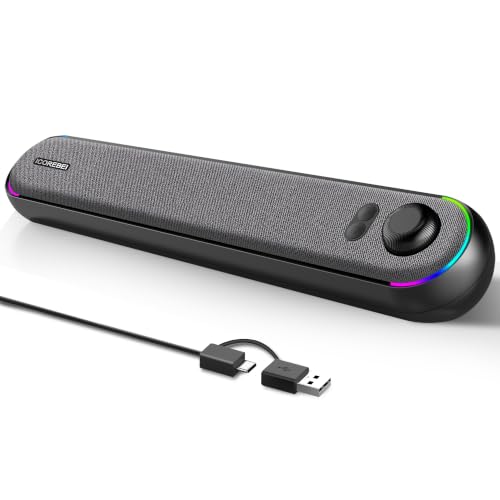
- USB-C audio and power with Bluetooth 5.3
- Stereo drivers and bass radiator for fuller sound
- Three RGB lighting modes for desktop setups
Best For: Multi-device desks needing wired and Bluetooth audio
Simple RGB Value – LENRUE A39PRO
The LENRUE A39PRO is a practical option for shoppers comparing soundbars for desktop setups. Its slim tabletop design delivers 10W stereo sound, uses USB for power and a 3.5mm connection for audio, and works with computers, laptops, tablets, phones, and other compatible devices.
Best For: Budget-conscious desktop users who want wired stereo sound, easy volume control, and colorful lighting.
Pros:
- 10W stereo output from two 5W drivers.
- Compatible with devices featuring a standard 3.5mm headphone jack.
- Top-mounted volume knob makes adjustments convenient.
- Colorful lighting can be switched on or off.
Cons:
- Requires separate USB power and 3.5mm audio connections.
- Wired design does not provide Bluetooth connectivity.
- Plastic enclosure and tabletop mounting may not suit every workspace.
Choose the A39PRO if you want straightforward plug-and-play audio with a little desk lighting. Make sure your computer or source device has a compatible 3.5mm audio output.
Gaming-Focused Upgrade – Razer Leviathan V2 X
The Razer Leviathan V2 X is a compact choice for soundbars for desktop setups, particularly where gaming features matter. It combines two full-range drivers, two passive radiators, USB-C power and audio, Bluetooth 5.0, and customizable Razer Chroma RGB lighting in a monitor-friendly form factor.
Best For: PC gamers who want compact sound, Bluetooth flexibility, and customizable RGB effects.
Pros:
- Compact design fits beneath a monitor to reduce desktop clutter.
- USB-C carries both power and audio for a simple setup.
- Bluetooth 5.0 supports switching between a PC and paired mobile devices.
- Chroma RGB offers customizable lighting through Razer software.
Cons:
- USB-C wired power and audio are still required for the primary setup.
- Not waterproof or water resistant.
- Software is needed for the broader lighting and control features.
The Leviathan V2 X stands out when gaming aesthetics and connection flexibility are higher priorities than a completely cable-free desk. Its compact bar format is also useful for smaller monitor setups.
Touch-Lit Minimalist – LENRUE E-1103
The LENRUE E-1103 keeps soundbars for desktop setups simple with a 15-inch space-saving bar, USB-powered stereo sound, and touch-controlled lighting. It connects to PCs, laptops, and compatible monitors without drivers or software, and includes a USB-C adapter for newer devices.
Best For: Users who want a slim USB speaker bar with simple controls and decorative lighting.
Pros:
- Space-saving design fits beneath monitors and laptops.
- Single USB connection provides power and stereo audio.
- Includes a USB-C adapter for newer laptops and devices.
- Touch control operates the breathing lights without extra software.
Cons:
- Not compatible with Xbox gaming systems or projectors.
- Monitor connections require a USB port that supports both power and audio output.
- 5W maximum output is more modest than some larger desktop speaker options.
The E-1103 is a convenient pick for uncluttered desks and everyday listening. Check your monitor’s USB capabilities before using it as a monitor-connected speaker.
Monitor-Mounted Convenience – Cyber Acoustics CA-2890
The Cyber Acoustics CA-2890 offers a tidy approach to soundbars for desktop setups with a clip-on monitor mount and single-cable USB operation. It attaches to most monitors up to 1 inch thick, includes USB-A to USB-C connectivity, and provides accessible volume, mute, and play/pause controls.
Best For: Users who want to keep a speaker bar attached to the monitor instead of occupying desk space.
Pros:
- Clip-on design fits most monitors up to 1 inch thick.
- Single USB cable handles power and audio for plug-and-play use.
- On-speaker controls include volume, mute, and play/pause.
- 10W output is designed to provide clear highs and enhanced bass.
Cons:
- Mounting compatibility depends on monitor thickness and shape.
- Wired USB connectivity does not offer wireless playback.
- USB-A to USB-C adapter may be needed depending on the computer’s ports.
The CA-2890 is especially appealing when monitor mounting and quick access to controls are more important than wireless features. It can also sit on a desk as a standalone speaker bar if needed.
Best Budget Pick – Compact USB Desktop Soundbar
If you want a straightforward option among soundbars for desktop setups, this LIELONGREN model keeps the connection simple with one USB cable for both audio and power. Its compact footprint fits neatly beneath a monitor, while dual 3W drivers and a passive radiator aim to provide clearer, fuller sound than typical built-in computer audio.
Best For: Minimalist desks, everyday computer audio, and users who prefer a single-cable USB setup.
Pros:
- One USB cable handles both power and audio, helping reduce cable clutter.
- Dual 3W drivers and a passive radiator support enhanced bass and reduced distortion.
- Compact 7.2-inch-wide design fits easily under many monitors.
- Works with Windows, macOS, Linux, and ChromeOS systems.
Cons:
- USB connectivity is wired and does not provide Bluetooth.
- Its 6-watt maximum output is intended for desktop listening rather than room-filling sound.
This is a practical choice when space and simplicity matter most. It offers useful upgrades such as added volume controls and a thicker enclosure, but shoppers seeking wireless playback or stronger output may want a larger soundbar.
Best for RGB Gaming Desks – Redragon RGB Desktop Soundbar
For soundbars for desktop setups that also add visual flair, the Redragon GS560 combines stereo audio with RGB lighting. The approximately 16-inch soundbar fits beneath a monitor and includes dynamic or static illumination modes, a dedicated volume knob, USB power, and a 3.5mm audio connection.
Best For: Gaming desks and workstations where RGB lighting, easy volume adjustment, and broad device compatibility are priorities.
Pros:
- Four backlit modes include dynamic and static RGB illumination.
- Upgraded drivers are designed to provide clear sound with richer bass.
- Dedicated volume knob offers convenient, precise adjustment.
- USB-powered design with 3.5mm audio works with PCs, TVs, laptops, and smartphones.
Cons:
- Requires USB power and a separate 3.5mm audio connection.
- RGB lighting may not suit understated or distraction-free setups.
- The 4-watt maximum output is better suited to personal desktop listening than large spaces.
The GS560 stands out when appearance and hands-on controls are as important as basic audio. Its compact soundbar format saves space, while the lighting gives gaming or entertainment desks a more expressive look.
Best Wireless Flexibility – Bluedee Bluetooth Desktop Soundbar
This Bluedee model is a flexible choice among soundbars for desktop setups, offering both Bluetooth 5.0 and a 3.5mm connection. Its slim 16.45-inch profile sits below a monitor, while USB power, gentle light strips, and a braided Y-cable help keep the desk organized.
Best For: Users who want to switch between computers, phones, tablets, and other compatible devices without giving up a compact desktop design.
Pros:
- Supports Bluetooth 5.0 and 3.5mm wired audio connections.
- Dual drivers and diaphragms are designed to balance high notes with deeper bass.
- USB-powered operation requires no additional drivers or software.
- Slim profile and braided Y-cable support a tidier workspace.
Cons:
- Bluetooth still requires USB power for the soundbar.
- At 16.45 inches wide, it needs more horizontal space than compact mini speakers.
- It is not waterproof or water resistant.
The SK010 is a strong fit for desks where connectivity flexibility matters. Bluetooth makes casual device switching easier, while the wired input remains useful for a computer or other source that benefits from a direct connection.
Space-Saving Pick – XKX115A Clip-On Computer Soundbar
If you want soundbars for desktop setups without using valuable desk space, the XKX115A is designed to clip onto the top, side, or bottom of a monitor. Its USB connection, USB-C adapter, touch controls, and adaptive channel switching make it a practical choice for compatible computers.
Best For: Monitor-based desktop setups that need compact, USB-powered stereo sound.
Pros:
- Clip-on design helps save desktop space and can also sit on a desk.
- Works with Windows, macOS, ChromeOS, Linux, and compatible USB-C devices.
- Dual drivers and passive radiators are designed for loud sound and deeper bass.
- Built-in G-sensor keeps left and right channels correctly positioned when mounted differently.
Cons:
- It is USB-powered and does not offer wireless connectivity.
- It is not compatible with monitors, TVs, or projectors as stated in the product notes.
The XKX115A stands out when a clean, monitor-mounted installation matters most. Confirm your computer’s USB connection, audio settings, and driver support before buying.
Compact Value Pick – LENRUE G11 Desktop Soundbar
The LENRUE G11 is a straightforward option for soundbars for desktop setups, combining USB power with a 3.5mm AUX connection. Its compact under-monitor profile, integrated cable design, touch lighting, and top volume knob suit basic computer listening without software installation.
Best For: Desktop and laptop users who want simple plug-and-play wired audio with optional lighting.
Pros:
- Compact design fits under a monitor without taking extra desk space.
- USB-powered and AUX-connected for simple plug-and-play operation.
- Includes a USB-C adapter for compatible devices.
- Touch-controlled lighting and a top volume knob offer convenient control.
Cons:
- No Bluetooth, headphone port, or microphone.
- Not compatible with TVs or headphones according to the product notes.
- Requires both USB power and a 3.5mm audio connection.
The G11 is best suited to users who prefer dependable wired connectivity over wireless features. Its limitations are clear, but its compact shape and simple controls make it an easy desktop upgrade.
Most Versatile Pick – ICOREBEI Bluetooth USB-C Soundbar
For flexible soundbars for desktop setups, the ICOREBEI combines USB-C audio and power with Bluetooth 5.3. Its slim angled design directs sound toward the listener, while stereo drivers, a bass radiator, and three RGB modes support work, gaming, movies, and music.
Best For: Users who want both wired USB-C audio and Bluetooth connectivity across multiple devices.
Pros:
- Supports USB-C audio and power through the included USB-C-to-USB-A cable.
- Bluetooth 5.3 can pair with compatible computers, mobile devices, TVs, and consoles.
- Dual full-range drivers and a bass radiator are designed for clear stereo sound and fuller bass.
- Three RGB modes can be switched or turned off.
Cons:
- Bluetooth use still requires continuous USB power; the soundbar has no built-in battery.
- Bluetooth range is listed as up to 10 meters in open conditions, so performance may vary by environment.
- It uses a tabletop design rather than a monitor clip mount.
The ICOREBEI offers the broadest connection options of these picks, making it useful when your setup includes several source devices. Choose it if Bluetooth flexibility and RGB lighting matter alongside desktop audio.
How We Picked the Best Soundbars for Desktop Setups
We focused on compact computer soundbars designed for use with desktops, laptops, and monitors. Each option was evaluated for connection method, power requirements, physical footprint, control convenience, and suitability for common activities such as gaming, video calls, music, and streaming.
Because desktop audio needs vary, the list includes both straightforward wired models and more flexible speakers with Bluetooth or AUX connectivity. RGB lighting and touch controls were considered useful extras, but not substitutes for clear, practical performance.
Quick Comparison
| Type | Best For | Connection Features | What to Check |
|---|---|---|---|
| USB-powered wired bar | Simple office and everyday use | USB power, usually wired audio | Available USB and audio ports |
| Gaming soundbar | Immersive desk audio and RGB setups | USB, AUX, or device-specific connections | Driver size, desk clearance, lighting controls |
| Bluetooth soundbar | Switching between computers and mobile devices | Bluetooth plus AUX or USB | Pairing convenience and wired fallback |
| Monitor-mounted bar | Very small desks | USB and wired audio | Monitor thickness and mounting space |
Key Buying Factors for Soundbars for Desktop Setups
Connection and Power
USB-powered models are convenient because they can draw power from a computer, monitor, dock, or wall adapter. Check whether USB handles power only or both power and audio. AUX input is useful when you want broad compatibility, while Bluetooth is better for wireless playback and quick device switching.
Size and Placement
Measure the space beneath your monitor before buying. A soundbar that is too tall can block the display, while a long model may not fit between desk accessories. Clip-on designs can save valuable surface area, but verify that the mounting system fits your monitor securely.
Sound and Volume Expectations
Compact bars are intended for near-field listening, not for filling a large room. Higher-wattage designs may provide more headroom, but placement and driver design also affect clarity. For speech-heavy use, prioritize balanced mids and easy volume control; for gaming and music, look for fuller stereo output and a wider listening presentation.
Controls and Extras
Touch controls, physical knobs, mute functions, headphone outputs, and RGB lighting can improve usability, but they also add complexity. Choose lighting features only if they suit your desk, and make sure controls remain accessible after the bar is positioned under the monitor.
Who Should Buy Which Soundbars for Desktop Setups?
Choose a Basic USB Soundbar If…
You want an affordable, low-clutter upgrade for office work, streaming, online classes, or casual listening. Wired USB models are usually the easiest to install and maintain.
Choose a Gaming-Focused Model If…
Your desk includes a gaming PC and RGB peripherals, and you want stronger presentation than built-in monitor speakers can provide. Prioritize sound controls, stereo performance, and compatibility with your gaming device.
Choose Bluetooth If…
You regularly switch between a computer, phone, tablet, or laptop. Bluetooth adds flexibility, while AUX support provides a dependable wired alternative when latency or battery concerns matter.
Choose a Compact or Clip-On Model If…
Your workspace is narrow or your desk is already crowded. Confirm dimensions and mounting compatibility first, then select the model that offers the connections and controls you will actually use.