
The right microphone can make a bigger difference to your stream than another camera upgrade. Clear, consistent voice audio helps viewers follow gameplay, commentary, tutorials, and live conversations without distracting cable noise or room clutter.
These 10 picks cover compact clip-on systems, dedicated gaming microphones, and hybrid USB/XLR options. Use the guide below to match microphone type, connectivity, range, and controls to the way you stream.
Best 10 Wireless Microphones for Streaming Picks for 2026
Best for Mobile Creators

- Two transmitters for interviews and dual-person streams
- Up to 48 hours with the charging case
- Noise cancellation and automatic limiting
Best For: Mobile streamers, interviewers, vloggers, and DJI Osmo users
Best Hybrid Desktop Mic

- USB plug-and-play with tap-to-mute
- XLR connection for future expansion
- Cardioid dynamic pickup with headphone monitoring
Best For: Beginner gamers and desktop streamers
Best Budget Phone Kit

- Two lavalier microphones for interviews
- Lightning and USB-C device compatibility
- Plug-and-play setup with noise reduction
Best For: Phone-based vloggers, TikTok creators, and mobile streamers
Best Wireless Desktop Setup
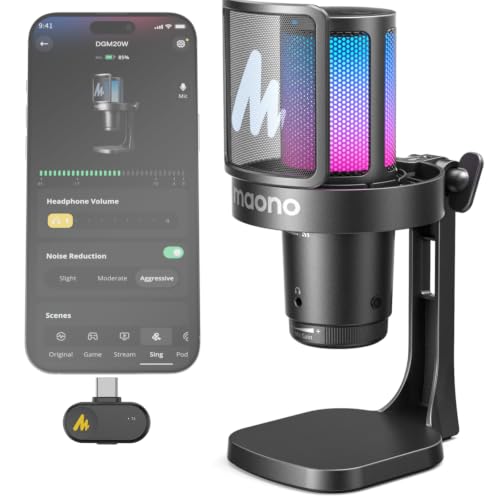
- 2.4G wireless and USB wired modes
- Adjustable noise reduction and cardioid pickup
- Up to 40 hours with RGB turned off
Best For: PC, smartphone, and PS5 streamers
Best Overall

- Tiny 9g transmitters with high-fidelity 48kHz/24-bit audio
- 300m line-of-sight range and up to 40-hour total battery life
- Camera, Lightning, and USB-C connectivity in one kit
Best For: Creators who stream or record across cameras, phones, and computers
Best Desktop Option
MAONO PD200W Hybrid Wireless Mic

- Wireless, USB, and XLR connectivity for flexible setups
- Dynamic cardioid design with three-stage noise cancellation
- Supports two wireless microphones through one receiver
Best For: Desktop streamers and podcasters planning a wired or wireless workflow
Best for USB-C Phones

- Plug-and-play USB-C receiver for phones, computers, and select cameras
- 9g transmitter with 48kHz/24-bit audio and adjustable noise cancellation
- 30-hour total battery life and phone recording controls
Best For: USB-C phone and computer creators who prioritize compact setup
Best USB-C Lavalier Value

- Two transmitters for dual-speaker recording
- Active denoise with original-sound and mute modes
- USB-C, USB, and Lightning connectivity
Best For: Mobile creators, interviews, and USB-C streaming
Best Battery Life
Hollyland Lark A1 Wireless Mic
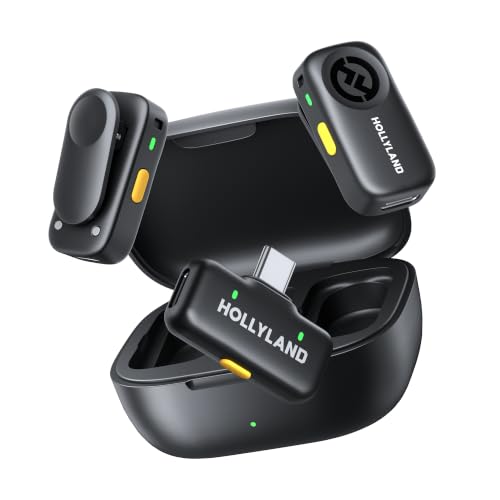
- Up to 54 hours with transmitters and charging case
- Plug-and-play 2.4GHz receiver connection
- Noise cancellation, gain, EQ, and reverb controls
Best For: Mobile livestreaming, interviews, and long recording sessions
Best for Mobile Creators – DJI Mic Mini
The DJI Mic Mini is a strong pick among wireless microphones for streaming when you want a discreet, portable setup for phones or cameras. Its two transmitters, 400m maximum transmission range, automatic limiting, and two-level noise cancellation make it well suited to interviews, livestreams, and on-location content.
Best For: Mobile streamers, interviewers, vloggers, and creators who need two wireless transmitters.
Pros:
- Ultralight 10g transmitters are discreet and comfortable on camera.
- Includes two transmitters, one receiver, and a charging case.
- Offers up to 48 hours of battery life with the charging case.
- Supports 48kHz audio, 120dB SPL, noise cancellation, and automatic limiting.
Cons:
- Its full kit is more specialized than a simple plug-and-play phone microphone.
- Strong noise cancellation is most useful in noisy environments and may not be necessary for quiet rooms.
Choose the DJI Mic Mini if portability, two-person recording, and extended battery life matter more than having a desktop microphone. Its DJI ecosystem connections are an added advantage for compatible Osmo devices.
Best Hybrid Desktop Mic – FIFINE AmpliGame AM8
The FIFINE AmpliGame AM8 is a practical choice among wireless microphones for streaming alternatives if you prefer a desktop mic with USB convenience and XLR upgrade potential. Its cardioid dynamic design focuses on your voice, while USB controls simplify live gaming, podcasting, and recording.
Best For: Beginner streamers and gamers who want USB plug-and-play operation with a future XLR path.
Pros:
- USB connection provides direct setup and a convenient tap-to-mute control.
- XLR connectivity supports expansion with an audio interface or mixer.
- Includes headphone monitoring, volume control, and a gain knob over USB.
- Controllable RGB lighting adds a gaming-focused desktop look.
Cons:
- It is corded rather than wireless.
- An XLR cable and audio interface are required for XLR use.
- RGB and the function controls are inactive when using XLR.
The AM8 makes sense for a fixed streaming desk where straightforward USB controls are valuable. Consider it when wireless mobility is less important than desktop monitoring, mute access, and upgradeable connectivity.
Best Budget Phone Kit – MAYBESTA Wireless Mini Mic
The MAYBESTA Wireless Mini Microphone is designed for creators who record directly on phones and tablets. As wireless microphones for streaming, its two lavalier transmitters, plug-and-play setup, omnidirectional pickup, and Lightning and USB-C compatibility make it convenient for vlogs, interviews, short-form video, and livestreams.
Best For: Phone-based creators who want a simple two-microphone lavalier kit.
Pros:
- Includes two lavalier microphones for interviews or two-person recording.
- Supports Android devices, iPhones, iPads, laptops, and tablets through Lightning or USB-C.
- Requires no adapter or application after selecting the appropriate receiver.
- Noise reduction, windscreens, and a longer receiver help with practical phone recording.
Cons:
- The supplied details do not specify an exact wireless range or battery runtime.
- Compatibility depends on choosing the correct Lightning or USB-C receiver connection.
This MAYBESTA kit is a useful convenience-first option for mobile creators. It is especially appealing when you need two clip-on microphones and want to keep a phone case on during recording.
Best Wireless Desktop Setup – MAONO DGM20W
The MAONO DGM20W combines a wireless desktop microphone with a USB wired fallback, making it one of the more flexible wireless microphones for streaming at a gaming desk. It supports 2.4G wireless and USB modes, offers cardioid pickup, adjustable noise reduction, RGB controls, and headphone monitoring.
Best For: PC and smartphone streamers who want a wireless desk mic with wired backup and gaming controls.
Pros:
- Supports both 2.4G wireless and USB wired connections.
- Works with computers, laptops, iPhones, Android phones, and PS5; a USB-C receiver and adapter cable are included.
- Provides 24-bit/48kHz audio, cardioid pickup, and up to 80dB SNR.
- Offers adjustable noise reduction, touch mute, RGB controls, gain adjustment, and headphone monitoring.
Cons:
- A Lightning receiver is not included.
- It is not compatible with Xbox.
- Up to 40 hours of battery life applies with RGB lighting turned off.
The DGM20W is a strong fit for streamers who want fewer desktop cables without giving up wired fallback options. Its controls and monitoring features also make it practical for gaming, voice chat, and live broadcasts.
Best Overall – Hollyland Lark M2 Camera Kit
The Hollyland Lark M2 is a versatile choice for wireless microphones for streaming, especially if you record with multiple devices. Its compact transmitters, high-resolution audio, noise cancellation, and broad camera, phone, and computer compatibility make it practical for creators who move between setups.
Best For: Streamers, vloggers, podcasters, and filmmakers who need a lightweight system with camera and computer connectivity.
Pros:
- 9g transmitters are exceptionally small and lightweight.
- 48kHz/24-bit audio, 70dB signal-to-noise ratio, and support for up to 115dB SPL.
- Up to 300m line-of-sight transmission and up to 40 hours with the charging case.
- Includes camera, Lightning, and USB-C receiver options, with mono/stereo switching for camera use.
Cons:
- The maximum range depends on clear line-of-sight conditions.
- Mono/stereo switching is limited to camera connections using the 3.5mm jack.
This kit stands out when flexibility matters. Factory pairing, one-touch noise cancellation, and UAC computer connectivity reduce setup friction, while the included receiver options make it suitable for a wide range of streaming workflows.
Best Desktop Option – MAONO PD200W Hybrid Wireless Mic
The MAONO PD200W takes a different approach to wireless microphones for streaming, pairing a desktop dynamic microphone with wireless, USB, and XLR connections. It is a strong fit for streamers and podcasters who want wireless convenience without giving up a wired upgrade path.
Best For: Desktop streamers, podcasters, and interview hosts who want wireless, USB, and XLR flexibility.
Pros:
- Supports wireless, USB, and XLR connection modes.
- 30mm dynamic capsule, cardioid pickup, 82dB signal-to-noise ratio, and up to 128dB SPL handling.
- One receiver can connect two wireless microphones, with separate tracks for editing.
- Offers up to 60 hours of battery life with RGB lighting off and a 60m wireless range.
Cons:
- At 1.32kg, it is substantially less portable than a mini lavalier system.
- Camera and Lightning accessories are sold separately.
Choose the PD200W if your streaming setup is centered around a desk and you value expansion options. The MaonoLink app adds preset and adjustment controls, while XLR support lets the microphone continue into more advanced audio setups.
Best for USB-C Phones – Hollyland Lark M2 USB-C Kit
For creators using modern phones and computers, the Hollyland Lark M2 USB-C kit is a straightforward option among wireless microphones for streaming. It combines a tiny clip-on transmitter with plug-and-play USB-C connectivity, adjustable noise cancellation, and remote video controls for compatible phones.
Best For: Android, iPhone 15-and-newer, action-camera, and computer users who want a compact USB-C setup.
Pros:
- Lightweight 9g transmitter with factory pairing and direct plug-in receiver design.
- 48kHz/24-bit audio, adjustable noise cancellation, and a 1,000ft line-of-sight range.
- Up to 30 hours of total battery life with the charging case.
- Transmitter controls can start or stop recording or take photos on compatible phones.
Cons:
- The USB-C version is less broadly connector-equipped than the camera kit.
- The listed 30-hour total battery life is lower than the camera version’s 40-hour figure.
- Remote phone controls depend on the phone supporting single-volume-button recording or photo actions.
This is a convenient pick when USB-C is your main connection. Its small form factor and automatic pairing make it easy to deploy, while the HollyAudio app provides firmware updates, noise-cancellation adjustment, and audio-status monitoring.
Best USB-C Lavalier Value – GoorDik Wireless Mini Mic
For creators seeking wireless microphones for streaming from a phone, tablet, or computer, this GoorDik set offers a flexible clip-on setup with USB-C connectivity, active denoise, and a claimed 30-meter wireless range. Two transmitters make it useful for interviews, dual-speaker videos, and mobile content.
Best For: USB-C phone creators, vloggers, interview videos, and budget-friendly two-person recordings.
Pros:
- Includes two transmitters for recording with two speakers.
- Offers noise-reduction and original-sound modes, plus mute control.
- Includes USB-C, USB, and Lightning connection options and outdoor wind protection.
- Each transmitter provides approximately 6–12 hours of use per charge.
Cons:
- Some Android devices may require OTG activation.
- Computer users may need to select the microphone as the default input device.
- The receiver’s USB-C charging feature is designed to help charge a connected phone, so setup details may vary by device.
This is a practical choice when portability and broad device compatibility matter more than a desktop-style microphone. Its dual-transmitter design and included adapters give newer and older mobile setups useful flexibility.
Best Desktop Controls – ZealSound K66 Wireless Microphone
The ZealSound K66 is a strong desktop-oriented option among wireless microphones for streaming, combining a 48 kHz condenser capsule with cardioid pickup, on-mic gain controls, and zero-latency headphone monitoring. Its 2.4GHz connection is designed for PC, console, phone, and tablet workflows.
Best For: Podcasters, streamers, gamers, Discord users, and creators who want direct control over gain, monitoring, echo, and mute functions.
Pros:
- Cardioid pickup focuses on the speaker and helps reduce side noise.
- On-mic controls provide gain, headphone-volume, echo, and mute adjustment.
- Noise-reduction mode targets keyboard clicks, fan hum, AC noise, and room chatter.
- Supports wireless and wired operation, with adapters for PC, Mac, iPhone, iPad, Android, and compatible consoles.
Cons:
- Its desktop microphone form is less discreet than a clip-on lavalier.
- Noise reduction is activated by pressing and holding the mute button rather than running continuously.
- Device compatibility can depend on the available adapter and connection setup.
Choose this model if quick sound adjustments and headphone monitoring are central to your workflow. Wired backup operation is especially useful for extended broadcasts or when the wireless battery needs recharging.
Best Battery Life – Hollyland Lark A1 Wireless Mic
For mobile creators comparing wireless microphones for streaming, the Hollyland Lark A1 emphasizes quick plug-and-play operation through a direct USB-C or Lightning receiver. Its two magnetic transmitters, charging case, noise cancellation, and extended case-assisted battery life suit frequent livestreaming and video production.
Best For: TikTok, YouTube, Instagram Live, interviews, vlogging, and creators who need a compact two-mic kit with long recording endurance.
Pros:
- Plug-and-play receiver connection avoids Bluetooth pairing.
- Two transmitters support dual-speaker recording.
- Each transmitter is rated for up to 9 hours, with up to 54 hours using the charging case and alternating transmitters.
- Includes three-level noise cancellation, six-level gain adjustment, clip protection, EQ, and reverb controls.
Cons:
- The supplied configuration lists a USB-C receiver, so Lightning use may require the appropriate compatible receiver or adapter.
- Noise cancellation, EQ, reverb, and gain features may require adjustment for the most natural sound.
- As an omnidirectional lavalier system, it may capture more surrounding sound than a directional desktop microphone.
The Lark A1 is well suited to creators who prioritize fast setup and dependable battery capacity. Its charging case and dual-transmitter design make it particularly convenient for mobile shoots, interviews, and long streaming schedules.
How We Picked These Wireless Microphones for Streaming
We focused on microphones suited to real streaming workflows, including PC gaming, mobile content, live commentary, podcasts, and multi-person recordings. We considered wireless reliability, connection options, audio quality, battery design, compatibility, noise control, monitoring features, and ease of setup. The selection includes both true wireless transmitter-and-receiver systems and flexible microphones that support wireless, USB, or XLR use.
Specifications such as range and battery life are manufacturer claims and can vary with interference, walls, device settings, and recording conditions. A shorter practical range with a stable connection may be more useful than a larger advertised number.
Quick Comparison
| Best For | Recommended Type | What to Prioritize |
|---|---|---|
| Gaming at a desk | Wireless desktop or hybrid mic | Low latency, mute control, gain adjustment |
| Mobile streaming | USB-C or phone-compatible lavalier | Phone compatibility, compact receiver, battery life |
| Camera and phone content | Dual-transmitter wireless system | Multiple speakers, receiver options, range |
| Podcasting and interviews | Dual wireless or USB/XLR microphone | Two-person recording, monitoring, backup connectivity |
| Travel and outdoor use | Small clip-on system | Charging case, wind protection, noise handling |
Key Buying Factors for Wireless Microphones for Streaming
Connection and Device Compatibility
Check whether the receiver uses USB-C, Lightning, a 3.5mm output, or a direct wireless connection. PC streamers may prefer USB or a receiver that works with a computer, while phone creators should confirm support for their exact iPhone or Android port. Hybrid USB/XLR models offer more upgrade flexibility but may require a separate wireless receiver or compatible setup.
Microphone Format and Placement
Lavalier transmitters clip near the speaker and keep the frame clean, making them useful for walking streams and demonstrations. Desktop microphones can sound fuller and are easier to reposition during gaming, but they occupy desk space and pick up keyboard or room noise if placed poorly.
Latency, Range, and Interference
Low latency matters for live monitoring and synchronized video. Range claims are most useful in open spaces; crowded wireless environments and walls reduce performance. For a desk setup, stable operation across the room is usually sufficient. For movement, choose a system with a strong receiver, clear status indicators, and practical range beyond your normal shooting area.
Audio Controls and Noise Management
Look for mute, gain, monitoring, noise reduction, and wind protection when available. Noise cancellation can reduce steady background sounds, but it may also affect voice tone. Positioning remains important: keep the mic close enough for a strong voice signal and avoid clothing rub on clip-on models.
Battery and Recording Workflow
Consider transmitter runtime, receiver runtime, charging-case capacity, and whether the system can charge while operating. Dual-transmitter kits are convenient for interviews, while a charging case helps mobile creators avoid carrying extra cables and batteries.
Who Should Buy Which Wireless Microphones for Streaming?
Choose a Compact Wireless Lavalier If You Stream from a Phone
Phone creators, vloggers, and mobile streamers should prioritize the small USB-C or phone-specific lavalier systems. They are quick to clip on, easy to carry, and better suited to hands-free video than a desktop microphone.
Choose a Dual-Transmitter Kit for Interviews or Two-Person Content
Systems such as the DJI Mic Mini, Hollyland Lark M2, or Hollyland Lark A1 configurations are better choices when two people need clear audio. Confirm the included receiver matches your camera, phone, or computer before buying.
Choose a Gaming Microphone for a Fixed PC Setup
Desk-based streamers may prefer the MAONO DGM20W, ZealSound wireless model, or a USB/XLR option such as the FIFINE AM8 or MAONO PD200W. These designs can provide easier access to mute and gain controls and may deliver a more substantial broadcast sound.
Choose a Hybrid Model If You Want Room to Upgrade
A USB/XLR microphone is the most flexible long-term option for creators who may add an audio interface, mixer, or more advanced streaming setup later. It is less compact than a clip-on system, but the extra connectivity can extend its useful life.