
Compact studio monitors make it easier to build a capable listening or production setup when desk space, budget, or room size is limited. The right pair can deliver more accurate detail than typical computer speakers without overwhelming a small workspace.
We selected 10 compact models across different price points and feature sets, including wired and Bluetooth options, portable designs, and monitors suited to beginners, producers, and everyday desktop listening.
Best 10 Compact Studio Monitors Picks for 2026
Most Portable

- 50W RMS stereo output in a compact design
- DSP offers desktop and free-field optimization
- Bluetooth, RCA, and auxiliary inputs
Best For: Mobile producers and small desktop studios
Best Traditional Monitor Pair

- 3.5-inch woofer and 0.75-inch dome tweeter
- XLR/TRS, RCA, and stereo-mini inputs
- Room-control and high-trim adjustments
Best For: Compact wired home recording setups
Best Connectivity

- 3.5-inch Kevlar woofers and silk-dome tweeters
- 1/4-inch, RCA, and 1/8-inch inputs
- Front headphone output and rear EQ controls
Best For: Flexible desktop production and multimedia setups
Best Wireless Features

- Balanced TRS, RCA, AUX, and Bluetooth connectivity
- Monitor, Music, and Custom listening modes
- App-based EQ adjustment through EDIFIER ConneX
Best For: Home studios needing wired and wireless flexibility
Desk-Friendly Value

- 3.5-inch woofers suit small desks and studios
- Tone Knob and Location Switch simplify room adjustment
- Includes isolation pads and all required cables
Best For: Small home studios, desktop listening, and multimedia
Premium Desktop Detail

- 80-watt active system reaches down to a stated 45 Hz
- D-ART tweeter targets precise high-frequency detail
- USB-C input, angled stands, and mic-stand mounting options
Best For: Computer-based production and detailed desktop monitoring
Versatile Everyday Monitor

- 50-watt stereo pair for production and everyday media
- High- and low-frequency controls aid room matching
- TRS, RCA, aux, and headphone connections add flexibility
Best For: Mixed desktop use, gaming, streaming, and entry-level production
Versatile Powerhouse

- 3-way design with 5-inch woofer and 46Hz–40kHz response
- 110W RMS output with XLR, TRS, RCA, AUX, and Bluetooth LDAC
- Room tuning through rear controls or the Edifier ConneX app
Best For: Near-field studio work, desktop listening, and flexible connectivity
Desktop Reference Pick
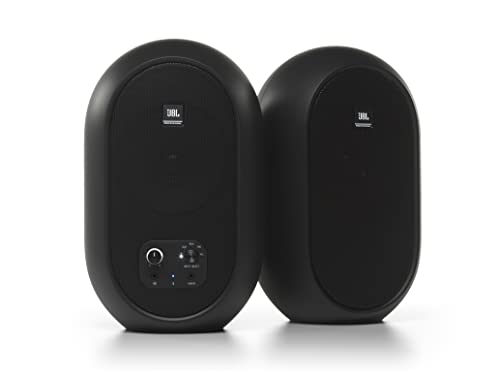
- Coaxial 4.5-inch woofer and 0.75-inch tweeter for a wide sweet spot
- 60W Class D system with 30W per speaker
- Bluetooth 5.0, AUX, RCA, TRS, and front headphone output
Best For: Desktop mixing and small workstations
Compact Connectivity Value

- 3.5-inch carbon-fiber driver with 0.75-inch silk-dome tweeter
- 24-bit USB DAC plus balanced 6.35mm TRS input
- Bluetooth 5.3, RCA, AUX, and front headphone output
Best For: Small creative workspaces and flexible desktop audio
Most Portable – iLoud Micro Monitor
The IK Multimedia iLoud Micro Monitor is a strong choice when you need compact studio monitors that can travel between a home setup, project studio, or mobile workspace. Its 50W RMS powered stereo system combines DSP-based EQ and position compensation with Bluetooth, RCA, and auxiliary connectivity.
Best For: Mobile producers, small home studios, DJs, and desktop listeners who prioritize portability.
Pros:
- Very compact and lightweight design with 3-inch woofers.
- Internal DSP provides desktop, free-field, bass, and treble adjustments.
- Offers Bluetooth plus RCA and 1/8-inch auxiliary inputs.
- Rated for low-end response down to 55Hz (-3dB).
Cons:
- Smaller drivers may not provide the output or low-end scale of larger monitors.
- The optional travel bag is not included as standard.
Choose the iLoud Micro Monitor when space and mobility matter as much as monitoring flexibility. It is especially practical for desktop and temporary setups where Bluetooth and compact dimensions are useful.
Best Traditional Monitor Pair – Yamaha HS3
The Yamaha HS3 is a practical pair of compact studio monitors for users who want conventional wired connections and a familiar two-way monitor layout. Each pair uses a 3.5-inch woofer and 0.75-inch dome tweeter, with room-control and high-trim controls for basic placement adjustment.
Best For: Home recording, desktop studio monitoring, and creators who need XLR, TRS, RCA, and stereo-mini connectivity.
Pros:
- Sold as a stereo pair with 3.5-inch woofers and 0.75-inch tweeters.
- Provides XLR/TRS combo, RCA, and stereo-mini inputs.
- Includes room-control and high-trim response controls.
- Includes speaker cable, stereo-mini-to-RCA cable, and anti-slip pads.
Cons:
- No wireless connectivity or Bluetooth.
- The listed frequency response begins at 70Hz, limiting deep bass compared with larger monitors.
The HS3 is a sensible fit for a compact wired workstation. Its range of inputs and included accessories make it easy to integrate into a small production setup without adding a separate interface adapter for common sources.
Best Connectivity – M-Audio BX3
The M-Audio BX3 is a versatile pair of compact studio monitors for desktop production, streaming, gaming, and podcasting. Its 3.5-inch Kevlar woofers, silk-dome tweeters, multiple rear inputs, and front headphone and auxiliary access make it easy to connect a broad range of gear.
Best For: Desktop creators who need flexible wired connections for computers, DJ equipment, instruments, and headphones.
Pros:
- Includes 3.5-inch Kevlar woofers and natural silk-dome tweeters.
- Offers 1/4-inch TRS, RCA, and 1/8-inch inputs plus a front headphone output.
- Rear high- and low-EQ controls allow basic sound customization.
- Includes cables, foam feet, and MPC Beats software.
Cons:
- Wired-only design does not provide Bluetooth.
- Its 3.5-inch drivers may be less suitable when very high output or deep bass is required.
The BX3 stands out when connection flexibility is a priority. It is well suited to a compact multimedia workstation that also handles music production, live streaming, gaming, or podcast monitoring.
Best Wireless Features – Edifier MR3
The Edifier MR3 combines compact near-field monitoring with wireless convenience and app-based sound control. It provides balanced TRS, RCA, auxiliary, and Bluetooth connectivity, along with Monitor, Music, and Custom modes for audio production, video editing, and everyday listening.
Best For: Home studios and desktop users who want wired monitoring, Bluetooth multipoint, and adjustable listening modes.
Pros:
- Supports balanced TRS, RCA, AUX, and Bluetooth connections.
- Offers Monitor, Music, and Custom sound modes.
- EDIFIER ConneX app provides EQ adjustment and personalization.
- Uses 3.5-inch mid-low drivers, 1-inch tweeters, and 18W*2 RMS output.
Cons:
- The product listing describes a larger overall footprint than some ultra-compact monitor options.
- Bluetooth and app features may be unnecessary for users seeking a strictly wired setup.
The MR3 is a flexible option for listeners who move between accurate monitoring and general playback. Its combination of balanced input, Bluetooth multipoint, and software-based EQ gives a compact workstation more configuration choices.
Desk-Friendly Value – Mackie CR3.5
The Mackie CR3.5 is a practical choice for compact studio monitors in a small home studio, bedroom setup, or desktop listening station. Its 3.5-inch woofers, Tone Knob, and Location Switch provide useful control without requiring menus or extra equipment.
Best For: Small desks, beginner music production, casual listening, and multimedia setups.
Pros:
- Sold as a complete stereo pair with isolation pads and all necessary cables.
- Tone Knob lets you adjust the speaker voicing directly from the desk.
- Location Switch helps correct bass response when placed against a wall or in open space.
- RCA and TRS connectivity works with computers, mobile devices, televisions, and other sources.
Cons:
- The 3.5-inch woofers are sized for desktop and small-room use rather than large spaces.
- There is no waterproofing, so the monitors require a dry indoor setup.
Choose the CR3.5 when straightforward controls, compact dimensions, and included accessories matter more than extensive connectivity or larger drivers. It is an accessible desktop monitoring package for modest spaces.
Premium Desktop Detail – ADAM Audio D3V
The ADAM Audio D3V brings advanced features to the compact studio monitors category, combining 3.5-inch aluminum woofers, passive radiators, and a D-ART tweeter in a fully active desktop system. USB-C connectivity and angled stands make it especially convenient for computer-based production.
Best For: Songwriters, producers, and listeners who want detailed desktop monitoring with flexible placement options.
Pros:
- 80-watt amplification and passive radiators extend the stated response as low as 45 Hz.
- 1.5-inch D-ART tweeter is designed for precise, unfatiguing high-frequency reproduction.
- USB-C, balanced 1/4-inch inputs, and placement-focused DSP switches support varied setups.
- Includes detachable 15-degree stands and threaded mounting points for microphone stands.
Cons:
- Its feature set may be more than needed for basic casual listening.
- The system requires corded power and is not waterproof.
The D3V stands out for users who want compact monitors with more sophisticated driver technology and positioning flexibility. It is a strong desktop-focused option for detailed work and long listening sessions.
Versatile Everyday Monitor – PreSonus Eris 3.5
The PreSonus Eris 3.5 is a flexible pair of compact studio monitors for music production, gaming, movies, streaming, and general desktop audio. Its 50-watt amplification, acoustic tuning controls, and broad input selection make it easy to adapt to different sources and rooms.
Best For: Desktop users who need one stereo pair for production, gaming, media, and everyday listening.
Pros:
- Complete stereo pair with 3.5-inch woven-composite woofers and 1-inch silk-dome tweeters.
- High- and low-frequency controls help tailor the sound to the room.
- Balanced TRS, RCA, front aux, and headphone connections support varied equipment.
- 50 watts of built-in amplification is designed to provide clear, dynamic sound.
Cons:
- The stated frequency range begins at 80 Hz, so deeper bass may require a separate solution.
- Bluetooth is listed in the specifications, but the supplied notes emphasize wired connections.
The Eris 3.5 is a well-rounded pick when versatility matters as much as monitoring. It offers useful room adjustment and convenient connections in a compact bookshelf- or desktop-friendly format.
Versatile Powerhouse – Edifier MR5
The Edifier MR5 is a strong choice for anyone seeking compact studio monitors with substantial output and flexible connectivity. Its 3-way design combines a 5-inch woofer, 3.75-inch midrange driver, and 1-inch silk-dome tweeter, while rear controls and app-based tuning help adapt the sound to your room.
Best For: Near-field studio work, desktop listening, and users who need wired and wireless connectivity.
Pros:
- 3-way active crossover and 46Hz–40kHz response support detailed monitoring.
- Includes XLR, TRS, RCA, AUX, Bluetooth LDAC, and a front headphone output.
- Rear high/low controls and app-based room compensation provide useful tuning flexibility.
- 110W RMS amplification and MDF cabinets suit both near-field use and mid-sized rooms.
Cons:
- Larger and heavier than many desktop-focused compact monitors.
- Requires corded power and is not water resistant.
The MR5 stands out when you want compact studio monitors that can also handle broader home audio duties. Its extensive inputs, tuning options, and higher power make it particularly adaptable, though its substantial cabinet may need more desk or shelf space.
Desktop Reference Pick – JBL 104-BT
The JBL Professional 1 Series 104-BT is designed for listeners who need compact studio monitors that fit neatly on a desk. Its coaxial driver places the 4.5-inch woofer and 0.75-inch tweeter together for a wide sweet spot, while Bluetooth and multiple wired inputs simplify everyday setup.
Best For: Desktop mixing, small workstations, and listeners who want reference-style monitoring with Bluetooth.
Pros:
- Coaxial driver design provides transparency and a wide listening area.
- 60W Class D amplification delivers 30W to each speaker.
- Supports Bluetooth 5.0, AUX, RCA, and balanced 1/4-inch TRS inputs.
- Front headphone jack automatically mutes the speakers for convenient monitoring.
Cons:
- 88Hz–20kHz (-3dB) frequency range offers less low-end extension than the Edifier MR5.
- Uses a master-and-extension-speaker layout, so the system still requires speaker wiring.
The 104-BT is a practical option when desk space and straightforward operation matter most. Its coaxial driver, front controls, and broad input selection make it easy to use, while its compact desktop-oriented enclosure keeps clutter under control.
Compact Connectivity Value – Ortizan C7
The Ortizan C7 offers a connectivity-focused approach to compact studio monitors. Its 3.5-inch carbon-fiber mid-bass driver and 0.75-inch silk-dome tweeter are tuned for a balanced response, while USB, Bluetooth 5.3, RCA, AUX, and balanced TRS inputs cover common desktop and music-production setups.
Best For: Small creative workspaces, casual monitoring, gaming, and users who want many input options.
Pros:
- 24-bit USB DAC supports direct digital audio playback.
- Balanced 6.35mm TRS input works with mixers and other professional gear.
- Bluetooth 5.3, RCA, two AUX inputs, and front headphone output add flexibility.
- 2-way driver arrangement is tuned for balanced high, mid, and low frequencies.
Cons:
- Its 3.5-inch driver is smaller than those in the Edifier MR5 and JBL 104-BT.
- Supplied details do not specify amplifier power or frequency-response limits.
- Some listed features and controls may be less clearly defined than on the other models.
The C7 makes sense for buyers prioritizing connection variety in a small setup. Its USB DAC and balanced TRS input are useful for desktop production, while Bluetooth and consumer inputs make it suitable for broader everyday use.
How We Picked the Best Compact Studio Monitors
We compared these monitors by considering cabinet size, driver configuration, power output, connection options, tonal controls, wireless features, and intended use. We also looked for practical differences that matter on a desktop, such as front-panel controls, placement flexibility, included accessories, and whether a model is sold as a complete pair.
“Studio monitor” does not always mean every model is equally flat or suited to professional mixing. Some options prioritize affordable nearfield monitoring, while others add Bluetooth convenience and a more relaxed sound for music, video, or gaming. The best choice depends on how accurately you need to hear a mix and how often you want to use the speakers for general listening.
Quick Comparison
| Best For | What to Look For |
|---|---|
| Small production desks | Compact cabinets, clear midrange, and balanced nearfield response |
| Bluetooth listening | Reliable wireless connectivity and convenient source switching |
| Beginners | Simple setup, useful controls, and a reasonable price |
| Portable setups | Small footprint, low weight, and flexible placement |
| More output | Larger woofers, higher power, and enough desk or room space |
Key Buying Factors for Compact Studio Monitors
Size and Listening Distance
Compact monitors work best in the nearfield, typically positioned close to the listener and aimed toward ear level. Smaller cabinets are easier to place on a crowded desk, but they generally produce less deep bass than larger models. Leave space around rear ports and avoid pushing the speakers directly against a wall unless the manufacturer allows it.
Drivers, Power, and Bass
Woofer size affects bass extension and maximum output, but it is not the only indicator of sound quality. A well-designed smaller monitor can sound more controlled than a larger budget speaker. If you produce bass-heavy music, consider adding a properly integrated subwoofer later rather than expecting tiny monitors to reproduce very low frequencies at high volume.
Connections and Controls
Wired inputs are important for consistent production work, while Bluetooth is useful for casual listening and quick playback from a phone. Check whether the pair includes balanced inputs, stereo RCA or TRS connections, a headphone output, tone controls, or a volume knob. Also confirm which speaker is powered and how the two speakers connect.
Who Should Buy Which Compact Studio Monitors?
Choose the smallest, simplest pair if your priority is a tidy desktop, basic editing, or beginner music production. Pick a model with Bluetooth if the speakers will serve both a computer and mobile devices. For mixing, prioritize a controlled, detailed presentation and use the same listening position consistently. If you need more room-filling volume or stronger low end, move up to a larger cabinet and verify that your desk can accommodate it.
Regardless of which pair you choose, place both speakers symmetrically, form an approximate listening triangle, and keep the tweeters near ear height. Good placement often improves clarity more than a modest difference in specifications.