
The right audio mixer can make a stream sound cleaner, more controlled, and easier to manage in real time. These picks cover simple plug-and-play interfaces, gaming-focused mixers, and full production consoles for creators with more demanding setups.
Whether you stream games, podcasts, music, or live commentary, this roundup highlights the features that matter most: input flexibility, monitoring, routing, software control, and ease of use.
Best 10 Audio Mixers for Streaming Picks for 2026
Best for Customizable Control

- LCD keys, touch strip, and dials
- Multi-actions and smart profiles
- Wave Link and broad plugin support
Best For: Streamers wanting customizable desktop audio and app control
Best Traditional Mixer

- 10-channel analog mixing
- Bluetooth playback and USB recording
- 24 GigFX+ effects with tap tempo
Best For: Live streaming, podcasting, and mixed audio setups
Best All-in-One Production Hub
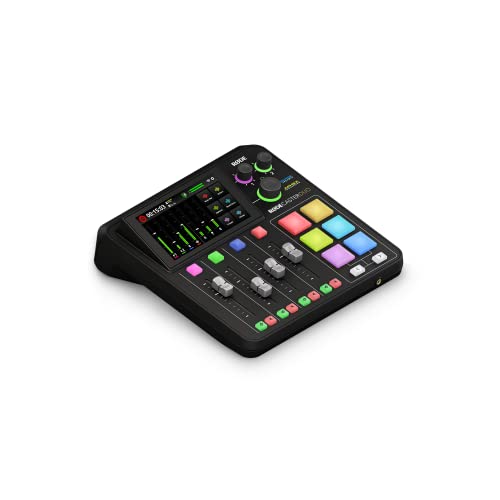
- Two combo inputs with high-gain preamps
- Four faders and six SMART pads
- APHEX processing and touchscreen control
Best For: Podcasters and creators wanting integrated production tools
Best for PC Gaming Streams

- Maps sources to four physical faders
- Three submixes for different listeners
- XLR input, dual USB-C, and sound pads
Best For: Windows gamers and solo creators managing game, chat, and voice audio
Compact Analog Pick

- Five-channel compact mixer with low-noise performance
- Phantom power and two-band EQ for the mic/line input
- Stereo RCA connections for playback or recording
Best For: Simple one-mic streaming and recording setups
Feature-Rich Streaming Pick

- XLR input with 48V phantom power
- Independent fader control for four audio channels
- Mute, monitoring, voice effects, and RGB features
Best For: Interactive PC streaming with an XLR microphone
Complete Creator Bundle

- Includes mixer, condenser microphone, and accessories
- Offers noise reduction, effects, auto-tune, and singing mode
- Compatible with PC, phone, and tablet platforms
Best For: Beginners wanting an all-in-one creator audio setup
Best Beginner Pick

- XLR input with 48V phantom power
- Voice effects, sound pads, and RGB lighting
- One-click mute, monitoring, and noise reduction
Best For: New gamers and streamers building an XLR setup
Best for Game/Chat Control

- Dedicated game/chat balance control
- Optical, auxiliary, and USB-C connectivity
- 7.1 surround, EQ modes, and voice effects
Best For: Multiplayer gamers managing several audio sources
Best Premium Processing

- 32-bit hardware DSP for audio processing
- Dual sound mixes with XLR microphone input
- App-based vocal effects, music, and sound effects
Best For: Streamers seeking customizable hardware-based audio processing
Best for Customizable Control – Elgato Stream Deck +
For creators who want compact, hands-on control, the Elgato Stream Deck + is a flexible option among audio mixers for streaming. Its LCD keys, touch strip, and dials provide visual and tactile control for audio, video, lighting, and supported apps.
Best For: Streamers and content creators who want customizable desktop control with Wave Link integration.
Pros:
- LCD keys, touch strip, and dials provide clear visual feedback.
- Supports multi-actions and smart profiles for different apps.
- Works with Wave Link, OBS, Twitch, Discord, Spotify, and other plugins.
- Drag-and-drop setup with ongoing plugin and software additions.
Cons:
- Its audio-mixing capabilities depend on software and plugin setup.
- It is a controller rather than a traditional multichannel analog mixer.
The Stream Deck + is a strong fit when fast customization matters more than a large number of physical audio inputs. It is especially useful for PC and Mac workflows built around supported software.
Best Traditional Mixer – Mackie ProFX10v3+
The Mackie ProFX10v3+ is a practical choice among audio mixers for streaming when you need physical inputs, live mixing, and recording in one desk. It combines 10 channels with XLR and 1/4-inch connectivity, Bluetooth playback, USB recording, and built-in effects.
Best For: Live streamers, podcasters, musicians, and users who need a conventional mixer for microphones, instruments, phones, and computers.
Pros:
- 10 channels accommodate a range of microphones, instruments, and playback sources.
- Bluetooth supports wireless playback, while USB enables recording.
- Onyx preamps are included on every mic channel.
- GigFX+ provides 24 effects with tap tempo.
Cons:
- Its larger physical footprint may be less convenient for compact desks.
- The unit is corded electric rather than portable or battery powered.
Choose the ProFX10v3+ if you prefer hands-on channel control and want streaming, recording, and live audio duties handled from one mixer. Its broad connectivity also makes it suitable for more than gaming-focused setups.
Best All-in-One Production Hub – RØDECaster Duo
The RØDECaster Duo is an all-in-one option among audio mixers for streaming, combining microphone and instrument inputs with broadcast-focused controls. It includes four faders, a touchscreen with haptic feedback, SMART pads, APHEX processing, and headphone or headset monitoring support.
Best For: Podcasters, streamers, musicians, and creators who want integrated production features in a compact studio-style unit.
Pros:
- Two Neutrik combo inputs accept microphones and instruments.
- Revolution preamps provide up to 76 dB of gain with low-noise specifications.
- Four faders, six SMART pads, and a responsive touchscreen support hands-on control.
- Includes studio-grade effects, APHEX processing, and a 3.5mm TRRS connection.
Cons:
- Four channels may be limiting for larger multi-person setups.
- It is a corded unit rather than a portable battery-powered mixer.
The RØDECaster Duo suits creators who want more than basic level adjustment. Its integrated processing, pads, touchscreen, and monitoring options make it a capable central hub for podcasts, streams, music, and content production.
Best for PC Gaming Streams – MAONO G3 Gaming Audio Mixer
The MAONO G3 is designed for Windows-based gaming and creator workflows that need quick control over voice, game audio, chat, and music. As one of the more gaming-focused audio mixers for streaming, it offers four physical faders, source mapping, submixes, dual USB-C connectivity, and an XLR input.
Best For: Windows gamers, beginner streamers, and solo creators managing multiple desktop audio sources.
Pros:
- Maps mic, game, music, chat, or alerts to four physical faders.
- Three submixes can create separate mixes for the streamer, audience, and teammates.
- XLR input includes 48V phantom power, up to 57 dB of preamp gain, and direct monitoring.
- Dedicated mute buttons, customizable sound pads, and RGB lighting support live interaction.
Cons:
- It is primarily aimed at Windows PC workflows.
- Users with very gain-hungry dynamic microphones may find the available preamp gain limiting.
- Its routing features require setup in MAONO Arena.
The G3 is a strong choice for gaming streams where fast source balancing matters. Its physical controls and separate listener mixes can simplify game, chat, voice, and music management without constant software switching.
Compact Analog Pick – Mackie Mix5
The Mackie Mix5 is a straightforward choice for streamers who want a compact, corded mixer with a mic/line input, stereo sources, and practical tone control. Its low-noise design and small footprint make it easy to add to a basic streaming or recording setup.
Best For: Streamers needing a compact mixer for one microphone, stereo playback, and simple audio control.
Pros:
- Compact five-channel design with high-headroom, low-noise performance
- Mic/line input includes two-band EQ and phantom power for condenser microphones
- Dedicated stereo RCA inputs and outputs support playback or recording
Cons:
- Only one mic/line input is provided
- Uses a corded electric power source rather than battery power
- Offers a more traditional feature set than streaming-focused mixers
The Mix5 is a sensible option when reliable basic mixing matters more than built-in effects, RGB lighting, or computer-oriented controls. It suits simple, hands-on audio routing for a small streaming desk.
Feature-Rich Streaming Pick – FIFINE Ampligame SC3
The FIFINE Ampligame SC3 is built for creators who want hands-on control over a streaming mix. It combines an XLR microphone input, independent channel controls, mute and monitoring buttons, sound effects, and RGB lighting in a plug-and-play design for Mac and Windows.
Best For: Streamers and gamers using an XLR microphone who want quick control over voice, headphones, line input, and effects.
Pros:
- XLR mic input with built-in 48V phantom power for compatible condenser microphones
- Independent controls for microphone, line in, headphones, and line out
- Four customizable sound-effect buttons, voice changing modes, and auto-tune options
- Front-panel mute and monitor controls support live operation
Cons:
- Not compatible with USB microphones
- XLR cable is not included
- Its effects and RGB features may be unnecessary for simple audio setups
The SC3 is a strong fit for interactive streaming workflows where fast physical controls and voice effects are useful. Buyers should plan on supplying a suitable XLR cable and compatible microphone.
Complete Creator Bundle – TENLAMP G10 with Microphone
The TENLAMP G10 Creator Audio Mixer Bundle is a convenient starting point for creators who need an audio mixer and microphone together. It supports streaming, podcasting, gaming, singing, and voice recording, with noise reduction, real-time controls, effects, and compatibility across computers and mobile devices.
Best For: Beginners building an all-in-one streaming, podcasting, or singing setup with a supplied microphone.
Pros:
- Bundle includes the mixer, condenser microphone, and essential accessories
- Built-in noise reduction, voice effects, auto-tune, and follow singing mode
- Real-time bass, treble, reverb, and pitch controls
- Works with Windows, Mac, iOS, and Android without requiring drivers
Cons:
- Two-channel design offers less channel capacity than larger mixers
- At 4.2 pounds, it is less lightweight than a compact mixer-only option
- Battery-powered operation may require attention to charging or runtime
The G10 bundle prioritizes convenience and creator-oriented effects over traditional multi-channel expansion. It is especially practical for newcomers who want to start streaming or recording without sourcing a separate microphone.
Best Beginner Pick – MAONO G1 Neo
The MAONO G1 Neo is a compact choice for creators comparing audio mixers for streaming. It combines an XLR input, 48V phantom power, one-click noise reduction, sound pads, voice effects, Bluetooth accompaniment, and RGB lighting in a beginner-friendly interface.
Best For: New gamers and streamers who want an approachable XLR mixer with built-in effects and lighting.
Pros:
- Pro preamp and 48V phantom power support compatible XLR condenser microphones.
- One-click mute, direct monitoring, loopback, and noise reduction simplify live streaming.
- Voice changing, custom sound pads, reverb, sidechain, and RGB effects add creative options.
- Works with computers, phones, tablets, PS4, and PS5, plus popular streaming software.
Cons:
- It does not support USB microphones or Xbox.
- The mixer is intended for XLR microphones rather than MAONO devices.
- Best results require careful adjustment of gain, volume, and headphone controls.
Choose the G1 Neo if easy controls and streamer-focused effects matter more than advanced routing. Its compatibility and compact design make it a practical starting point for a gaming setup.
Best for Game/Chat Control – FIFINE SC8
The FIFINE SC8 is a flexible option among audio mixers for streaming, especially for players who need quick game and chat adjustments. It offers XLR microphone support, optical and auxiliary inputs, USB-C plug-and-play connectivity, virtual 7.1 surround, and dedicated controls for game, chat, and background audio.
Best For: Multiplayer gamers and streamers who want hands-on game/chat balancing and multiple audio inputs.
Pros:
- 48V phantom power, a Dynamic/Condenser toggle, and up to -50dB gain support compatible microphone setups.
- Dedicated game/chat balance control and three push-mute volume knobs make live adjustments convenient.
- Optical AUX, 3.5mm AUX-In, and USB-C support PC, PS5, Switch, mobile, PS4, and TV-related setups.
- Includes virtual 7.1 surround, three EQ modes, eight voice effects, and four customizable buttons.
Cons:
- It is not compatible with USB microphones.
- An XLR cable is not included.
- Audio quality can vary with the cable’s shielding, length, and connector condition.
The SC8 stands out when routing flexibility and fast in-game control are priorities. It is a strong fit for streamers who use compatible XLR or 6.35mm microphones and want dedicated game/chat management.
Best Premium Processing – Roland BRIDGE CAST
The Roland BRIDGE CAST is a polished choice for creators evaluating audio mixers for streaming. Designed as an all-in-one gaming and livestream hub, it provides dual sound mixes, 32-bit hardware DSP, XLR microphone connectivity, vocal transformer effects, music playback, and USB-C connections for Windows, Mac, and mobile devices.
Best For: Online gamers and streamers who want dedicated hardware processing and customizable broadcast audio.
Pros:
- 32-bit hardware DSP handles audio processing without relying entirely on computer resources.
- Dual sound mixes help tailor audio for gaming and streaming workflows.
- Supports a broadcast-grade microphone and headphones through its desktop mixer design.
- The companion app adds vocal effects, royalty-free background music, and sound effects through BGM CAST and Roland Cloud.
Cons:
- The supplied details list three channels, so it may be less suitable for highly expanded routing needs.
- Its advanced app and DSP features may be more than a beginner needs.
- Manufacturer warranty details require checking Roland’s website.
The BRIDGE CAST is best suited to streamers who value hardware-based processing and a more customizable broadcast workflow. Its companion software expands the creative options beyond basic mixing.
How We Picked the Best Audio Mixers for Streaming
We evaluated these Audio Mixers for Streaming based on the needs of modern creators rather than channel count alone. Key considerations included microphone connectivity, USB compatibility, headphone monitoring, physical controls, routing options, onboard processing, and support for multiple audio sources. We also considered how well each model suits its intended user, from beginners building a first setup to experienced streamers managing microphones, game audio, voice chat, music, and production effects.
Because streaming setups vary widely, this list includes both compact gaming interfaces and larger analog or digital mixers. Some prioritize simplicity and low cost, while others provide more control for podcasts, interviews, music, or multi-person broadcasts.
Quick Comparison
| Best For | What to Look For |
|---|---|
| First-time streamers | Simple USB connection, clear level controls, and easy monitoring |
| Gaming setups | Separate game, microphone, chat, and music controls |
| Podcasts and interviews | Multiple microphone inputs, routing, and independent headphone mixes |
| Music and production | More channels, effects, stronger preamps, and flexible outputs |
| Portable creators | Compact construction, USB power, and minimal setup requirements |
Key Buying Factors for Audio Mixers for Streaming
Inputs and Connectivity
Check whether the mixer has the right inputs for your microphones and other sources. XLR inputs are important for many dynamic and condenser microphones, while 3.5mm, line-level, Bluetooth, and USB connections can simplify game audio, phones, music players, and computers. If you plan to add a second microphone later, buy enough inputs now.
Routing and Monitoring
Good routing lets you control your microphone, game audio, voice chat, music, and stream mix independently. Look for separate headphone and monitor outputs, mute controls, and loopback or USB routing if you need to send a mixed signal to streaming software while monitoring another source privately.
Effects, Gain, and Software
Built-in EQ, compression, noise reduction, reverb, voice effects, and programmable controls can reduce the need for extra software. However, simpler hardware may be preferable if you want fewer compatibility issues. Confirm operating-system support and whether advanced functions require a companion app.
Power and Compatibility
Some mixers are bus-powered over USB, while others require an external adapter. Verify compatibility with your computer, console, microphone, and streaming platform. Condenser microphones may also require 48V phantom power, which should be used only with compatible equipment.
Who Should Buy Which Audio Mixers for Streaming?
Choose a compact gaming mixer if you mainly stream from one computer and want fast access to microphone, game, and chat levels. A USB interface with straightforward controls is usually the best starting point for beginners.
Choose a larger analog mixer if you need several microphones, instruments, external audio sources, or hands-on channel control. These models are better suited to podcasts, interviews, music streams, and permanent desktop studios.
Choose a digital production or dual-bus mixer if you need advanced routing, customizable mixes, onboard processing, or separate feeds for the stream and your headphones. These options cost more, but they can simplify complex broadcasts and leave room for future upgrades.