
Clear, consistent speech is one of the biggest differences between an amateur-sounding podcast and a polished production. The right compressor helps control volume swings, improve intelligibility, and keep voices present without making them sound harsh or lifeless.
This roundup covers 10 options for different workflows, including standalone rack processors, channel strips, podcast consoles, USB interfaces, and studio-grade compressors. Use the buying guide below to match features, connectivity, and control to your recording setup.
Best 10 Audio Compressors for Podcasting Picks for 2026
Rackmount Precision

- Dual-channel VCA compression with Auto attack/release
- Noise gate and LED gain-reduction monitoring
- XLR/TRS connectivity with sidechain insert
Best For: Rack-based podcast studios and streaming rigs
All-in-One Podcast Hub
RØDECaster Pro Production Console

- Four microphone inputs and multiple guest channels
- APHEX audio processing for broadcast-style sound
- Sound pads plus stereo or multitrack recording
Best For: Full podcast production and live streaming
Vocal Control Center
Dual-Channel Compressor/Limiter

- Overeasy compression with adjustable attack and release
- Noise gate and LED compression monitoring
- XLR/TRS I/O plus sidechain insert
Best For: Hardware-based podcast and voiceover vocal control
Classic Dynamics Rack
Behringer Composer Pro-XL MDX2600

- Two-channel compressor, limiter, and gate
- Designed for production, mixing, and mastering
- Product title identifies an included de-esser
Best For: Studios needing versatile two-channel dynamics processing
Best Podcast Recorder

- Four XLR inputs with phantom power
- Four individually controlled headphone outputs
- Mix-minus for phone and remote interviews
Best For: Portable multi-person podcast recording
Best Dedicated Compressor

- Compact analog compressor pedal
- Constant headroom technology
- Ten gain-reduction status LEDs
Best For: Hands-on compression with existing recording hardware
Best USB Interface

- Two XMAX-L preamps with phantom power
- Stereo loopback for calls and backing tracks
- Stream Mix mode with effects and reverb
Best For: Computer-based podcasting and streaming
Tube-Tone Control
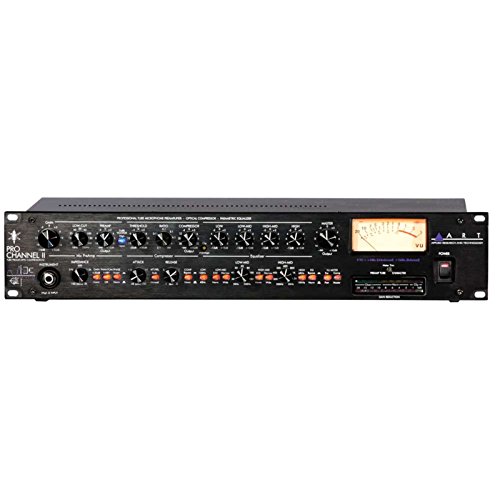
- Tube preamp, compressor, and EQ in one channel
- Selectable VU metering for multiple signal points
- XLR and 1/4-inch connectivity
Best For: Voice creators wanting an integrated tube recording channel
Warm Optical Dynamics

- One-channel tube optical compressor
- Warm, balanced, versatile sound profile
- Rackmount chassis with knob controls
Best For: Podcasters wanting dedicated optical compression
Dual-Channel Signal Control

- Dual-channel compression and peak limiting
- Built-in noise gate and feedback suppression
- XLR and 1/4-inch TRS I/O in a 1U rackmount
Best For: Studio, streaming, and live setups needing two-channel processing
Rackmount Precision – Dual-Channel Audio Compressor
For creators comparing audio compressors for podcasting, this dual-channel rackmount processor offers flexible control for vocals and other sources. Its VCA circuitry, adjustable dynamics settings, noise gate, and clear LED monitoring make it suitable for studio, streaming, and live setups.
Best For: Podcasters using rack-mounted or professional XLR/TRS equipment who want dedicated vocal compression and noise reduction.
Pros:
- Dual-channel compression with adjustable attack and release, plus Auto settings.
- Built-in noise gate helps reduce unwanted background noise.
- LED indicators show gain reduction, compression, and gate thresholds.
- Sidechain insert supports targeted frequency ducking.
Cons:
- Requires corded power and external audio gear.
- Rackmount format may be excessive for simple, computer-only podcast setups.
This is a practical choice when you need hands-on, hardware-based dynamics control and flexible routing. Its 1U rackmount design and professional connectors are best suited to a more developed podcast studio.
All-in-One Podcast Hub – RØDECaster Pro Production Console
The RØDECaster Pro takes a broader approach than a standalone compressor, combining audio processing with podcast production controls. For audio compressors for podcasting, its onboard processing is especially appealing to creators who want broadcast-oriented sound without building a rack-based system.
Best For: Beginners and professionals producing multi-microphone podcasts, live streams, or shows with remote guests and sound effects.
Pros:
- Four microphone inputs with studio-grade preamps.
- Onboard APHEX Aural Exciter and Big Bottom processing for shaped podcast audio.
- Supports smartphone, USB, and Bluetooth channels for remote integration.
- Records to microSD or computer, with stereo and multitrack options.
Cons:
- It is an all-in-one production console rather than a dedicated standalone compressor.
- Its larger feature set may be more than needed for a single-microphone podcast.
Choose this when workflow and production flexibility matter as much as compression. The sound pads, recording options, and multiple connection methods make it a strong central hub for complete podcast production.
Vocal Control Center – Dual-Channel Compressor/Limiter
This dual-channel rackmount unit is aimed at creators who want consistent vocal levels in a hardware signal chain. Among audio compressors for podcasting, it stands out for combining Overeasy compression, a noise gate, LED metering, and a sidechain insert with XLR/TRS connectivity.
Best For: Podcast, voiceover, and broadcast setups that need hardware vocal control alongside mixers, interfaces, or PA equipment.
Pros:
- Dual-channel compression supports multiple sources or stereo processing.
- Adjustable attack and release allow detailed dynamic shaping.
- Noise gate and LED feedback assist with cleaner, easier setup.
- Classic VCA circuit is designed to enhance vocal clarity and presence.
Cons:
- Rackmount hardware requires compatible external equipment and cabling.
- Push-button controls may offer less immediate adjustment than knob-based controls.
Its feature set is well matched to spoken-word production where vocal consistency and background-noise management are priorities. It makes the most sense for a dedicated studio rather than a minimal portable setup.
Classic Dynamics Rack – Behringer Composer Pro-XL MDX2600
The Behringer Composer Pro-XL MDX2600 is a two-channel compressor, limiter, and gate designed for audio production, mixing, and mastering. For buyers comparing audio compressors for podcasting, its multi-function dynamics design can suit a studio that wants more than basic compression.
Best For: Home and project studios needing two-channel compression, limiting, and gating for podcast production or general audio work.
Pros:
- Combines compressor, limiter, and gate functions in one unit.
- Two-channel design supports multiple audio sources.
- Designed for audio production, mixing, and mastering applications.
- Includes a de-esser according to the product title.
Cons:
- The supplied specifications provide limited detail about controls and connectivity.
- As corded hardware, it is less convenient than software-based processing.
This is a sensible option for a studio that wants a versatile dynamics processor for podcasting and broader production tasks. Buyers who need detailed vocal-specific features should verify the available connections and controls before choosing it.
Best Podcast Recorder – Zoom PodTrak P4
For creators comparing audio compressors for podcasting, the Zoom PodTrak P4 is a practical portable recording hub rather than a standalone compressor. It supports up to four XLR microphones with phantom power, four individually controlled headphone outputs, and remote-call connectivity for flexible multi-person recordings.
Best For: Portable podcasts with multiple microphones, guests, and remote interviews.
Pros:
- Four XLR microphone inputs with phantom power.
- Four headphone outputs with individual volume control.
- Automatic mix-minus supports phone and remote interviews.
- Battery-powered operation and programmable sound pads suit mobile recording.
Cons:
- Battery life is listed at up to 3.5 hours on two AA batteries.
- It is a recorder and audio interface, not a dedicated compressor.
The PodTrak P4 is a strong choice when connection flexibility and portability matter more than built-in dynamics processing. Its multi-track recording and remote-interview features make it especially useful for podcast production on the go.
Best Dedicated Compressor – MXR Studio Compressor
Among audio compressors for podcasting, the MXR Studio Compressor is a compact analog pedal designed for compression rather than recording or microphone connectivity. Its constant headroom technology, gain-reduction LEDs, and true-bypass switching make it suited to setups that already have an audio interface or mixer.
Best For: Musicians and creators who need a dedicated analog compressor in a pedalboard-style format.
Pros:
- Dedicated analog compression in a compact pedal design.
- Constant headroom technology supports clear, clean performance.
- Ten gain-reduction status LEDs provide visual feedback.
- True bypass helps preserve the signal when disengaged.
Cons:
- Uses a 1/4-inch audio interface and does not provide USB recording.
- It is not a complete podcast recording solution.
- Requires a 9-volt power source.
The MXR is the most directly relevant option here for compression itself, but it requires supporting recording hardware. Consider it when you want hands-on analog processing before the signal reaches your podcast interface.
Best USB Interface – PreSonus Revelator io24
For podcasters evaluating audio compressors for podcasting, the PreSonus Revelator io24 combines USB-C connectivity with integrated effects, loopback mixing, and microphone preamps. It accepts XLR microphones with phantom power and can blend hardware inputs, effects, loopback audio, and reverb for streaming or podcast software.
Best For: USB podcasting and streaming setups that need loopback mixing and built-in effects.
Pros:
- Two XMAX-L microphone preamps with +48V phantom power.
- Two stereo loopback streams support audio from apps such as Zoom and Skype.
- Stream Mix mode combines inputs, effects, loopback audio, and reverb.
- Preset effects and custom preset creation simplify processing.
Cons:
- It provides two channels rather than four microphone inputs.
- The notes identify integrated effects but do not specify a dedicated compressor control.
- Loopback and effects features require compatible computer software.
The Revelator io24 is a flexible interface for creators who want software-friendly routing and effects in a compact setup. It is better suited to computer-based podcasting and streaming than to standalone recording.
Tube-Tone Control – ART Pro Channel II
ART Pro Channel II Microphone Preamp/Compressor/EQ Professional Tube Based Selectable VU Metering
Check Price On AmazonThe ART Pro Channel II is a versatile choice among audio compressors for podcasting when you want microphone preamp, compression, and EQ in one rack-style channel. Its tube-based design and selectable VU metering support hands-on voice recording and level management.
Best For: Podcasters and voice creators who want an integrated tube preamp, compressor, and EQ.
Pros:
- Combines a tube microphone preamp, switchable optical/tube compressor, and tube EQ.
- Selectable VU metering monitors mic pre output, compressor output, or main output.
- Supports XLR, 1/4-inch TRS, and 1/4-inch TS connectivity.
- Offers precision detented potentiometers for repeatable adjustments.
Cons:
- Its single-channel design may not suit stereo or multi-microphone setups.
- At 13.4 pounds, it is a substantial piece of rack equipment.
Choose this model if you value an all-in-one analog front end and tube character more than a compact, compressor-only setup.
Warm Optical Dynamics – Warm Audio WA-1B
The Warm Audio WA-1B is a focused, one-channel option for audio compressors for podcasting, built around optical compression and a warm, balanced sound profile. Its dedicated format keeps the signal-processing role straightforward for a compatible recording chain.
Best For: Podcasters seeking a dedicated single-channel optical compressor with warm tonal character.
Pros:
- Uses a one-channel tube optical compression design.
- Provides a warm, balanced, and versatile sound profile.
- Analog signal format and knob controls offer a hands-on workflow.
- Includes a rackmount chassis and compressor unit.
Cons:
- It provides only one compression channel.
- Its supplied notes identify a 3.5mm stereo audio jack rather than a broad range of listed professional connectors.
- At 12.1 pounds, it is not especially lightweight.
This is a sensible pick when optical compression and tonal warmth are the priority, provided your existing setup matches its connectivity.
Dual-Channel Signal Control – 2 Channel Audio Compressor
This 1U rackmount unit takes a broad signal-management approach to audio compressors for podcasting, combining dual-channel compression and limiting with a noise gate. XLR and 1/4-inch TRS connections make it suited to studio, streaming, live, and stage-oriented routing.
Best For: Users who need two-channel dynamics control, noise reduction, and flexible rack connectivity.
Pros:
- Provides dual-channel compression and peak limiting.
- Includes a noise gate for reducing unwanted background noise.
- Offers XLR and 1/4-inch TRS inputs and outputs.
- Adds electronic crossover, feedback suppression, DSP reverb, and anti-howling processing.
Cons:
- The supplied notes do not specify detailed compressor controls or signal specifications.
- Its broader live-sound processing feature set may be more than a simple podcast chain requires.
Consider it when you want a rack-based processor that can handle two channels and additional voice-processing tasks, rather than compression alone.
How We Picked the Best Audio Compressors for Podcasting
We evaluated these products according to the needs of spoken-word creators: transparent or characterful gain control, useful threshold and ratio adjustment, reliable input and output connections, metering, noise management, and ease of integration. We also considered whether each option suits a solo creator, a multi-mic studio, remote interviews, live streaming, or a more traditional recording chain.
The selection includes dedicated analog processors as well as podcast-focused hardware with built-in compression, routing, recording, or effects. That matters because the best choice is not always the unit with the most advanced compressor; it is the one that fits your entire signal path.
Quick Comparison
- Best for an all-in-one podcast workflow: RØDE RØDECaster Pro.
- Best for portable multi-person recording: Zoom PodTrak P4.
- Best for USB recording and streaming: PreSonus Revelator io24.
- Best for a complete analog channel strip: ART Pro Channel II.
- Best for rackmount studio or live setups: Behringer Composer Pro-XL MDX2600 and the dual-channel processors.
- Best for premium optical compression: Warm Audio WA-1B.
- Best for instrument or single-channel use: MXR Studio Compressor.
Key Buying Factors for Audio Compressors for Podcasting
Compressor Controls
Look for threshold, ratio, attack, release, and makeup gain controls if you want precise results. A limiter can provide extra protection against peaks, while a de-esser can reduce harsh “s” sounds. Automatic or preset modes are useful for beginners and fast streaming workflows.
Connection and Channel Count
Check whether your microphones use XLR, TRS, or USB connections. A dual-channel rack unit can handle two voices, but a podcast console or multichannel recorder is more practical for several guests. Also verify that the device provides enough headphone outputs, independent mixes, and suitable routing.
Sound and Headroom
Transparent compression preserves natural speech, while tube and optical designs may add warmth or gentle coloration. Prioritize clean headroom and low noise, especially when using sensitive condenser microphones or recording quiet voices.
Workflow Features
For streaming and remote interviews, loopback, phone inputs, sound pads, onboard recording, and USB connectivity can be more valuable than advanced analog controls. For a studio rack, dependable metering, sidechain access, and balanced I/O may matter more.
Who Should Buy Which Audio Compressors for Podcasting?
Choose a podcast console or recorder if you want a simple setup for multiple microphones, headphones, guests, and live production. These products reduce the need for separate mixers, interfaces, and software routing.
Choose a USB interface with built-in processing if you record mainly to a computer and want compact hardware for podcasting, streaming, and voice production. It is a strong middle ground between convenience and control.
Choose a rackmount compressor or channel strip if you already own a mixer or interface and want dedicated hardware in your vocal chain. A channel strip is especially useful when you also want preamp gain and EQ.
Choose a premium optical or character compressor if tonal quality and studio flexibility matter more than portability or automatic operation. These units are best for experienced users who understand gain staging and want compression as part of a deliberate recording chain.