
The best MIDI interfaces make it easier to connect keyboards, synthesizers, drum machines, and other hardware to a computer or larger MIDI setup. The right choice depends on how many devices you need to connect, whether you need USB hosting, and how much routing flexibility your studio requires.
This roundup covers compact cables, multi-port interfaces, MIDI thru boxes, and USB host solutions for beginners, performers, and hardware-focused producers.
Best 10 Midi Interfaces Picks for 2026
Best Flexible MIDI Router

- 3-in/3-out MIDI with routing, filtering, and mapping
- USB-C compatibility across major operating systems
- Low-latency support for sysex, timecode, and MPE
Best For: Complex MIDI rigs and standalone routing
Best Audio-and-MIDI Hub
Focusrite Scarlett 4i4 4th Gen

- MIDI I/O with four line inputs and four line outputs
- Two mic preamps and two Hi-Z instrument inputs
- 24-bit/192kHz recording with Air, Auto Gain, and Clip Safe
Best For: Hybrid home studios with several instruments
Best MIDI Distribution Box

- Routes one MIDI input to five MIDI outputs
- Supports clock, sysex, timecode, MPE, and all MIDI channels
- Compact standalone design with USB-C power
Best For: Distributing one MIDI source across multiple devices
Best Compact Recording Interface
Focusrite Scarlett Solo 4th Gen

- One mic preamp and one Hi-Z instrument input
- 24-bit/192kHz recording with 120dB dynamic range
- Includes Air mode and a broad software bundle
Best For: Solo vocalists, guitarists, and songwriters
Best USB Host MIDI Interface

- Standalone USB host connects USB and DIN MIDI gear
- Up to eight USB MIDI ports with a hub
- Advanced routing, filtering, mapping, and presets
Best For: Hybrid MIDI setups using modern USB and legacy DIN hardware
Best MIDI-Friendly Audio Interface
Focusrite Scarlett Solo 3rd Gen

- Mic preamp with Air mode for brighter recordings
- Hi-Z input for guitar and bass
- 24-bit/192kHz recording with bundled software
Best For: Computer-based vocal, guitar, and podcast recording
Best Expandable MIDI Routing Interface

- Up to 2x2 DIN and 4x4 USB-C virtual MIDI
- Standalone 5V USB or 9V DC power
- Optional WIDI Bluetooth and advanced routing
Best For: Complex studio, stage, and pedalboard MIDI systems
Best Plug-and-Play Pick
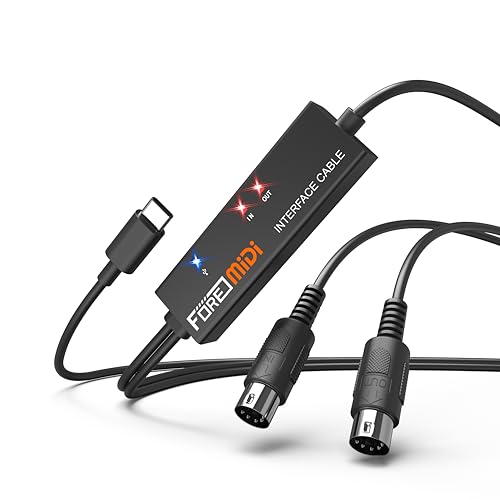
- 1-in/1-out MIDI with 16 channels
- Built-in driver and LED status indicators
- Works with mobile and desktop systems
Best For: Basic recording setups and 5-pin MIDI devices
Best for Complex Rigs

- Six USB-C host and six TRS MIDI ports
- Advanced routing, filtering, and mapping
- Standalone 5V or 9V power options
Best For: Pedalboards, live rigs, and multi-device MIDI setups
Best Budget Cable-Style Pick

- 1-in/1-out design with 16 channels
- Plug-and-play Windows and Mac support
- LED indicators for power and signal activity
Best For: Simple keyboard and synthesizer recording setups
Best Flexible MIDI Router – CME U6MIDI Pro
The CME U6MIDI Pro is one of the most adaptable midi interfaces for computer-based and standalone setups. Its 3-in/3-out MIDI connectivity, USB-C compatibility, and built-in routing tools make it useful for keyboards, synthesizers, drum machines, and digital pianos.
Best For: Musicians who need advanced MIDI routing, filtering, merging, or splitting across multiple devices and operating systems.
Pros:
- Works with macOS, iOS, Windows, Android, Linux, and Chrome OS.
- Supports 3 MIDI inputs and 3 MIDI outputs with router, filter, mapper, merge, split, and thru functions.
- Designed for low-latency, jitter-free transmission and supports sysex, MIDI timecode, and MPE.
- Includes lifetime software updates and manufacturer support.
Cons:
- Advanced configuration requires the UxMIDI Tools software for full control.
- Provides MIDI connectivity only, not audio inputs or outputs.
Choose the U6MIDI Pro when flexible signal management matters more than recording audio. It is especially compelling for larger MIDI rigs that need reliable routing and broad device compatibility.
Best Audio-and-MIDI Hub – Focusrite Scarlett 4i4 4th Gen
The Focusrite Scarlett 4i4 4th Gen is a practical choice when you need midi interfaces and high-quality audio recording in the same studio hub. Alongside MIDI I/O, it provides mic, instrument, and line connections for synths, drum machines, vocals, and guitars.
Best For: Home studios and producers who want MIDI connectivity alongside multiple audio inputs and outputs.
Pros:
- Includes MIDI input and output plus four line inputs and four line outputs.
- Offers two mic preamps, two Hi-Z instrument inputs, and up to 24-bit/192kHz recording.
- 120dB dynamic range, Air mode, Auto Gain, and Clip Safe support recording and monitoring.
- Comes with Pro Tools Intro+, Ableton Live Lite, Cubase LE, and Hitmaker Expansion.
Cons:
- It is larger and heavier than a MIDI-only interface.
- Its feature set may be more than needed for users who only require MIDI connections.
The Scarlett 4i4 makes the most sense for a hybrid setup where MIDI instruments and recorded audio share one interface. Its flexible I/O gives growing studios room to connect several devices without adding separate hardware.
Best MIDI Distribution Box – CME MIDI Thru5 WC
CME MIDI Thru5 WC 1-in-5-out MIDI Thru | 5-pin DIN, High-speed, Optional Bluetooth
Check Price On AmazonThe CME MIDI Thru5 WC is a focused solution for distributing one MIDI signal to five devices. Unlike computer-oriented midi interfaces, it is a standalone 1-in/5-out MIDI Thru box that uses standard 5-pin connections and USB-C for power only.
Best For: Stage, studio, and pedalboard setups that need to send one MIDI source to multiple devices simultaneously.
Pros:
- Distributes one MIDI input to five MIDI outputs.
- Supports all MIDI channels and messages, including clock, sysex, timecode, and MPE.
- Compact, lightweight housing suits crowded studios, road rigs, and pedalboards.
- USB-C power and optocouplers help avoid ground-loop concerns.
Cons:
- It only provides MIDI Thru distribution, not computer MIDI interfacing or routing.
- The USB port supplies power and does not carry MIDI data.
If your main requirement is multiplying one MIDI source, the Thru5 WC is simpler and more appropriate than a full multiport interface. Its compact design also makes it convenient for live rigs where reliable distribution is the priority.
Best Compact Recording Interface – Focusrite Scarlett Solo 4th Gen
The Focusrite Scarlett Solo 4th Gen is primarily a compact audio interface, but it belongs in a midi interfaces roundup for musicians who need a small computer recording setup with a mic input and instrument input. It is suited to vocals, guitar, and straightforward songwriting workflows.
Best For: Solo musicians who prioritize simple audio recording and need a compact interface for a computer-based setup.
Pros:
- Combines one XLR mic preamp with one Hi-Z instrument input.
- Offers 24-bit/192kHz recording and a stated 120dB dynamic range.
- Air mode adds presence and harmonic drive to vocals and guitars.
- Includes Pro Tools Intro+, Ableton Live Lite, Cubase LE, and Hitmaker Expansion.
Cons:
- The supplied specifications do not list dedicated MIDI input or output.
- Its two-channel design is less suitable for multiple hardware synthesizers or MIDI devices.
The Scarlett Solo is best viewed as an affordable, streamlined recording interface rather than a dedicated MIDI hub. Choose it when microphone and guitar recording come first; users with several hardware MIDI instruments should consider a model with explicit MIDI I/O.
Best USB Host MIDI Interface – CME H2MIDI Pro
The CME H2MIDI Pro is a compact choice for musicians who need midi interfaces to bridge modern USB MIDI gear with traditional 5-pin DIN hardware. It works standalone without a computer, while USB-C connectivity adds flexible computer and mobile integration.
Best For: Hybrid setups combining USB keyboards, controllers, synths, drum machines, and legacy MIDI hardware.
Pros:
- Connects class-compliant USB MIDI devices to 5-pin DIN MIDI hardware without a computer.
- Supports up to eight USB MIDI device ports through a standard USB hub.
- Provides routing, filtering, mapping, and splitting through HxMIDI Tools, with four saved presets.
- Works with macOS, Windows, iOS, Android, Linux, and ChromeOS.
Cons:
- Offers one-in/one-out 5-pin DIN MIDI I/O.
- Advanced WIDI Bluetooth connectivity is not listed for this model.
- Its one-year manufacturer warranty is shorter than some competing coverage options.
The H2MIDI Pro stands out when compact size and USB-host functionality matter most. Its 32-bit processor and support for complex MIDI data make it a practical routing hub for producers and performers with mixed-generation equipment.
Best MIDI-Friendly Audio Interface – Focusrite Scarlett Solo 3rd Gen
The Focusrite Scarlett Solo 3rd Gen is primarily an audio interface, but it belongs in a midi interfaces roundup for musicians who need a simple USB recording hub alongside MIDI-equipped instruments. Its inputs focus on vocals and guitar rather than dedicated MIDI routing.
Best For: Home recording, podcasts, vocals, and guitar or bass tracks in a computer-based setup.
Pros:
- Includes a mic preamp with switchable Air mode for added clarity.
- Offers a Hi-Z instrument input with Gain Halos for guitar and bass recording.
- Records at up to 24-bit/192kHz and provides two low-noise balanced outputs.
- Includes Ableton Live Lite, Pro Tools Intro+, Cubase LE, and Hitmaker Expansion software.
Cons:
- Does not list dedicated MIDI DIN or USB MIDI I/O.
- Provides one XLR mic input and one instrument input, limiting simultaneous sources.
- Its MIDI-related usefulness depends on using separate MIDI hardware or computer software.
Choose the Scarlett Solo when recording audio is the priority and MIDI connectivity is handled elsewhere. It is a straightforward, well-equipped interface for singers, guitarists, and podcasters rather than a dedicated MIDI hardware router.
Best Expandable MIDI Routing Interface – CME H4MIDI WC
The CME H4MIDI WC is a flexible option for musicians comparing midi interfaces for complex USB and DIN setups. It supports standalone operation, dual power options, advanced routing, and optional WIDI Bluetooth expansion for studio, stage, and pedalboard use.
Best For: Guitarists, producers, and performers who need multiple MIDI ports, programmable routing, and portable standalone operation.
Pros:
- Provides up to two-in/two-out DIN MIDI, eight USB host ports with a hub, and four-in/four-out USB-C virtual MIDI.
- Supports 5V USB or 9V DC standalone power for flexible stage and pedalboard setups.
- Offers thru, split, merge, mapper, and filter functions through HxMIDI Tools.
- Can expand with an optional WIDI Core module for Bluetooth MIDI.
Cons:
- WIDI Bluetooth functionality requires the optional WIDI Core module.
- Its feature set may be more extensive than needed for simple one-device setups.
- Includes a one-year manufacturer warranty.
The H4MIDI WC is the strongest fit here for elaborate routing and portable performance systems. Its broader I/O, 9V power option, preset switching, and expansion path make it especially useful when a basic MIDI adapter would be too limiting.
Best Plug-and-Play Pick – FORE T1 USB-C MIDI Interface
For straightforward MIDI setups, the FORE T1 is one of the simpler midi interfaces to use. It provides one MIDI input, one MIDI output, 16 input and output channels, USB-C connectivity, and built-in plug-and-play support for compatible computers, mobile devices, and MIDI gear.
Best For: Home recording, keyboard and synthesizer users, and buyers who want a basic USB-C connection without separate driver installation.
Pros:
- One MIDI in and one MIDI out support 16 input and output channels.
- Built-in driver and LED indicators simplify setup and connection monitoring.
- Compatible with iOS, Android, Windows, and Mac systems, plus common music software.
- USB bus-powered design includes an integrated 6.5-foot cable.
Cons:
- It is limited to one MIDI input and one MIDI output.
- The USB A-to-C adapter mentioned for Type-A ports is not included.
- Requires compatible 5-pin DIN MIDI hardware.
The FORE T1 is a practical choice when you need reliable two-way MIDI transfer rather than advanced routing. Its integrated cable, status lights, and broad operating-system support make it convenient for basic recording and editing workflows.
Best for Complex Rigs – CME H12MIDI Pro Interface
The CME H12MIDI Pro is a flexible option among midi interfaces for hardware-heavy setups. It combines six USB-C host ports, six TRS MIDI ports with selectable Type A/B operation, computer connectivity, and configurable MIDI routing in a compact aluminum enclosure.
Best For: Live rigs, pedalboards, hybrid studios, and users connecting multiple class-compliant USB MIDI devices without relying on a computer.
Pros:
- Six USB-C host ports support up to 16-in/16-out virtual MIDI.
- Six TRS MIDI ports offer selectable Type A/B compatibility.
- Routing tools support thru, split, merge, filtering, mapping, and up to six hardware presets.
- Supports standalone 5V USB-C or 9V DC power and supplies up to 3A of USB host power.
Cons:
- Its advanced routing features may be more than a basic MIDI setup requires.
- TRS connections may require separate straight TRS-to-MIDI cables for 5-pin DIN gear.
- USB host operation is intended for class-compliant MIDI devices.
Choose the H12MIDI Pro when expansion and routing control matter more than minimal setup. Its standalone operation and broad platform compatibility make it particularly useful for complex hardware chains and mobile MIDI workflows.
Best Budget Cable-Style Pick – LEKATO USB-C MIDI Cable
The LEKATO is a cable-style choice for shoppers comparing simple midi interfaces. With one MIDI input, one MIDI output, 16 channels, USB-C connectivity, and LED activity indicators, it is designed to connect standard MIDI instruments to Windows or Mac recording systems.
Best For: Keyboard, digital piano, synthesizer, and drum-pad owners who need a compact cable for basic recording or editing.
Pros:
- Supports one MIDI input and one MIDI output across 16 channels.
- Built-in driver enables plug-and-play use with Windows and Mac systems.
- LED indicators help show power and MIDI signal activity.
- Soft bare-copper cable construction is designed for stable, low-latency transmission.
Cons:
- Compatibility is listed primarily for Windows and macOS rather than a wider range of systems.
- Some older or specific instruments may require driver settings or a proprietary interface.
- Its one-in/one-out design is intended for standard setups, not complex routing.
The LEKATO makes sense for users who want a dedicated cable rather than a multi-port MIDI box. Check your instrument’s compatibility first, especially if you are connecting vintage or specialized hardware.
How We Picked These Midi Interfaces
We selected these Midi Interfaces based on connection type, port count, compatibility, portability, and the needs of different studio setups. The list includes traditional USB Midi Interfaces, USB-C cables, MIDI thru units, and host interfaces that can connect USB MIDI devices to standalone hardware without a computer.
We also considered practical factors such as plug-and-play operation, bidirectional MIDI support, expansion potential, and whether a product is better suited to recording, live performance, sequencing, or simple keyboard-to-computer connections.
Quick Comparison
| Best For | What to Look For | Typical Choice |
|---|---|---|
| Basic computer recording | Simple USB or USB-C MIDI connection | Compact MIDI cable or entry-level interface |
| Multiple hardware instruments | Several MIDI inputs and outputs | Multi-port interface |
| Standalone hardware rigs | USB host functionality | Dedicated USB host interface |
| Sending one signal to several devices | MIDI thru outputs | Powered MIDI thru box |
| Portable setups | Small enclosure and bus-powered operation | Compact host or cable interface |
Key Buying Factors for Midi Interfaces
Port Count and Routing
Count the MIDI inputs and outputs you need today, then consider your likely expansion. A single input and output can handle one keyboard or controller, while multi-port models are better for several synthesizers, drum machines, and external sound modules. A MIDI thru unit is useful when one controller must send the same data to multiple destinations.
USB Host Support
Standard Midi Interfaces typically connect MIDI hardware to a computer. USB host interfaces serve a different purpose: they let USB MIDI keyboards or controllers communicate with hardware MIDI equipment without relying on a computer. Confirm that the host model supports the device types and power requirements in your setup.
USB-C, Drivers, and Compatibility
USB-C can simplify connection to newer laptops, tablets, and phones, but the connector alone does not guarantee every device will work together. Check operating-system support, included adapters, driver requirements, and whether the interface is bus-powered or needs an external supply.
Timing and Reliability
For live performance and hardware sequencing, stable timing and dependable connections matter more than extra features. Look for secure connectors, reliable power, and a layout that makes MIDI routing easy to understand on a crowded desk or rack.
Who Should Buy Which Midi Interfaces?
Choose a Basic Cable or Compact Interface
Choose a simple USB-C MIDI cable or compact interface if you only need to connect one keyboard, controller, or synthesizer to a computer for recording, editing, or software instruments.
Choose a Multi-Port Interface
A multi-port model is the better fit for producers building a hardware studio. It provides more simultaneous connections and reduces the need to swap cables when working with several instruments.
Choose a MIDI Thru Box
Buy a MIDI thru unit when one controller, sequencer, or interface needs to distribute identical MIDI data to multiple devices. It is especially useful for live rigs and layered hardware setups.
Choose a USB Host Interface
A USB host interface is ideal when you want to use a USB MIDI keyboard or controller with older hardware, standalone synthesizers, or a computer-free performance rig. Before buying, verify the required power and connection standards for every device.