
Adding a subwoofer can give a desktop system fuller music, deeper game audio, and more impact in movies without replacing your main speakers. The right choice depends on your available space, connection options, listening habits, and tolerance for vibration.
We selected 10 compact subwoofer and 2.1 speaker options, ranging from studio-focused models to affordable multimedia systems. Use the guide below to match power, size, connectivity, and placement to your desk.
Best 10 Subwoofers for Desktop Setups Picks for 2026
Best Studio-Friendly Pick

- 30 Hz low-frequency extension
- Bluetooth 5.0 and flexible inputs
- Adjustable crossover and room tuning
Best For: Desktop music production and controlled bass
Best Budget Home Audio Option
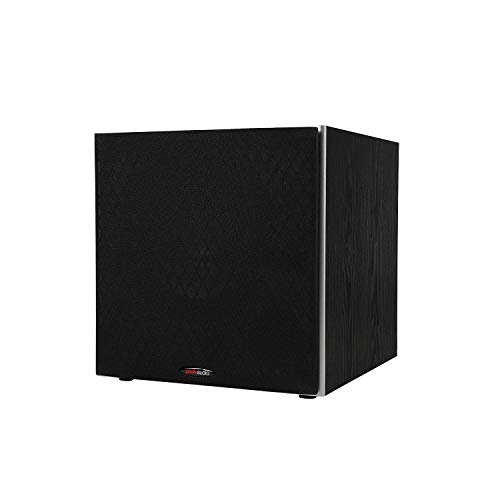
- 10-inch woofer for added bass impact
- Up to 100 watts of amplifier power
- Variable crossover and wired inputs
Best For: Small-to-mid-size home audio rooms
Best for CR Monitor Systems

- Made for Mackie CR Series monitors
- Bluetooth, TRS, and RCA connectivity
- Desktop remote and adjustable crossover
Best For: CR monitor-based desktop audio
Best Compact Deep-Bass Design
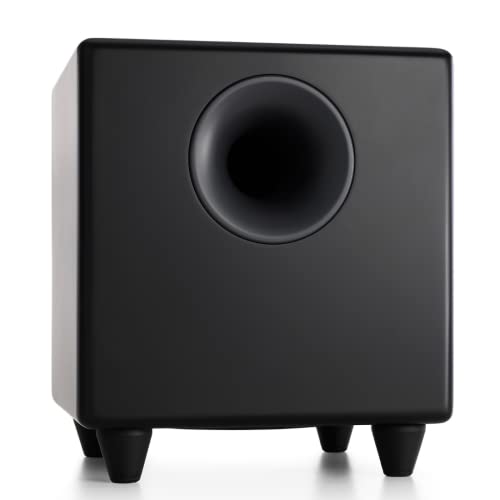
- Down-firing 8-inch driver reaches 27 Hz
- 250-watt powered output
- Compact enclosure with optional wireless adapter support
Best For: Compact desktop, gaming, and home theater systems
Best All-in-One Pick

- 60W peak 2.1 desktop speaker system
- USB, AUX, and Bluetooth 5.4 connectivity
- Compact build with customizable RGB lighting
Best For: Gamers wanting bass and flexible connectivity in one system
Best Upgrade Subwoofer
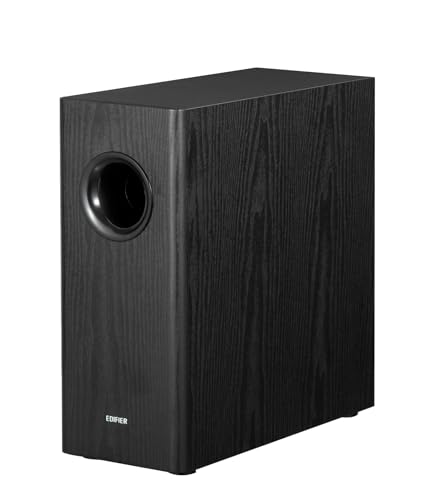
- 8-inch woofer with 70W RMS output
- 35Hz bass and adjustable crossover
- RCA connections for compatible systems
Best For: Adding controlled deep bass to RCA-equipped desktop audio
Best Budget 2.1 System

- 62W peak, 30W RMS 2.1 audio
- 5.25-inch down-firing subwoofer
- Simple wired auxiliary connection
Best For: Affordable music, movie, and gaming audio at a desktop
Room-Filling Bass

- 8-inch driver and 70W output
- Low-pass filter reaches 38Hz
- MDF enclosure with auto standby
Best For: Desktop setups with space for a substantial wired subwoofer
Simple Desktop Upgrade
Creative Pebble Plus 2.1 Speakers
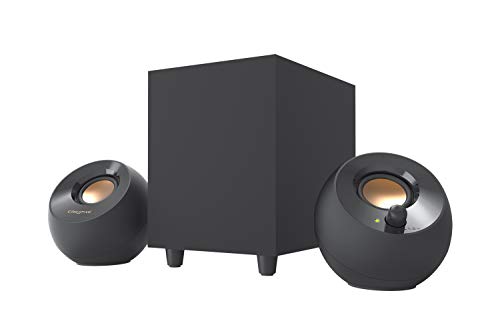
- 4-inch down-firing subwoofer
- USB-powered with 3.5mm AUX input
- 8W RMS High Gain Mode
Best For: Compact computer and laptop desks
Compact Powered Impact

- 5.24-inch long-throw woofer
- 60W maximum output with Class D amp
- Vibration pads for shelf placement
Best For: Desktop gaming and studio audio in limited space
Best Studio-Friendly Pick – PreSonus Eris Sub 8BT
The PreSonus Eris Sub 8BT is a strong choice for subwoofers for desktop setups when accurate bass, flexible connections, and easy room tuning matter. Its 8-inch driver reaches down to 30 Hz, while Bluetooth 5.0 and balanced or unbalanced inputs make it adaptable for production, listening, and multimedia work.
Best For: Desktop music production, studio monitors, and listeners who want adjustable, controlled low end.
Pros:
- 8-inch driver delivers bass down to 30 Hz.
- Bluetooth 5.0 plus TRS, RCA, and front-panel aux connectivity.
- Adjustable crossover and high- and low-frequency controls help tailor the sound.
- Front headphone output and automatic power-saving mode add convenience.
Cons:
- Its studio-focused controls may be more than casual listeners need.
- Requires floor or desk-adjacent placement rather than mounting.
Choose the Eris Sub 8BT if you want a desktop-friendly subwoofer that emphasizes integration and tuning rather than simply adding maximum volume.
Best Budget Home Audio Option – Polk Audio PSW10
The Polk Audio PSW10 is a practical option among subwoofers for desktop setups that also serve compact home audio or movie systems. Its 10-inch driver, built-in amplifier, variable crossover, and multiple connection options make it easy to add more bass to an existing setup.
Best For: Small-to-mid-size rooms, home theater systems, and desktop users who want straightforward wired bass enhancement.
Pros:
- 10-inch Dynamic Balance woofer provides substantial low-frequency output.
- Built-in 50-watt RMS amplifier delivers up to 100 watts of power.
- Continuously variable 80–160 Hz crossover supports speaker blending.
- Includes speaker- and line-level connections plus a phase switch.
Cons:
- Its 17-inch depth and 14.5-inch height require more space than compact 8-inch models.
- Connectivity is wired rather than Bluetooth.
The PSW10 makes sense when desktop bass is part of a broader home audio setup and you have room for a larger, conventional subwoofer enclosure.
Best for CR Monitor Systems – Mackie CR8SBT
The Mackie CR8SBT is designed for desktop users who want to extend the low end of CR Series monitors. This 8-inch subwoofer combines TRS and RCA connections with Bluetooth, an adjustable crossover, and a desktop remote for convenient volume control and sub bypass.
Best For: Mackie CR monitor owners, computer audio, and desktop listening setups needing convenient bass control.
Pros:
- Purpose-built to complement Mackie CR Series monitors.
- Supports TRS, RCA, and Bluetooth connections.
- Desktop remote provides quick volume and sub-bypass control.
- Adjustable crossover helps blend the subwoofer with the main monitors.
Cons:
- Its 32.4-pound weight makes repositioning less convenient.
- The supplied notes list a 40 Hz frequency figure, offering less stated extension than some competitors.
If your desktop system already uses Mackie CR monitors, the CR8SBT offers especially convenient integration; other speakers can use it too, but compatibility and placement should be checked.
Best Compact Deep-Bass Design – Audioengine S8
The Audioengine S8 is a compact powered option for subwoofers for desktop setups, gaming, home theater, and stereo listening. Its down-firing 8-inch driver is rated to reach 27 Hz, while the small square enclosure and optional W3 wireless adapter compatibility make placement relatively flexible.
Best For: Desktop and home theater users who want deep bass from a compact enclosure.
Pros:
- 8-inch down-firing driver reaches a stated 27 Hz.
- 250-watt output supports a powerful, immersive presentation.
- Compact 11.26-inch-square enclosure allows flexible placement.
- Sleep mode helps reduce power use when idle.
Cons:
- Standard connectivity is wired through RCA.
- Wireless use requires the separately compatible W3 adapter kit.
- At 30 pounds, it is compact but not especially light.
The S8 is a compelling fit when you want serious low-frequency extension without moving to a large 10-inch cabinet, provided RCA connectivity suits your system.
Best All-in-One Pick – Nylavee SK400Pro
For desktop setups that need both fuller sound and flexible connections, the Nylavee SK400Pro combines a 2.1 speaker system with a dedicated subwoofer. Its 60W peak output, Bluetooth 5.4, USB, and AUX connectivity make it a versatile choice among subwoofers for desktop setups.
Best For: Gamers and everyday desktop users who want bass, RGB lighting, and multiple input options in one compact system.
Pros:
- 2.1-channel audio with up to 60W peak power and dedicated deep-bass subwoofer
- Supports USB, AUX, and Bluetooth 5.4 for wired or wireless use
- Compact design, adjustable RGB lighting, and a single rotary control
Cons:
- The subwoofer is wired and the system requires an external power adapter
- RGB lighting may not suit minimalist desk setups
The SK400Pro is a practical all-in-one option when you want a simple desktop audio upgrade without pairing separate speakers and subwoofer components.
Best Upgrade Subwoofer – Edifier T5s Powered Subwoofer
The Edifier T5s is a standalone powered subwoofer for desktop users who already have compatible speakers or an amplifier. Its 8-inch long-throw woofer, 70W RMS output, and 35Hz frequency response make it a strong choice for adding deeper bass to suitable desktop setups.
Best For: Users with RCA-equipped speakers, amplifiers, or compatible Edifier systems who want a dedicated bass upgrade.
Pros:
- 8-inch woofer with 70W RMS output and bass reaching down to 35Hz
- Adjustable low-pass filter and 0°/180° phase selector for integration
- Built-in amplifier, auto-standby, and included RCA connection cables
Cons:
- Requires compatible RCA or line-in equipment; it is not a complete speaker system
- Its larger cabinet may take more desk or floor space than compact desktop subwoofers
- It has no wireless connectivity
The T5s offers more control and output than an integrated computer-speaker subwoofer, but compatibility and available space should be checked before buying.
Best Budget 2.1 System – Cyber Acoustics CA-3610
The Cyber Acoustics CA-3610 is a straightforward wired 2.1 system for desktop users who want dedicated bass without adding a separate component. With 62W peak power, a 5.25-inch down-firing subwoofer, and auxiliary connectivity, it is a practical entry among subwoofers for desktop setups.
Best For: Users seeking an uncomplicated wired system for music, movies, games, and general computer audio.
Pros:
- 2.1 layout with 62W peak power and 30W RMS
- 5.25-inch down-firing subwoofer with tuned port for stronger bass
- Dual 2-inch titanium drivers help provide crisp highs and warm mid-tones
Cons:
- Connectivity is wired and limited to auxiliary input
- No Bluetooth, USB audio, or lighting features are listed
- The plastic enclosure may feel less premium than wood-cabinet alternatives
The CA-3610 keeps the setup simple and affordable, making it suitable when reliable wired 2.1 sound matters more than modern connectivity features.
Room-Filling Bass – Edifier T5 Powered Subwoofer
Edifier T5 Powered Subwoofer - 70w RMS Active Woofer with 8 inch Driver and Low Pass Filter
Check Price On AmazonFor desktop setups that need stronger low-end impact, the Edifier T5 adds a dedicated 8-inch driver and 70W RMS of powered bass. Its low-pass filter reaches down to 38Hz, helping it supplement speakers without taking over their midrange and treble.
Best For: Desktop listeners who want a traditional wired subwoofer with substantial bass output and a sturdy MDF enclosure.
Pros:
- 8-inch driver with 70W maximum output for powerful bass
- Low-pass filter with frequency response down to 38Hz
- Dense MDF enclosure helps reduce acoustic resonance
- Automatic standby helps limit unnecessary power use
Cons:
- Large 16.5-inch-deep cabinet may require considerable desk or floor space
- Uses wired RCA connectivity rather than a compact USB connection
- Not water resistant
The T5 is the strongest choice here for dedicated, full-bodied bass, provided your desktop setup has room for its sizable cabinet and supports RCA connections.
Simple Desktop Upgrade – Creative Pebble Plus 2.1 Speakers
The Creative Pebble Plus is a compact all-in-one option for subwoofers for desktop setups, pairing two elevated satellite speakers with a standalone 4-inch down-firing subwoofer. USB power and 3.5mm AUX input keep installation straightforward for computers and laptops.
Best For: Computer users who want an affordable, compact 2.1 speaker system with added bass and convenient front-mounted volume controls.
Pros:
- Dedicated 4-inch down-firing ported subwoofer
- USB-powered design avoids requiring a wall socket
- 45-degree elevated drivers aim sound toward the listener
- High Gain Mode increases output to 8W RMS with a 5V 2A USB adapter
Cons:
- USB power adapter for High Gain Mode is not included
- 8W RMS total output is modest compared with larger powered subwoofers
- Plastic enclosure may feel less substantial than MDF alternatives
The Pebble Plus favors convenience and a small footprint over room-filling power, making it a practical match for everyday desktop listening, gaming, and laptop use.
Compact Powered Impact – Ortizan V8 Active Subwoofer
The Ortizan V8 is a compact active subwoofer designed for desktop gaming and studio audio. It combines a 5.24-inch long-throw woofer with a Class D amplifier and vibration pads, delivering up to 60W of output without the footprint of a larger 8-inch cabinet.
Best For: Desktop users seeking a dedicated, shelf-mounted bass module for computer audio or gaming setups.
Pros:
- 5.24-inch long-throw woofer supports deep bass extension
- 60W maximum output in a relatively compact enclosure
- Class D amplifier supports efficient powered operation
- Vibration pads help suit shelf or desktop placement
Cons:
- Supplied details identify Bluetooth connectivity but do not specify other input options
- Smaller driver may not deliver the same scale as an 8-inch subwoofer
- Designed primarily for desktop compatibility rather than broad device support
The V8 offers a middle ground between compact computer speakers and larger dedicated subwoofers, with useful output for gaming and desktop audio when shelf space is limited.
How We Picked the Best Subwoofers for Desktop Setups
We compared these models by cabinet size, driver diameter, stated power, frequency claims, connection options, and intended use. We also considered practical desktop concerns, including footprint, volume control, low-pass adjustment, wireless compatibility, and whether a product is a standalone subwoofer or a complete 2.1 speaker system.
Specifications such as wattage and bass extension are useful for comparison, but they do not tell the whole story. Room size, placement, crossover settings, and the performance of the paired speakers can significantly affect the result.
Quick Comparison
| Best For | Look For | Notable Options |
|---|---|---|
| Small desks | Compact cabinets and modest output | Creative Pebble Plus, Ortizan Compact |
| Studio monitors | Clean integration and adjustable crossover | PreSonus Eris Sub 8, Mackie CR8SBT |
| Music and general listening | Deeper extension and flexible placement | Audioengine S8, Edifier T5s |
| Gaming and movies | Strong impact and simple controls | Polk Audio PSW10, Cyber Acoustics CA-3610 |
| Complete desktop audio | Included satellite speakers and easy setup | Nylavee, Creative Pebble Plus |
Key Buying Factors for Subwoofers for Desktop Setups
Size and Placement
Measure the space under or beside your desk before buying. An 8- or 10-inch model can produce more authority, but a smaller enclosure may be easier to position near a wall or beneath a monitor shelf. Leave ventilation space and avoid placing the cabinet where it can cause desk or floor vibration.
Power and Bass Response
Higher power ratings can provide more headroom, but they are not a direct measure of sound quality. Look for a suitable match with your main speakers. A compact desktop system usually benefits more from controlled, clean bass than from maximum volume.
Connections and Controls
Check whether your setup needs RCA, 3.5mm, speaker-level, USB, Bluetooth, or wireless-ready connectivity. A volume control, phase switch, or adjustable low-pass filter makes blending the subwoofer with desktop speakers easier. Some products include remote controls, while others require adjustments on the cabinet or source device.
Standalone Subwoofer or 2.1 System
A standalone model is appropriate when you already own compatible speakers and want to extend their low end. A 2.1 package is often simpler for a laptop or basic PC setup because the satellites, amplifier, and subwoofer are designed to work together.
Who Should Buy Which Subwoofers for Desktop Setups?
Choose a studio-oriented model such as the PreSonus or Mackie if you use powered monitors for music production, editing, or critical listening and want more controlled integration.
Choose a flexible general-purpose subwoofer such as the Polk Audio, Audioengine, or Edifier models if you already have desktop speakers and want fuller music, games, and movie sound.
Choose a complete 2.1 system such as the Nylavee, Cyber Acoustics, or Creative option if you need an affordable all-in-one upgrade with included satellites. For a very small desk, prioritize compact dimensions and lower output; for a larger room or louder listening, favor greater headroom and adjustable controls.